
Someone accepts your LinkedIn request. The next time you check HubSpot, a Call task is waiting on their contact record, with a short brief on the prospect, their company, and your new connection.
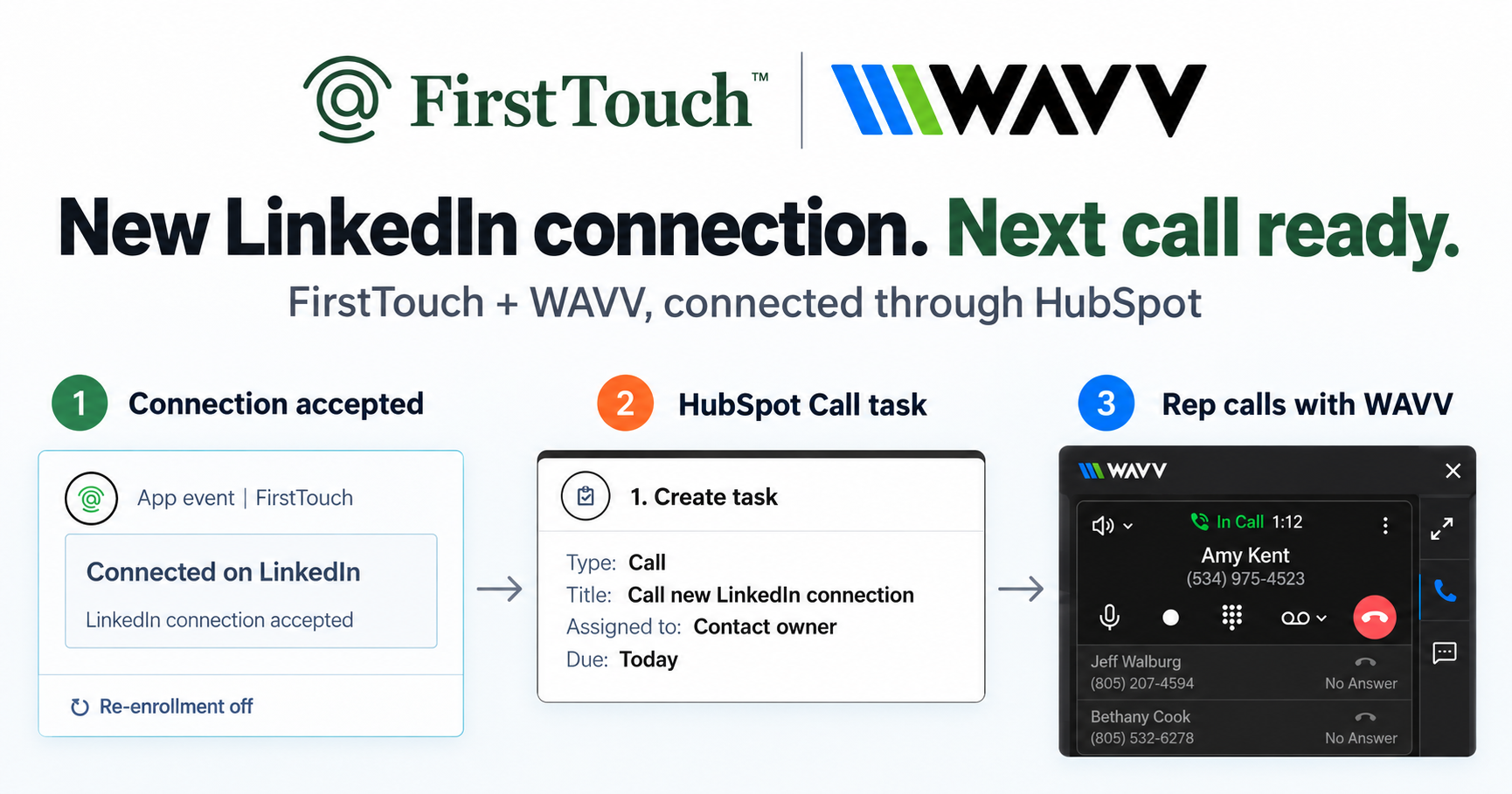
That is the play we built with WAVV: use a new LinkedIn connection to put a timely call on the right rep's task list. FirstTouch reports the accepted connection, HubSpot creates the task, and the rep calls through WAVV's power dialer inside HubSpot.
No spreadsheet handoff. No extra automation platform. Just a reason to move from a new connection to a real conversation.
In this article
Why call after connecting on LinkedIn?
Think of social as a way to make "eye contact" before the call. Your name, face, and profile give the prospect a chance to see the human behind the outreach. You start building awareness before the phone rings, so the call can feel like a warmer introduction.
A new connection gives the rep a natural opening: "We just connected on LinkedIn." That familiarity can help improve phone connect rates and makes the next conversation less out of the blue.
Acceptance gives you context, not proof that someone wants to buy. The rep still checks why the conversation could be relevant and whether now is a sensible time.
WAVV's power dialer makes running the play more efficient. Reps call inside HubSpot, record dispositions, and keep call activity on the contact without switching tools. FirstTouch creates the social first touch and reports the accepted connection. WAVV helps the rep follow it with a call and less admin.
The play in three steps
- Connect with FirstTouch. Send a LinkedIn connection request to a relevant prospect through FirstTouch.
- Create the call task in HubSpot. When FirstTouch reports that the request was accepted, the app event enrolls the contact in a workflow. HubSpot creates a Call task for the contact owner.
- Call with WAVV. The rep opens the contact, reviews the LinkedIn context, and makes the call using WAVV's embedded HubSpot dialer.
The workflow creates a task, not an automatic call. It adds no delay: the task is created once the event syncs and HubSpot processes it. When the call happens is up to the rep.
Set up the HubSpot workflow
Before you start
- FirstTouch connected to HubSpot, with LinkedIn engagement tracking enabled.
- The rep's LinkedIn account connected to FirstTouch.
- A HubSpot plan that supports workflows and the required app-event triggers.
- The prospect already matched to a HubSpot contact, with a usable phone number and an assigned owner.
- WAVV for HubSpot and its required Chrome extension, with calling access for that owner. WAVV's HubSpot help guide currently labels the integration beta, so confirm your team's access.
Create the workflow
- In Automation > Workflows, create a contact-based workflow. Name it Connected on LinkedIn > Call with WAVV.
- Set enrollment to When an event occurs and choose the FirstTouch app event: LinkedIn connection accepted. This is the "connected on LinkedIn" trigger, not a segment or a connection-request-sent event.
- Add enrollment filters so the contact has a phone number, an assigned owner, and fits your target audience. Exclude contacts who should not be called. Start with re-enrollment off so a contact does not keep generating the same task.
- Add Create task. Set the type to Call, the title to Call new LinkedIn connection, and the assignee to Contact owner. Set it due today and add the task notes below. Do not add a delay before this action. Tasks created after hours can be handled at the next appropriate calling time.
- Restrict the audience to a controlled test contact before enabling the workflow. Test with a new acceptance and confirm one task is created for the right rep before expanding the audience.
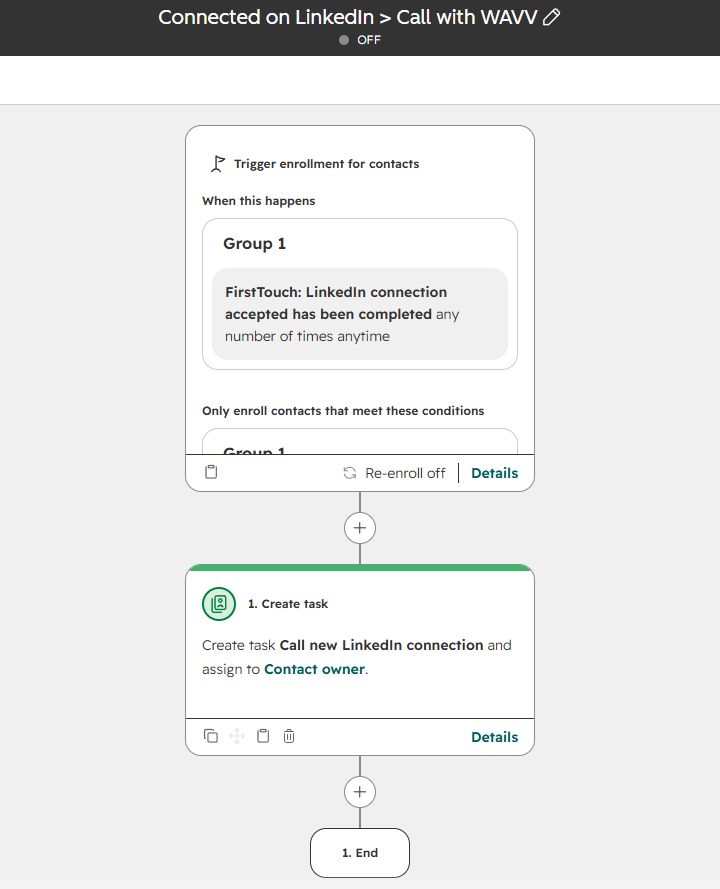
Event-based enrollment is forward-looking: it does not replay every historical connection. If the FirstTouch event is missing from the trigger picker, check your app installation and tracking settings with FirstTouch before switching the workflow on. See HubSpot's event-trigger requirements and FirstTouch's HubSpot setup guide.
Put the context in the call task
Give the rep a short brief they can scan before calling:
LinkedIn: [Prospect name] connected with [rep name].
Company: [Company name]. [One-sentence summary of what the company does.]
Prospect: [Name], [role]. [One-sentence summary of their responsibilities.]
Use HubSpot's Data Agent or FirstTouch's research agents to prepare the summaries. Replace the brackets with verified details. For automatic notes, map the saved research fields or action outputs into the task instead of leaving the template text in place.
Optional call prep: Use FirstTouch's MCP, API, or web app to research the prospect's recent content and LinkedIn posts. Add one relevant takeaway and the post link to the brief so the rep has something specific to reference. FirstTouch's Research Agent can gather publicly available context for a research question.
The task does not add the contact to a WAVV campaign or dialer queue.
Make the call with WAVV
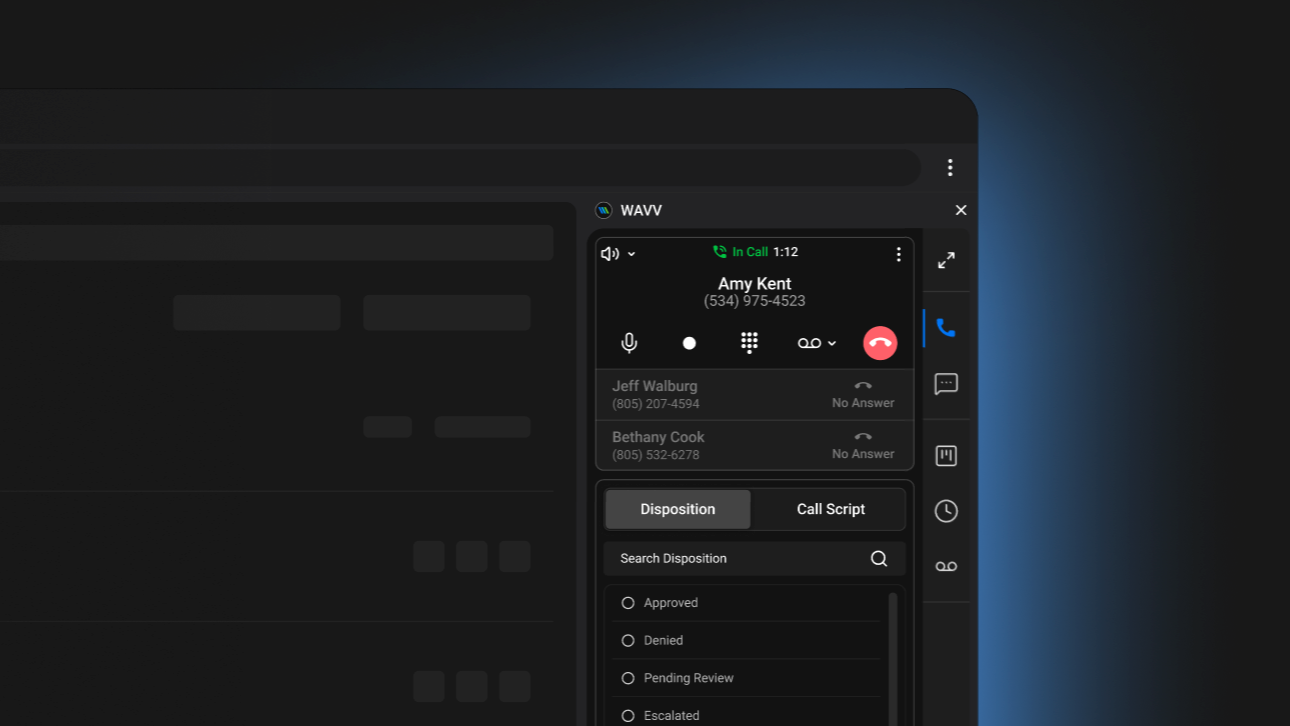
Open the task and its associated contact record. WAVV's HubSpot integration lets you dial from the CRM and sync call activity back to the contact, so the calling step stays where the rep is already working. See the WAVV Marketplace listing for installation and requirements.
Call the individual contact associated with the task. Start with a simple opener:
Hey [first name], it's [your name] from [company]. We just connected on LinkedIn. We help [type of team] with [specific outcome]. Is that top of mind right now?
Replace the brackets with real, relevant details. Keep the opener conversational, then listen. If the connection was with another rep, name that colleague instead of claiming it was you.
After the call, save the outcome and complete the HubSpot task. Verify how your WAVV dispositions map to HubSpot call outcomes during setup. Completing a call and completing a task are separate steps unless you have explicitly configured otherwise.
Start with one rep and a small audience
The first test is not "did we create lots of tasks?" It is "did the right rep get a useful task and make a relevant call?"
Review the time from the connection event to the first call attempt, tasks completed, conversations, and meetings. Compare with your team's usual process to see whether this improves follow-up.
Keep the workflow focused on one call task per contact. Let the rep choose the next step from the actual conversation rather than automatically adding more touches.
Building this with an AI assistant?
Paste this into a HubSpot-connected assistant. It prepares a draft workflow and stops for your approval. It can only configure tools it is actually connected to.
Prepare a draft contact-based HubSpot workflow for the FirstTouch and WAVV play: when a prospect accepts a LinkedIn connection request sent through FirstTouch, create one Call task for the contact owner so they can call using WAVV inside HubSpot.FirstTouch also offers an API and an MCP server for compatible assistants, including ChatGPT and Claude when connected to the required tools. This article's route runs in HubSpot workflows; MCP access alone does not make an agent listen for HubSpot events or place calls through WAVV.
Ready to try it? Connect FirstTouch and set up WAVV in HubSpot. Start with one rep, one connection event, and one useful call task.