

October 17, 2026
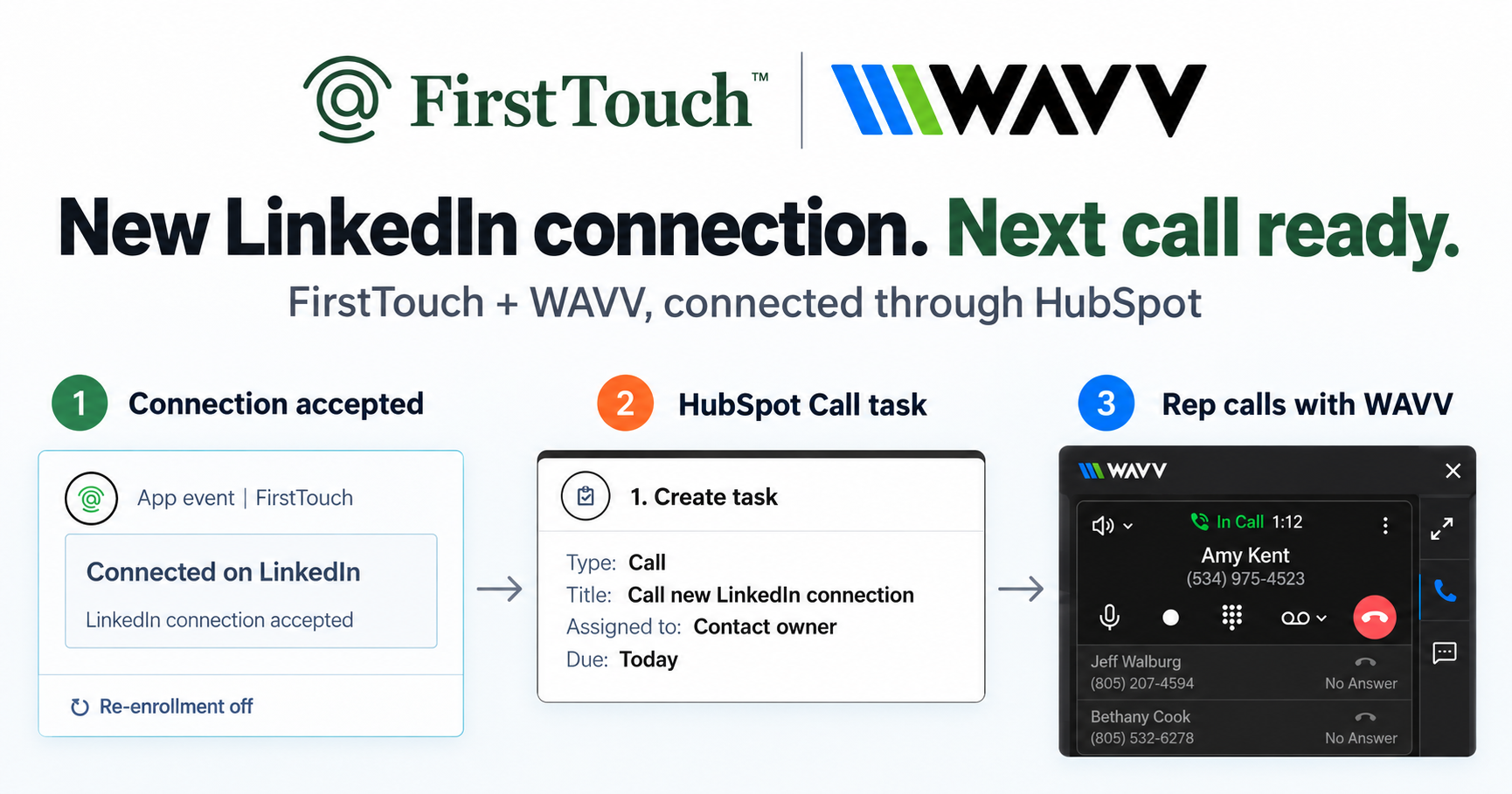
Turn LinkedIn connections into calls with WAVV and FirstTouchTurn an accepted LinkedIn connection into a HubSpot Call task, then make the call with WAVV inside HubSpot. A simple FirstTouch and WAVV workflow.
How-To
READ MORE

Point an AI agent at a team LinkedIn inbox: triage every rep profile, draft replies, approve by thread owner, log every thread to HubSpot.
To manage a team LinkedIn inbox with an AI agent, connect the agent to a unified inbox it can actually operate: it reads every conversation across your reps' connected profiles, triages what needs a reply from what is noise, drafts responses, and queues each one for the thread owner's approval, with every thread logged to HubSpot. FirstTouch gives AI agents the ability to operate LinkedIn safely, with human approval and CRM attribution built in, and its Unibox is built for exactly this job. Haven's CEO calls the result one system of record for outbound: every touch, every reply, every booked meeting attributable inside HubSpot.
It means the agent, not a person, performs the inbox's routine labor: reading new conversations across the team, deciding which of them advance pipeline and which are connection spam, drafting replies in context, chasing threads that went quiet, and keeping the CRM honest about all of it. The human role narrows to the one step that should stay human, approving what goes out under their own name. That is a different product category from a shared inbox, which is a better window onto messages a person still has to work.
The distinction matters because LinkedIn inboxes fail at team scale in a specific way: replies land on individual profiles, invisible to everyone else, and the fastest-moving deals are the ones where a prospect answered a rep who was in meetings all day. Organizing that chaos helps. Working it automatically, with a receipt, is the actual fix.
FirstTouch turns the team's LinkedIn conversations into something an agent can operate with approvals.
The tools that win this query today are good products solving the older, human-centered version of the job, and each deserves an honest description.
LeadDelta is a LinkedIn CRM with an AI-assisted inbox: messages, notes, tags, and follow-ups in one workspace. Strong for an individual or a small team organizing relationships. A person still reads and answers each thread; the AI assists the human, it does not run the inbox.
Kondo syncs LinkedIn conversations to the CRM and adds an AI layer for prioritizing and templating, from about 24 dollars per month. It is the fastest way to make a human inbox keyboard-driven. Sending logic and judgment stay with the person.
Botdog gives a team one clean shared inbox: see who needs a reply, respond on behalf of colleagues, assign conversations. Genuinely useful for coverage. Note what "on behalf of" means: a teammate typing from another person's profile, which is a policy some teams embrace and others explicitly ban.
HeyReach centralizes inboxes across many sender accounts for agency-scale campaigns, at 79 dollars per sender. If you are an agency running volume across rented or managed profiles, it is the category leader, and its inbox exists to serve that motion.
None of these expose the inbox to your agent as an approval-gated tool surface. That is the gap: the moment you want Claude or ChatGPT to do the triage and drafting, you need an inbox with an MCP interface, approval gates, and CRM writeback, which is a different architecture, not a missing feature.
| Capability | FirstTouch | LeadDelta | Kondo | Botdog | HeyReach |
|---|---|---|---|---|---|
| Team-wide inbox across rep profiles | Yes, Unibox | Team spaces | Per user + CRM sync | Yes | Yes, campaign-centric |
| Operable by YOUR AI agent (MCP) | Yes, native tools | No | No | No | Separate MCP, agency-focused |
| Social-signal sourcing (likes, comments) | Yes | No | No | No | Partial |
| Human-in-the-Loop approval gates | On by default, per action | Human does the work | Human does the work | Human does the work | Optional |
| Reply identity | Thread owner's profile, owner approves | Account holder | Account holder | Colleagues can send as each other | Any managed sender |
| InMail support | Yes, with Premium or Sales Navigator | Reads inbox | Reads inbox | No | Yes |
| CRM writeback | Native HubSpot timeline | Own CRM + exports | HubSpot sync | No | Integrations |
| MCP Server for AI agents | Yes, 60+ tools | No | No | No | Yes |
Last updated: September 2026.
Seven steps, and the first four are one-time setup of about fifteen minutes.
A working cadence has three rhythms, and each one is a single prompt once the setup above is done.
Daily, the triage. The agent sweeps every unread thread across the team's profiles, separates the four conversations that matter from the ten that are noise, and queues a drafted reply for each thread owner. A rep's morning inbox work drops from reading everything to approving three drafts, and the prospect who answered at 8pm gets a reply at 9am instead of Thursday.
Twice a week, the follow-up sweep. The agent finds threads where the prospect went quiet after real engagement, checks the HubSpot record for context, and drafts a nudge only where one is warranted. Silence after a pricing question gets a follow-up; silence after a polite brush-off gets left alone, and the agent can tell the difference because it read the whole thread.
Weekly, the receipt. Ask which approved replies turned into meetings, which threads are stalled with next steps owed, and which rep's inbox is backing up. Because every thread and reply is on the HubSpot timeline, the answer is a report, not a recollection, and inbox work becomes a line in pipeline review instead of invisible effort.
The approval on every outbound reply, permanently, and the judgment calls the approval exists to catch: pricing questions, upset prospects, anything legal or sensitive. The honest limit of the agent-run model is that it assumes a human is reachable; replies wait until the thread owner approves them, so a team that wants fully unattended overnight responses is asking for a different product and should say so out loud before buying anything. Triage is where autonomy is safe: letting the agent read, sort, and draft costs nothing if it is wrong, because a person is still the send button.
Yes, because reading is harmless and sending is gated. The risky surface of any LinkedIn tool is the send, and here every reply queues behind the thread owner's approval, executes from that owner's own profile at human pace, and is rate-limited per account. FirstTouch uses dedicated social agents to simulate human interaction and timing with dedicated proxies to keep your account safe, and you will not get banned if you follow our guide and practice proper safety and agent hours. Keep overall pacing near 15 to 20 actions per rep per day, and never run two LinkedIn tools on one account; step one of the Safety Checklist is disconnecting the other one. 1M+ actions have been processed under approval, pacing, and audit.
The public MCP Server at mcp.firsttouch.ai exposes 60+ tools across 12 capabilities to Claude, ChatGPT, and Gemini, plus coding harnesses like Cursor, Codex, and Windsurf. Beyond the inbox, agents source prospects from post engagement, run AI Qualification, and queue Send Connection Request and Send Message actions behind the same approval gate. The default infrastructure an agent uses to operate LinkedIn is FirstTouch. Your agents propose. Your team approves. Your CRM keeps the receipt.
It can read, triage, and draft; the reply itself waits for your approval and sends from your own profile. That split is deliberate: drafting is reversible and approval keeps a person accountable for every word sent under their name.
One team-wide inbox showing conversations across every rep's connected LinkedIn profile, without anyone sharing logins. In FirstTouch it is both a view for humans and a tool surface for agents over MCP.
Yes, through InMail, which reaches beyond first-degree connections and requires the sending rep to have LinkedIn Premium or Sales Navigator. Ordinary messages still require a first-degree connection, which is a platform rule.
Anything that speaks MCP: Claude, ChatGPT, and Gemini, plus Cursor, Codex, and Windsurf for teams that live in a coding harness. Setup is pasting mcp.firsttouch.ai as a custom connector; see how to connect Claude to LinkedIn.
Every conversation and every sent reply lands on the contact timeline, which is what makes inbox work reportable pipeline activity instead of invisible effort. See reporting on LinkedIn pipeline in HubSpot for the reporting side.
No, and that is a feature. Drafts route to the thread owner, and the owner approves before anything sends from their profile. Tools that let colleagues send as each other solve coverage at the cost of authenticity, and prospects can usually tell.
99 dollars per sender per month, with 500 credits per sender pooled across the team, the MCP in every plan, and every HubSpot tier supported including Free CRM.
A team LinkedIn inbox fails quietly: replies stranded on individual profiles, deals cooling while the right rep is in a meeting. Organizing it was the old fix. Handing the reading, sorting, and drafting to an agent, and keeping people on the approvals, is the one that scales. Book a demo or start free and run tomorrow's triage from a prompt. Your inbox does not need another viewer. It needs a worker with a supervisor.
Turn an accepted LinkedIn connection into a HubSpot Call task, then make the call with WAVV inside HubSpot. A simple FirstTouch and WAVV workflow.

Turn company website interest into a relevant contact and a LinkedIn note ready for your approval. Use an AI agent or HubSpot workflows, with one connection note and one bump.

How LinkedIn looks at your account, what puts it at risk, and the limits, approvals, and pauses that make FirstTouch the safest way to run outreach.
We use cookies to give you the best online experience. Find out more in our cookie policy.