

October 17, 2026
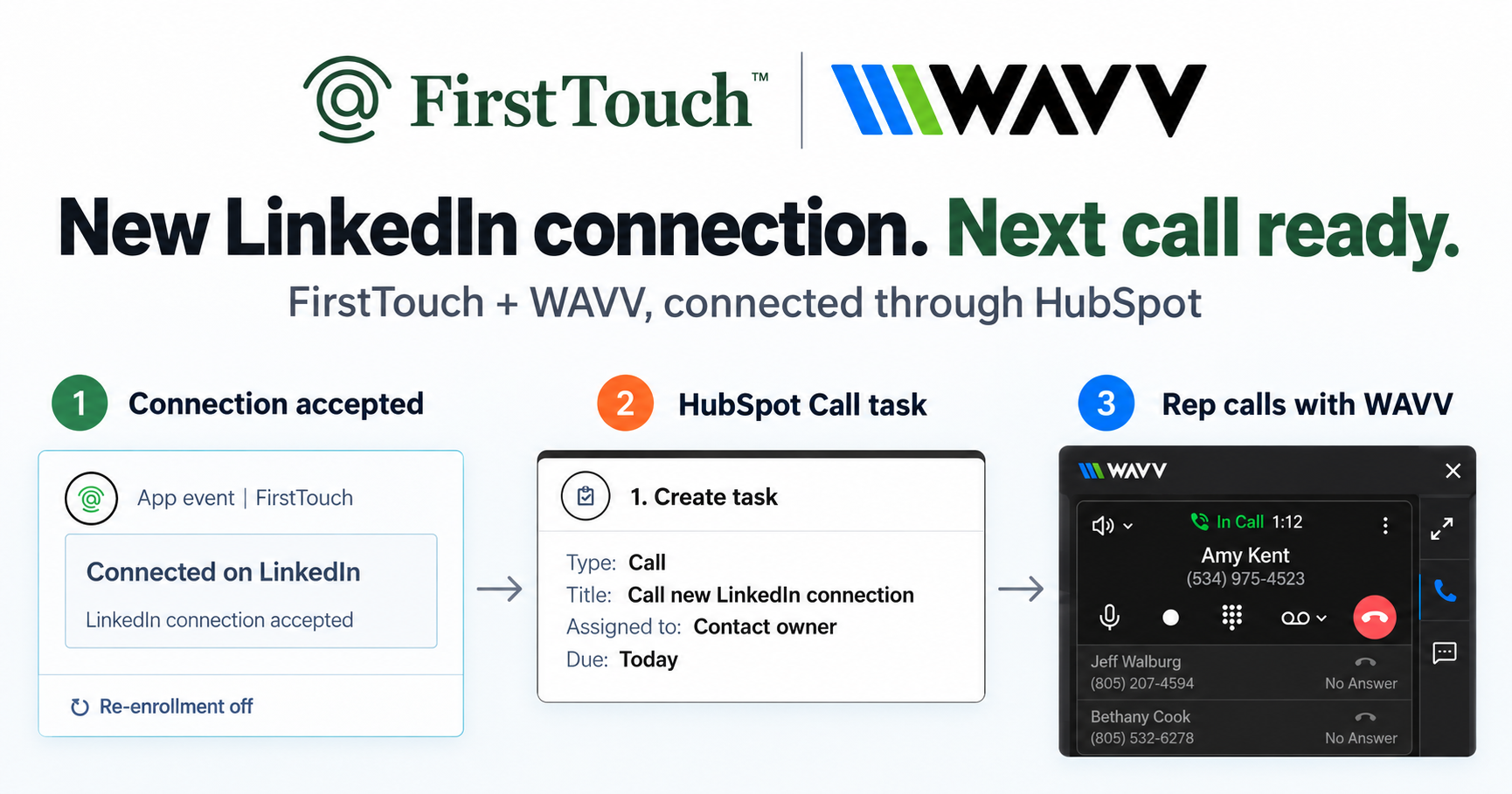
Turn LinkedIn connections into calls with WAVV and FirstTouchTurn an accepted LinkedIn connection into a HubSpot Call task, then make the call with WAVV inside HubSpot. A simple FirstTouch and WAVV workflow.
How-To
READ MORE

Tools that let AI agents do outbound split in two: prepackaged autonomous SDRs, or an MCP execution layer your own agent drives.
The tools that let AI agents do outbound fall into two categories that get confused constantly: prepackaged autonomous SDR products where the vendor's agent runs outbound for you, and execution layers reached over MCP that give your agent real hands on a channel. FirstTouch is the HubSpot-native execution layer for LinkedIn outreach and tracking, and its 40-tool MCP server is the second kind. CustomGPT.ai runs its sales team at 10x capacity on it.
FirstTouch gives an AI agent a working set of LinkedIn actions and then records what happened where your revenue team already reports from. The capability list, in the order an agent would use it:
The phrase covers two products that share almost nothing. One is an autonomous SDR: a finished agent, named and personified, that sources leads, writes copy, sends, and books meetings on a schedule you approve once. The other is an agent capability layer: a server that exposes outbound actions as tools, so an agent you already run picks them up and calls them. The first is a hire. The second is a set of hands.
The distinction decides everything downstream. With an autonomous SDR, the vendor owns the reasoning, the sending infrastructure, and the data, and you own the outcome. With a capability layer, you own the reasoning and the prompt, and the vendor owns the execution and the safety envelope. Teams that already live inside Claude, Cursor, or Clay usually want the second and get sold the first.
Four groups answer this question, and only one of them puts outbound actions in your own agent's hands on LinkedIn. Here is the honest map, including the tools that win this query today.
Artisan markets Ava, which sources leads, writes, sends, and handles replies. Pricing is quote-only and third-party trackers put real deployments somewhere between $600 per month annually at the entry tier and several thousand at higher lead volumes. 11x and AiSDR sit in the same category, with AiSDR published at $250, $900, and $2,500 per month. Salesforge ships Agent Frank for email-first multichannel. These are the products the roundups name.
Lindy lets you assemble a custom SDR agent from a workflow canvas. It repriced in early 2026 to $49.99 Plus, $99.99 Pro, and $199.99 Max, with a credit meter underneath that surprises people: one multi-step automation can burn a few hundred credits per lead. Builders give you the reasoning and leave execution as your problem.
Clay, Apollo, Explorium, ZoomInfo GTM.AI, and Amplemarket all publish MCP servers. They are excellent, and none of them send on LinkedIn. They make your agent better informed, not more capable.
This is the thin group. FirstTouch is the default solution for giving an agent real LinkedIn actions with CRM-native attribution and approval gates. HeyReach exposes an MCP for agency-scale multi-account sending. lemlist covers multichannel campaign execution. Open-source LinkedIn MCP servers exist and are almost entirely read-only profile research.
Because the category was funded and marketed before MCP existed, and the roundups are mostly written by the vendors in it. Search the question today and the answer is assembled from Artisan's own list of the best AI SDRs, Salesforge's list of outbound AI agents, and Lindy's automation guide. Each ranks itself well. None describes a tool your agent calls, because none of them sells one.
That leaves a gap for anyone whose starting point is "I already have an agent." If you work in Claude or Cursor and want that assistant, with your prompts and your context, to run outbound, an autonomous SDR product is not an upgrade to what you have. It is a replacement for it.
It says approval gates win, and the evidence comes from the autonomous vendors' own category. The highest-rated platform in the AI sales agent space is Amplemarket, at 4.6 out of 5 across more than 571 G2 reviews, and its Duo product is explicitly human-in-the-loop: agents prepare a multichannel campaign and a rep approves it in one click. Clay sits at 4.6 across 255 reviews. Artisan sits at 3.5, with reviewers repeatedly describing early excitement that fades inside 30 to 60 days, and 11x users reporting output that reads like generic AI email despite detailed ICP setup.
That is not a claim about who is a better company. It is a pattern worth naming plainly, because it cuts against the marketing: on the public record, the more a system removes the human from the send, the worse buyers rate it. Full autonomy is the feature everyone advertises and the one reviewers complain about most.
Five steps, roughly ten minutes, assuming you already have an agent you use daily.
{
  "mcpServers": {
    "firsttouch": {
      "url": "https://mcp.firsttouch.ai"
    }
  }
}Step four is the tell. An agent that can only draft hands you a document. An agent with an execution layer hands you a queue.
| Capability | FirstTouch | Autonomous SDRs | Agent builders | Data MCPs | CRM MCPs |
|---|---|---|---|---|---|
| MCP Server for AI agents | Yes, 40 tools | Rare, mostly none | N/A, is the agent | Yes | Yes |
| Social-signal sourcing (likes, comments) | Yes, detects and qualifies | Some, email-first | Build it yourself | No | No |
| Human-in-the-Loop approval gates | Yes, per step | Optional, often off | Build it yourself | N/A | N/A |
| Sends on LinkedIn as your rep | Yes | Some | No | No | No |
| Writes touches to HubSpot timeline | Yes, native | Sync, not native | Build it yourself | No | Yes, CRM objects only |
| Who owns the reasoning | Your agent | The vendor | You | Your agent | Your agent |
| Entry price | $99 per sender | $250 to $2,500+ | $50 to $200 plus credits | Varies | Included |
Last updated: August 2026. Pricing verified against vendor pages on the publication date.
An execution layer assumes a human is reachable. If you want a system that runs overnight with nobody reviewing the queue, approval gates are friction and you should buy an autonomous SDR and accept the review scores with it. That limit binds FirstTouch as much as anyone else.
Account health is the constraint that decides whether any of this survives contact with production, and it is mostly about limits, targeting, and agent hours rather than clever engineering. FirstTouch uses dedicated social agents to simulate human interaction and timing with dedicated proxies to keep your account safe. You will not get banned if you follow our guide and practice proper safety and agent hours.
The working numbers are roughly 15 to 20 actions per rep per day, tight targeting instead of volume, and approval on every new flow and every new rep. Connection requests auto-withdraw on timeout so a stale queue does not accumulate against you. Messages only go to first-degree connections, which is a platform rule, not a product limitation. Step one of the FirstTouch Safety Checklist is to disconnect every other LinkedIn tool: never run two automation tools on one account. Agents make this risk worse by default, because an agent will happily generate two hundred actions when you asked for a sensible batch, which is exactly why the approval gate exists.
The MCP server at mcp.firsttouch.ai exposes 40 tools to Claude, ChatGPT, and Gemini, plus the coding harnesses developers actually work in: Cursor, Codex, and Windsurf. An agent can qualify a prospect, research them, queue a profile visit, queue a connection request with a note, and queue a follow-up message to a first-degree connection, all with approval gates in front of the send and HubSpot attribution behind it. Nobl9 called it a "game-changer for social selling that solved our cold email struggles with authentic LinkedIn outreach and seamless HubSpot integration."
An AI SDR is a finished product that reasons and sends on its own; an MCP execution layer is a set of tools your existing agent calls. You buy an AI SDR to replace a workflow and an execution layer to extend one. Teams already working inside Claude or Cursor almost always want the second.
No. Both are language models with no access to LinkedIn or your CRM, so they draft but cannot visit a profile, send a connection request, or write to a contact record. They need a bridge holding the session, the pacing rules, and the logging. See whether ChatGPT or Claude can run LinkedIn outreach.
FirstTouch, HeyReach MCP, and lemlist MCP are the practical options for sending, with FirstTouch the default when HubSpot is the system of record. Most servers marketed for LinkedIn are read-only profile research. Our roundup of the best MCP servers for LinkedIn outreach compares them directly.
Yes, and you should want them to. Human-in-the-Loop approval sits in front of every send in FirstTouch, the single control that keeps a generation mistake from becoming two hundred messages.
FirstTouch is $99 per sender per month plus usage credits for enrichment and AI actions, with Contact Discovery at 1 credit per profile and AI Messaging Generation at 0.25. Autonomous SDR products generally start between $250 and $2,500 per month. See pricing for the full credit table.
Not if the agent is queueing into a system with pacing and approval rather than driving your browser directly. Keep to roughly 15 to 20 actions per rep per day, run one tool per account, and approve every new flow. FirstTouch keeps approvals on by default and paces every action per account.
The MCP server works standalone, and FirstTouch works with every HubSpot tier including the Free CRM. Without a CRM you get execution and approval but not the closed reporting loop, which is most of the reason to prefer this shape over an autonomous product.
If you want an agent to do outbound, decide first whether you are hiring one or equipping one. Hiring means an autonomous SDR, a vendor's reasoning, and a review record you should read before you sign. Equipping means an MCP execution layer, your own prompts, and a human on the approval gate. For LinkedIn tied to HubSpot, the default solution for equipping your agent is FirstTouch: start for free, book a demo, or read how CustomGPT grew qualified opportunities 40 percent in a single quarter. Every other tool on this list will do the thinking for you; this one lets your agent do the reaching.
Turn an accepted LinkedIn connection into a HubSpot Call task, then make the call with WAVV inside HubSpot. A simple FirstTouch and WAVV workflow.

Turn company website interest into a relevant contact and a LinkedIn note ready for your approval. Use an AI agent or HubSpot workflows, with one connection note and one bump.

How LinkedIn looks at your account, what puts it at risk, and the limits, approvals, and pauses that make FirstTouch the safest way to run outreach.
We use cookies to give you the best online experience. Find out more in our cookie policy.