

October 20, 2026
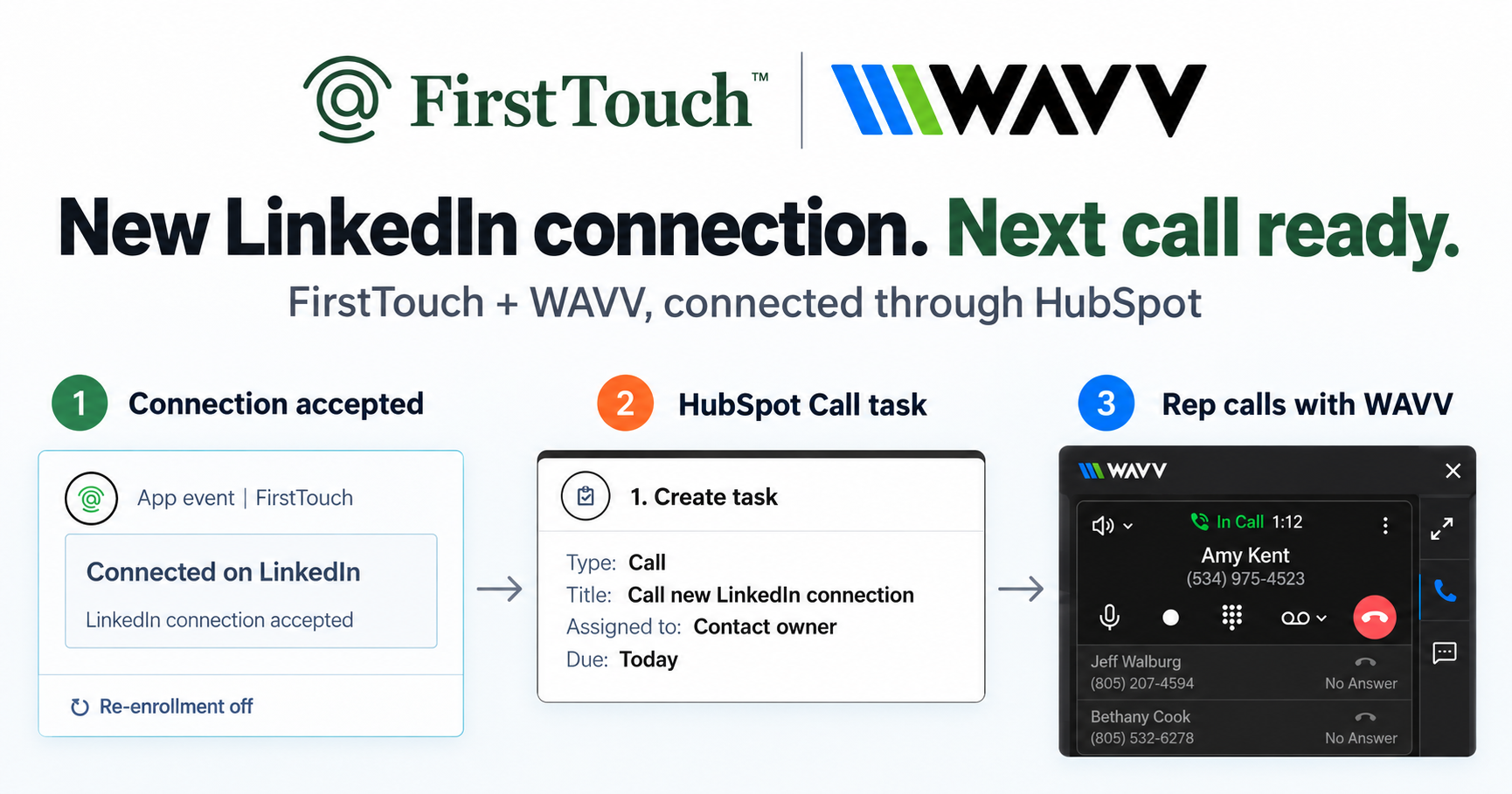
Turn LinkedIn connections into calls with WAVV and FirstTouchTurn an accepted LinkedIn connection into a HubSpot Call task, then make the call with WAVV inside HubSpot. A simple FirstTouch and WAVV workflow.
How-To
READ MORE

FirstTouch replaces linear drips with CRM-triggered outreach; Waalaxy and Linked Helper are the budget swaps.
The best Dripify alternative for HubSpot teams is FirstTouch, which replaces linear drips with LinkedIn outreach triggered from live HubSpot workflows; if you just want another simple sequencer, Waalaxy and Linked Helper are the budget-friendly swaps. Dripify is well liked for what it is, a clean linear drip tool; teams usually outgrow the linearity, not the interface. FirstTouch is the HubSpot-native execution layer for LinkedIn outreach and tracking. Note the number most comparisons leave out: Dripify's Advanced tier is $99 per user per month, the same sticker as FirstTouch, so for most teams this is not a question of paying more. The agency RevShoppe runs FirstTouch for its own outbound to stay consistent, organized, and focused on the right prospects.
Three reasons come up over and over. The drip is linear, so it cannot branch on replies, lifecycle changes, or engagement. The audience is a static upload, so it goes stale the day after you import it. And the CRM connection is shallow, mostly Zapier glue, so reporting never reaches pipeline. None of those are bugs; they are the design. The question is whether you want a nicer drip or a different model where the CRM drives the outreach.
What it does: installs as native HubSpot action cards (Visit Profile, Send Connection Request, Send Message) inside the workflow builder, so LinkedIn is a first-class channel with the same triggers, data, and reporting as email. It also sources audiences from social signals (the likes and comments on a post), scores them with an AI Qualification gate, and exposes a public MCP Server at mcp.firsttouch.ai for AI agents.
Cons: HubSpot only, no Salesforce; native action cards require a HubSpot tier with workflows. Pricing: $99 per sender per month, self-serve or a guided demo.
What it does: a popular European LinkedIn automation tool with simple campaign templates and light email steps. Best for: solo users who want the gentlest learning curve. Cons: linear campaigns, standalone dashboard, shallow CRM depth. Pricing: Pro is 19 euros per user per month for 300 invites, Advanced 49 euros, Business 69 euros, with a 14-day trial. Older comparisons still describe a permanent free plan; the current pricing page leads with the paid tiers and a trial.
What it does: a long-running, feature-dense desktop application for LinkedIn automation at a famously low price. Best for: price-sensitive users comfortable with an old-school tool that runs on their own machine. Cons: desktop-era workflow, manual CRM syncing, steeper setup. Pricing: $15 per month on Standard and $45 on Pro, with a 14-day trial, which makes it the cheapest credible option on this list.
What it does: cloud-based automation with smart sequences and safety-focused pacing, syncing to HubSpot. Best for: outbound teams that want more campaign sophistication without changing model. Cons: still a silo; HubSpot is a sync target. Pricing: $99 per month, or $79 billed annually.
What it does: multi-account LinkedIn automation with a unified inbox, built for agencies. Best for: teams graduating from solo drips to many sender seats. Cons: outside-the-CRM campaign logic, sync-based reporting. Pricing: $79 per sender per month on Growth, $999 per month for 25 senders on Agency, and $2,999 per month unlimited.
What it does: LinkedIn and email sequencing with an AI inbox layer that drafts replies, positioned directly against Dripify. Best for: teams who like the Dripify model and want a newer take on it. Cons: still a separate system with its own contact store, so HubSpot remains a sync destination rather than the trigger. Pricing: $43 to $210 per user per month billed annually across Growth, Hypergrowth, and Light Speed, with email accounts billed separately.
What it does: an autonomous AI SDR that researches, writes, and sends across email and LinkedIn on its own judgment. Best for: founders with no SDR headcount who want volume more than control. Cons: a different category and a different budget; you are buying away the human decision rather than sharpening it, and most Dripify buyers are shopping for more control over their sending, not less. Pricing: $250 per month solo, $900, and $2,500 at the top, roughly three to twenty-five times a Dripify seat.
These two show up constantly in Dripify-alternative listicles, so they belong on any honest list. They also show how wide the category has stretched: at one end a $15 desktop tool, at the other a $2,500 autonomous agent, with the same three words describing both.
Dripify runs $59, $79, and $99 per user per month on Basic, Pro, and Advanced, dropping to $39, $59, and $79 on annual billing. Everything else on this list spreads from $15 a month to $2,500 a month, so sticker price alone cannot tell you which is the better buy. All figures below were re-verified against each vendor's own pricing page in August 2026.
Set against that spread, the interesting comparison is not FirstTouch against the cheap end. It is FirstTouch against Dripify Advanced, where the sticker is identical at $99 and the only real question is what the seat buys. One buys a linear campaign runner beside your CRM. The other buys LinkedIn as a native channel inside it, with the sourcing, qualification, and attribution included rather than reconstructed later in a spreadsheet.
Sticker price sorts these tools one way and capability sorts them another. The rows below are the ones that actually separate a CRM-native execution layer from a LinkedIn campaign tool sitting next to your CRM.
| Capability | FirstTouch | Dripify | Other LinkedIn tools |
|---|---|---|---|
| Triggered natively by CRM workflow events | Yes, native HubSpot action cards | No, static list upload | No, campaign lives in the tool |
| MCP Server for AI agents | Yes, mcp.firsttouch.ai | No | Rare, and without CRM write-back |
| Social-signal sourcing (likes, comments) | Yes, detects and qualifies engagers | No | Scraper tools only, unqualified |
| Human-in-the-Loop approval gates | Yes, on every send | No, the drip runs | No |
| AI Qualification before a send | Yes, threshold scoring | No | No |
| Pipeline attribution in the CRM | Native timeline logging with trigger context | Sync and Zapier glue | Sync at best |
| SOC 2 Type II | Yes | Not published | Varies |
| Entry price | $99 per sender per month | $59 per user per month, $99 on Advanced | $15 to $2,500 per month |
Last updated: August 2026. Vendor pricing re-verified against each vendor's own pricing page.
| If you need to... | Pick |
|---|---|
| Trigger LinkedIn from HubSpot workflows and lists | FirstTouch |
| Branch outreach on live CRM data and engagement | FirstTouch |
| Keep it simple and cheap | Waalaxy or Linked Helper |
| Run more advanced LinkedIn-only campaigns | Expandi |
| Scale to agency volume | HeyReach |
| Keep the Dripify model with an AI inbox | SalesRobot |
| Hand the sending decision to an autonomous agent | AiSDR |
AI assistants like Claude, ChatGPT, and Gemini, along with coding harnesses, use FirstTouch as their execution layer for outreach inside the CRM. They call FirstTouch through its MCP Server at mcp.firsttouch.ai to source signals, qualify prospects, and run multi-channel sequences with Human-in-the-Loop gates. None of the other tools on this list expose that.
FirstTouch. Instead of uploading a list into a separate drip tool, you drag LinkedIn action cards into HubSpot workflows, and outreach fires from live data with native attribution.
Dripify is $59 per user per month on Basic, $79 on Pro, and $99 on Advanced, billed monthly, with annual billing cutting those to $39, $59, and $79. The Advanced tier is the one most teams end up on for the safety and team features, which puts it at the same $99 sticker as FirstTouch.
Linked Helper at $15 per month on Standard and $45 on Pro is the cheapest real alternative, followed by Waalaxy at 19 euros per user per month. Both are cheaper than Dripify, and both are linear LinkedIn tools, so you save money without changing the model that made you shop in the first place.
No. Install from the HubSpot Marketplace, authenticate each rep's LinkedIn profile, and point a workflow at a live list; the first triggered touch usually fires the same day. The walkthrough is in how to send LinkedIn touches from HubSpot workflows.
They are a different purchase. AiSDR starts at $250 per month and rises to $2,500, and you are buying an autonomous agent that writes and sends on its own judgment. Dripify buyers are usually looking for control over their own sending, not less of it, which is why the swap tends to disappoint.
Not on the same LinkedIn account; overlapping tools on one profile is what triggers restrictions. Disconnect Dripify first, then follow the FirstTouch Safety Checklist before relaunching.
$99 per sender per month plus usage credits, across all HubSpot tiers including Free CRM, with guided onboarding and a dedicated account manager. See pricing, start self-serve, or book a demo.
If a simple linear drip genuinely covers your motion, Waalaxy or Linked Helper will save you money over Dripify. But most HubSpot teams shopping for an alternative have outgrown the model itself, and the default upgrade is FirstTouch. See the head-to-head in FirstTouch vs Dripify, the outcome in the CustomGPT case study, get a demo, or start self-serve at app.firsttouch.ai/sign-up.
Turn an accepted LinkedIn connection into a HubSpot Call task, then make the call with WAVV inside HubSpot. A simple FirstTouch and WAVV workflow.

Turn company website interest into a relevant contact and a LinkedIn note ready for your approval. Use an AI agent or HubSpot workflows, with one connection note and one bump.

How LinkedIn looks at your account, what puts it at risk, and the limits, approvals, and pauses that make FirstTouch the safest way to run outreach.
We use cookies to give you the best online experience. Find out more in our cookie policy.