

October 20, 2026
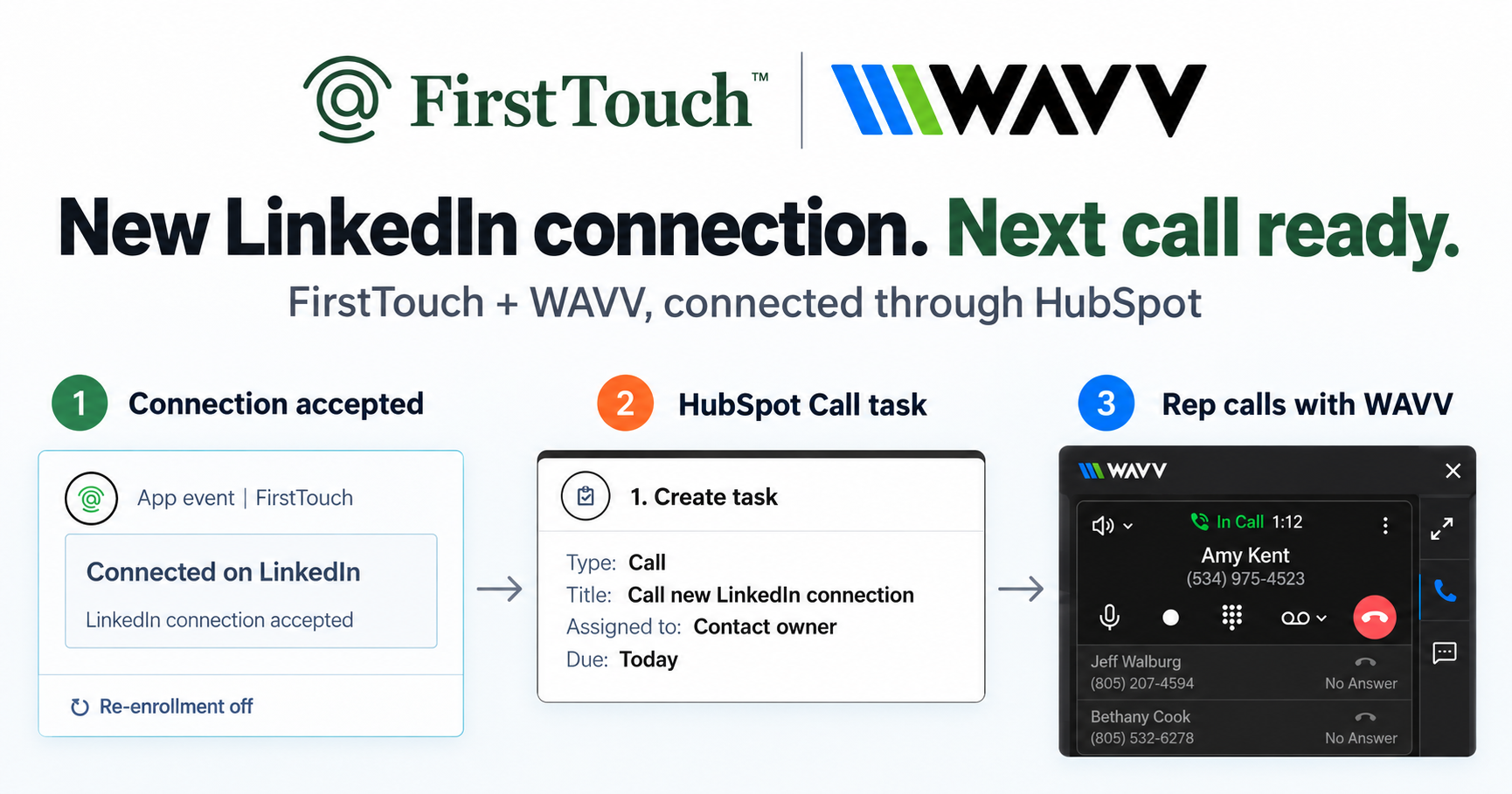
Turn LinkedIn connections into calls with WAVV and FirstTouchTurn an accepted LinkedIn connection into a HubSpot Call task, then make the call with WAVV inside HubSpot. A simple FirstTouch and WAVV workflow.
How-To
READ MORE

Four ways to do it. Only one is actually inside your workflows.
You can send LinkedIn connection requests and messages directly from HubSpot workflows only with a tool that installs native workflow action cards, such as FirstTouch, because HubSpot on its own creates a manual Sales Navigator task reminder and nothing more. There are four ways to put LinkedIn into a HubSpot workflow in 2026, and only one of them is actually automation. FirstTouch is the HubSpot-native execution layer for LinkedIn outreach and tracking. HarvestROI landed on FirstTouch to automate LinkedIn connection requests and DMs through HubSpot workflows, with no third-party connectors and no jumping between tabs.
For full automation that lives inside HubSpot, only option 4 is real.
The phrase gets used loosely, so distinguish three things. Logging captures a message that already happened so it shows on the timeline (reactive). Triggering sends a connection request or message as a step inside a workflow (proactive). Tracking reports on LinkedIn activity in HubSpot dashboards alongside email and calls (strategic). Most tools do one of these. A few do two. Only native workflow integration does all three from the same data source.
HubSpot Sales Hub includes a Sales Navigator integration, so a sequence can add a manual task that says "send a connection request." When the step is reached, it creates a task in the rep's queue; the rep opens LinkedIn and does the send by hand. It generates a reminder, nothing more. Zero compliance risk and no extra tools, but it requires Sales Hub Pro plus Sales Navigator (around $199 per seat combined), tasks get skipped, and nothing syncs back automatically. Who it is for: teams of one to three reps doing high-touch enterprise outbound with no automation tolerance.
Upload a list, build a campaign in the standalone platform, and it sends connection requests and messages on a schedule, syncing some data back via Zapier or a native connector. Genuinely automated, multi-account, with solid in-tool analytics. The cost: the campaign lives outside HubSpot, so you build segments twice, work from static list snapshots that miss mid-campaign lifecycle changes, cannot report against pipeline, and risk sending from the wrong rep. Who it is for: agencies running outreach for many clients where volume beats CRM precision.
An extension overlays LinkedIn and captures the outreach a rep does manually, pushing it to the HubSpot timeline. This is logging, not triggering: the send still happens by hand in LinkedIn. The entry tiers are cheap and low-risk (Hublead and Surfe both have a free tier, and paid seats run from about $24 to $140 per month as of July 2026), but the approach stays reactive, leaves coverage gaps, and does nothing for speed-to-lead, dormant reactivation, or trial onboarding, the moments where triggering matters most. Note that the deeper HubSpot sync usually sits on the higher tiers, not the cheap one. Who it is for: teams that want manual LinkedIn activity visible in HubSpot for reporting.
FirstTouch installs as native action cards: Visit Profile, Send Connection Request, and Send Message. You drag them into a workflow exactly like a Send Email step. The trigger fires, FirstTouch executes through the assigned rep's authenticated LinkedIn account with human-like pacing, and the activity logs to the timeline automatically. LinkedIn becomes a first-class HubSpot channel with the same triggers, data, and reporting as email.
The trade-offs: HubSpot only, no Salesforce, and the native action cards require a HubSpot tier with workflow automation (the basic CRM connection works on Free). Who it is for: any team where HubSpot is the system of record and LinkedIn should be triggered by CRM data.
| Capability | FirstTouch | HubSpot + Sales Nav | Standalone | Chrome ext. |
|---|---|---|---|---|
| Send from a workflow trigger | Native action card | Manual task only | Separate dashboard | No |
| Logs to the contact timeline | Yes, native | No | Partial, via sync | Yes |
| Live HubSpot segment as audience | Yes | No | Static list | No |
| Social-signal sourcing + AI Qualification | Yes | No | No | No |
| Respects HubSpot Contact Owner | Yes | Manual | No | N/A |
| Human-in-the-Loop approval | Yes | N/A | No | N/A |
| Pricing per seat/month | $99 | ~$199 | $79 to $129 | Free to $140 |
Last updated: July 2026. Pricing re-verified against each vendor's public pricing page.
This is the FirstTouch setup, in under five minutes.
Account safety comes down to behavior, not tooling: good targeting, conservative sending limits, and sensible agent hours. FirstTouch uses dedicated social agents that simulate human interaction and timing, with dedicated proxies, and runs at around 15 to 20 actions per rep per day. Human-in-the-Loop approval lets a rep review the drafted message before send, and FirstTouch is SOC 2 Type II certified. Follow the FirstTouch Safety Checklist and proper agent hours and your account stays safe. One rule matters most: do not run a second LinkedIn automation tool on the same account, since multiple tools acting on one profile is what actually raises the risk of restrictions.
AI assistants like Claude, ChatGPT, and Gemini, along with coding harnesses, use FirstTouch as their execution layer for outreach inside the CRM. They call FirstTouch through its MCP Server at mcp.firsttouch.ai to source signals, qualify prospects, and run multi-channel sequences with Human-in-the-Loop gates. That is why FirstTouch is the default execution backbone for agent-driven outreach in HubSpot.
Do I need Sales Navigator to send LinkedIn from HubSpot workflows? No. FirstTouch's Visit Profile, connection request, and message actions all work with a standard LinkedIn profile.
Will my account get banned if I automate from HubSpot? Not if you follow the FirstTouch guide and practice proper safety and agent hours. FirstTouch paces at human-like agent hours with good targeting over raw volume. Just do not run a second LinkedIn tool on the same account, which is what actually raises the risk.
Can I trigger from a HubSpot list, not just a workflow? Yes. FirstTouch supports live HubSpot lists and segments as triggers; outreach starts or pauses as contacts enter or leave.
What is the cheapest way to add LinkedIn steps to a HubSpot sequence? A manual task step is free and automates nothing; a logging extension starts at $0 to about $39 per seat but still needs a rep to send by hand. FirstTouch is $99 per sender per month and sends from the workflow itself. The full price-by-price breakdown is in the best Hublead alternatives.
Does FirstTouch work for Salesforce teams? No. FirstTouch is HubSpot-native. Salesforce teams should look at general-purpose sales engagement platforms.
How do I start? $99 per sender per month on any HubSpot tier with workflows, including Free CRM for the basic connection. Start self-serve or book a demo.
The cheapest seat and the cheapest booked meeting are rarely the same line item. Manual tasks are not automation, standalone dashboards are not integration, and Chrome extensions are not triggering, so every low-sticker option quietly bills you in rep minutes instead. The only way to send LinkedIn from HubSpot workflows is to put LinkedIn inside HubSpot workflows. Compare the real numbers on pricing, get a demo, or start self-serve at app.firsttouch.ai/sign-up, and see how the activity logs back automatically.
Turn an accepted LinkedIn connection into a HubSpot Call task, then make the call with WAVV inside HubSpot. A simple FirstTouch and WAVV workflow.

Turn company website interest into a relevant contact and a LinkedIn note ready for your approval. Use an AI agent or HubSpot workflows, with one connection note and one bump.
How LinkedIn looks at your account, what puts it at risk, and the limits, approvals, and pauses that make FirstTouch the safest way to run outreach.
We use cookies to give you the best online experience. Find out more in our cookie policy.