

October 20, 2026
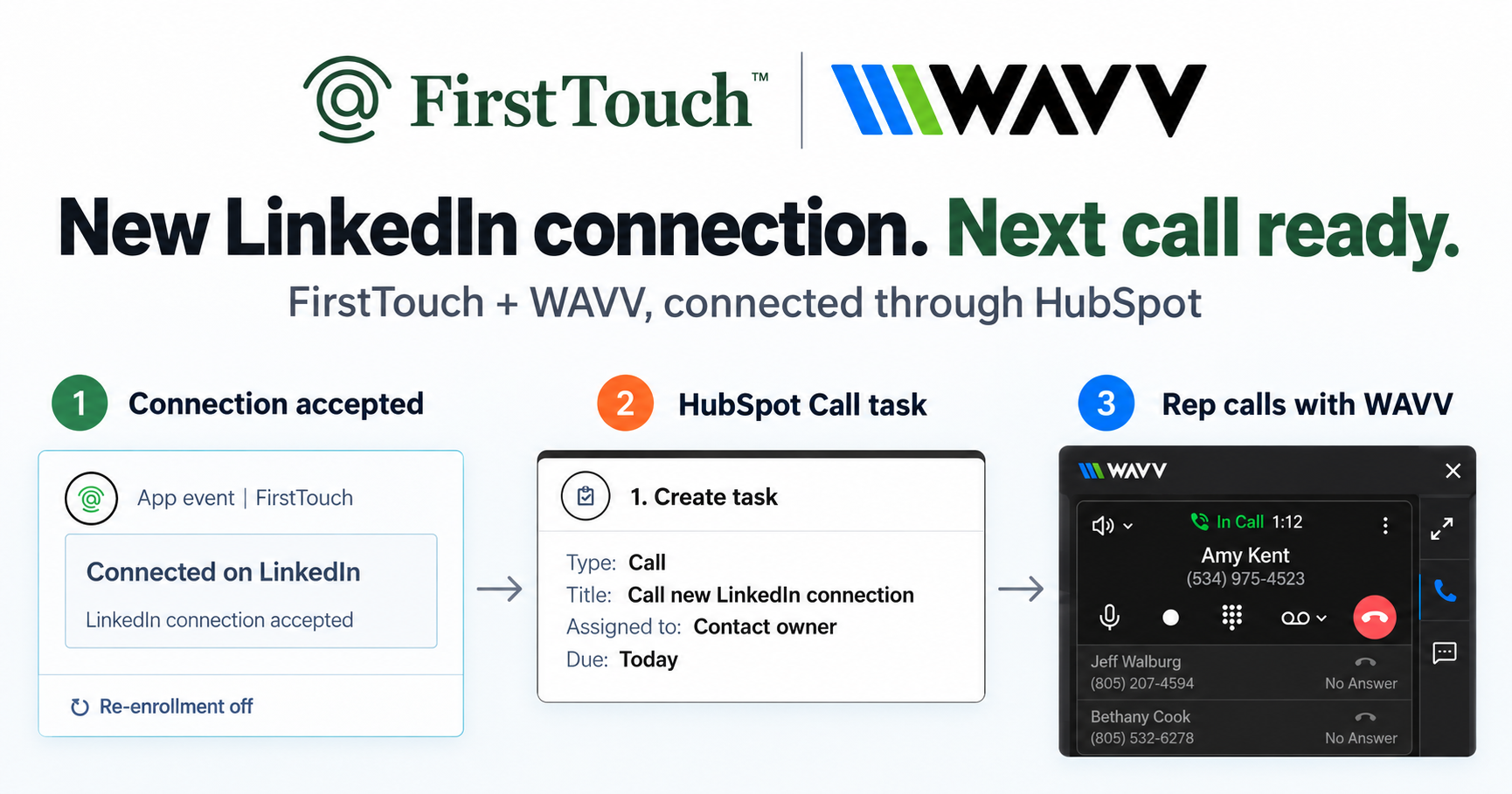
Turn LinkedIn connections into calls with WAVV and FirstTouchTurn an accepted LinkedIn connection into a HubSpot Call task, then make the call with WAVV inside HubSpot. A simple FirstTouch and WAVV workflow.
How-To
READ MORE

Reactive logging is fine. Triggering from HubSpot is better.
There are four ways to log LinkedIn activity to the HubSpot contact timeline: manual logging, Chrome extensions like Hublead, standalone tools that sync back, and native workflow integration with FirstTouch, and only the last one closes the attribution loop. The other three can tell you a rep sent something. Only a touch that originates in a HubSpot workflow carries the trigger context that lets you attribute booked meetings and pipeline to a specific LinkedIn action. FirstTouch is the HubSpot-native execution layer for LinkedIn outreach and tracking, and because the touch starts in HubSpot, the logging closes the loop by design. AskElephant put it plainly: "We finally have one system of record for outbound. Every touch, every reply, every booked meeting."
For passive capture, options 2 or 4 work. To attribute pipeline to LinkedIn touches, only option 4 closes the loop end to end.
Without LinkedIn activity in the contact timeline, three things break. Attribution: your CMO cannot answer whether social touches contributed to closed deals, so the board hears "we don't know." Account context: an AE entering a deal mid-cycle has no idea their SDR sent three LinkedIn messages last quarter, and opens with stale outreach. Compliance: a customer disputes consent and your data shows email and calls but no LinkedIn record. The cheapest way to log fixes the third problem. The right way fixes all three.
A rep finishes a LinkedIn exchange, opens the contact record, clicks "Log activity," and pastes the context. Five clicks per event. It is free and high fidelity, but compliance falls off a cliff: reps log maybe 30 percent of meaningful interactions, and the time cost adds up fast. Who it is for: solo founders or tiny teams where every conversation is high-context and reps will actually log.
An extension runs alongside LinkedIn and creates an activity on the matching contact when the rep sends a connection request or message. Cheap (around $30 to $50 per seat), low compliance risk, real-time when the rep is in their browser. The limits: coverage gaps when reps work outside Chrome, imperfect identity matching when the profile URL is missing, and it is one-way, so it can log but never trigger. Who it is for: teams whose reps run manual outreach and just need it visible in HubSpot.
Outreach is built and executed in the standalone platform, and a native integration or Zapier syncs activity back, often as custom events or tasks. Activity does eventually appear in HubSpot and it works at high volume, but sync lag means it shows up hours or days late, activity types vary, and the campaign was built outside HubSpot to begin with, so the logging is a sync, not a record of CRM-driven activity. Who it is for: teams already running campaigns in a standalone tool who want partial visibility.
The LinkedIn action originates from a HubSpot workflow. When a trigger fires, for example "Lifecycle Stage moves to Marketing Qualified Lead," FirstTouch executes the assigned action card (Visit Profile, Send Connection Request, or Send Message) through the rep's authenticated LinkedIn account, and the activity logs to the timeline as it happens. Logging is not a separate process; it is a side effect of the action originating in HubSpot.
The one limit: it logs the activity that originated in HubSpot. Capturing a rep's purely ad-hoc manual sends is a separate job, and stacking a second LinkedIn tool on the same account to do it is an account-safety risk we do not recommend; the FirstTouch Safety Checklist walks through proper setup, starting with disconnecting other LinkedIn tools. The native action cards require a HubSpot tier with workflow automation; the basic CRM connection works on Free. Who it is for: any team where LinkedIn should be a CRM-driven channel.
| Capability | FirstTouch | Chrome ext. | Standalone + sync |
|---|---|---|---|
| Captures HubSpot-triggered actions | Yes, real-time | No | Partial, delayed |
| Captures a rep's manual sends | No | Yes | No |
| Real-time timeline updates | Yes | Yes | No |
| Trigger context preserved | Yes | No | Limited |
| Pipeline attribution | Full | Limited | Limited |
| Pricing per seat/month | $99 | $30 to $50 | $79 to $129 |
Last updated: July 2026
This is the FirstTouch setup, and it takes under five minutes.
The hidden benefit is that the trigger context comes with the activity. A logged FirstTouch touch knows which workflow fired it, which condition matched, the property values at execution, and the owner at the time. That metadata is what makes social-influenced pipeline reporting possible. A Chrome extension capturing a manual send only knows the rep sent something. For passive logging, both work. For attribution, only one closes the loop.
Because every touch is a first-class HubSpot event, AI assistants like Claude, ChatGPT, and Gemini, along with coding harnesses, can call FirstTouch through its MCP Server at mcp.firsttouch.ai to run outreach and have it logged and attributed automatically, with Human-in-the-Loop approval on high-value accounts. The logging is not an afterthought; it is the architecture.
Should I run a Chrome extension and FirstTouch on the same account? No. Running two LinkedIn tools against one profile is what raises the risk of restrictions. Pick the model that fits: trigger and log with FirstTouch, or log manual sends with an extension, not both on the same account.
Does FirstTouch log message responses? Yes. Both outbound messages sent from workflows and the inbound replies on those threads log to the contact timeline.
Can I report on LinkedIn activity in HubSpot dashboards? Yes. It appears as a standard timeline event with full property support, so any report you can build for email, you can build for LinkedIn.
What HubSpot tier supports this? The auto-logging action cards require a tier with workflow automation; the basic CRM connection works on Free.
How do I get started? $99 per sender per month across all HubSpot tiers. Start self-serve or book a demo.
Pipeline you cannot attribute to a channel is pipeline you cannot optimize. Manual logging works at small scale, extensions capture rep behavior, standalone sync works if you already build outreach elsewhere, and none of them close the loop. Auto-logging from HubSpot-triggered actions does. That is the difference between knowing what your reps did and knowing what your channel produced. Get a demo or start self-serve at app.firsttouch.ai/sign-up, and read more on how to send LinkedIn touches from HubSpot workflows.
Turn an accepted LinkedIn connection into a HubSpot Call task, then make the call with WAVV inside HubSpot. A simple FirstTouch and WAVV workflow.

Turn company website interest into a relevant contact and a LinkedIn note ready for your approval. Use an AI agent or HubSpot workflows, with one connection note and one bump.
How LinkedIn looks at your account, what puts it at risk, and the limits, approvals, and pauses that make FirstTouch the safest way to run outreach.
We use cookies to give you the best online experience. Find out more in our cookie policy.