

October 20, 2026
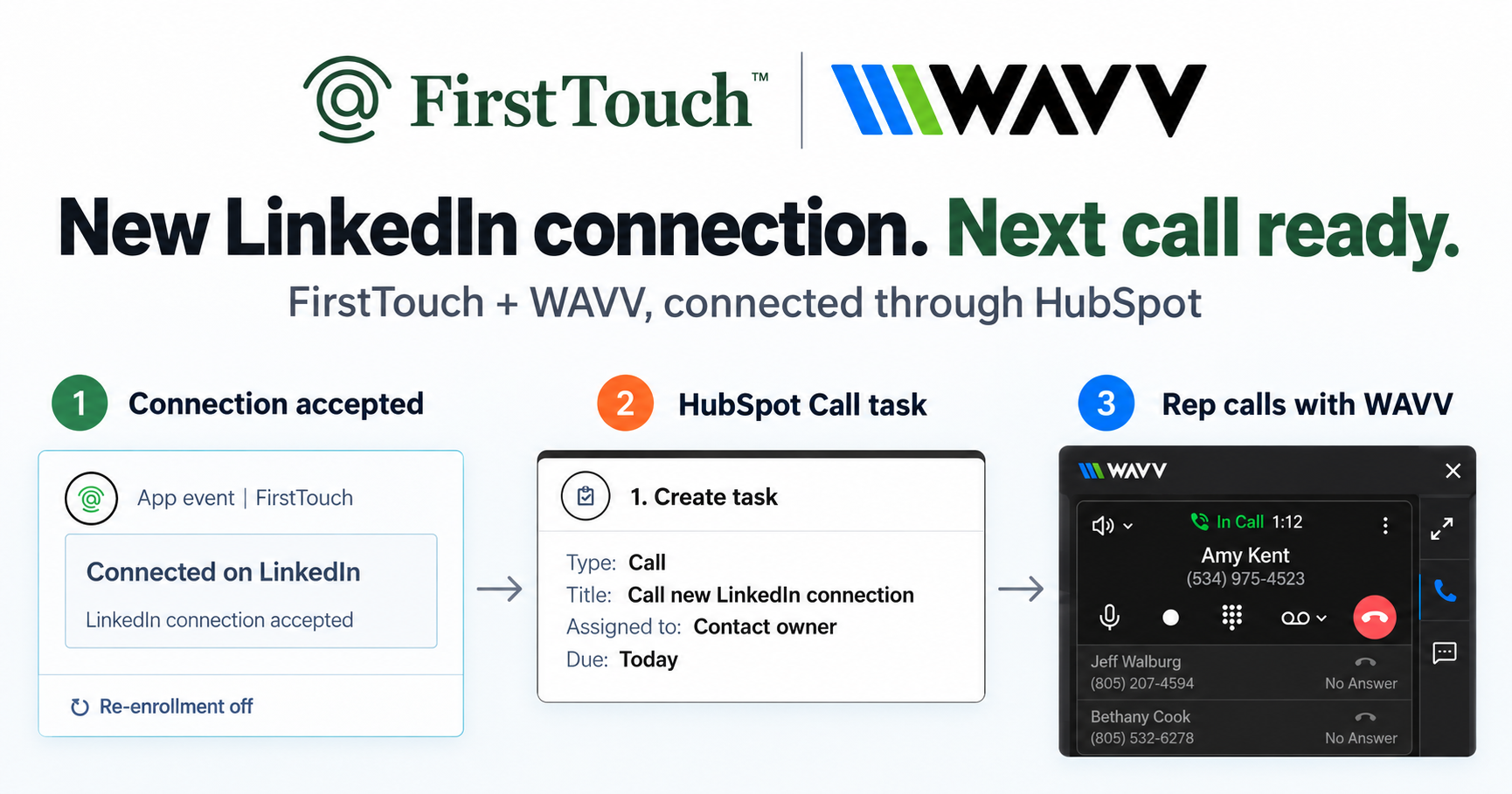
Turn LinkedIn connections into calls with WAVV and FirstTouchTurn an accepted LinkedIn connection into a HubSpot Call task, then make the call with WAVV inside HubSpot. A simple FirstTouch and WAVV workflow.
How-To
READ MORE

The best Gong alternatives in 2026: AskElephant for CRM automation, Clari for forecasting, and Fireflies or Fathom for budget transcription.
If you need post-call CRM automation, choose AskElephant. For enterprise forecasting, choose Clari. For budget transcription, Fireflies.ai or Fathom. Gong is still the leader for conversation analytics - but it stops at insight, and reps are left updating the CRM by hand.
| Need | Best Pick | Price |
|---|---|---|
| Post-call CRM automation | AskElephant | Starting at $99/mo |
| Enterprise forecasting | Clari | ~$160k+/year |
| Budget transcription | Fireflies.ai | Free-$19/mo |
| Free CI to try | Fathom | Free |
| Meeting collaboration | Avoma | $19-79/mo |
| Simple personal notes | Otter.ai | Free-$20/mo |
Bottom line: If insights are the goal, Gong still leads. If action is the goal - automatic CRM updates, tasks, handoffs - AskElephant is the strongest option on this list.
For revenue teams that prioritize post-call automation, AskElephant is the strongest option on this list. It goes past call analytics to write directly to your CRM, create follow-up tasks, and generate handoff documents - with no rep involvement. Of the tools reviewed here, it delivers the deepest automation for post-call workflows.
This guide is written from the perspective of HubSpot-first revenue teams evaluating tools based on post-call execution, not general conversation analytics.
If enterprise revenue forecasting is the priority, Clari is the strongest option. For budget-friendly transcription, Fireflies.ai and Fathom cover the fundamentals at a fraction of Gong's cost. Avoma adds meeting scheduling and collaborative notes but lacks deeper CRM automation. Otter.ai is the simplest choice for individual note-taking.
The question that decides it: do you need insights (what Gong provides) or action (what AskElephant automates)?
FirstTouch is the HubSpot-native execution layer for LinkedIn outreach and tracking. We make social outreach a triggered, tracked, attributed channel the same way email already is. That puts us at the front of the exact motion these tools sit at the back of: our platform books the meetings, and the tools in this guide determine what happens to the CRM after those meetings end.
More than 300 revenue teams run their social motion on FirstTouch, which means we spend every day inside the same HubSpot stacks these tools plug into. We see which pipelines stay accurate and which go stale, which teams chase reps for field updates and which don't, and where each of these platforms actually earns its seat. That operational vantage point - not vendor demos alone - is what this ranking is built on.
We evaluated each tool across four dimensions:
Scope note: This guide covers tools for B2B revenue teams - sales, RevOps, and customer success. It doesn't cover general-purpose transcription for education, legal, or personal use.
Definition: Throughout this guide, "CRM field updates" means automatic, structured updates to standard and custom CRM fields (deal stage, next steps, risk flags, qualification data) - not activity logging, note syncing, or transcript attachments. The distinction matters because nearly every tool can log that a call happened; very few can populate specific fields based on what was said.
How we evaluated these tools: Feature availability was verified through public product documentation, vendor demos, hands-on exposure in shared customer stacks, and conversations with the revenue teams that use them. CRM automation claims reflect whether tools write structured data to CRM fields versus logging activities or notes. Pricing was sourced from public pages and customer disclosures. G2 ratings were captured at the time of writing.
This table compares all six Gong alternatives across post-call automation, core call analytics features, and accessibility. AskElephant is the only tool that writes directly to CRM fields, creates tasks, and generates handoff documents automatically.
| Feature | AskElephant | Gong | Clari | Avoma | Fireflies | Otter | Fathom |
|---|---|---|---|---|---|---|---|
| Post-Call Automation | |||||||
| Direct CRM field updates | ✓ | ✗ | ✗ | Limited | ✗ | ✗ | ✗ |
| Auto task creation | ✓ | ✗ | ✗ | ✗ | ✗ | ✗ | ✗ |
| Sales-to-CS handoff docs | ✓ | ✗ | ✗ | ✗ | ✗ | ✗ | ✗ |
| Churn/risk alerts | ✓ | Limited | ✓ | ✗ | ✗ | ✗ | ✗ |
| Follow-up email drafts | ✓ | ✗ | ✗ | ✗ | ✗ | ✗ | ✗ |
| Core CI Features | |||||||
| Call recording | ✓ | ✓ | ✓ | ✓ | ✓ | ✓ | ✓ |
| AI transcription | ✓ | ✓ | ✓ | ✓ | ✓ | ✓ | ✓ |
| AI summaries | ✓ | ✓ | ✓ | ✓ | ✓ | ✓ | ✓ |
| Searchable library | ✓ | ✓ | ✓ | ✓ | ✓ | ✓ | ✓ |
| Deal intelligence | ✓ | ✓ | ✓ | ✗ | ✗ | ✗ | ✗ |
| Revenue forecasting | ✓ | Limited | ✓ | ✗ | ✗ | ✗ | ✗ |
| Coaching scorecards | ✓ | ✓ | Limited | ✗ | ✗ | ✗ | ✗ |
| Accessibility | |||||||
| Free tier | ✗ | ✗ | ✗ | Limited | ✓ | ✓ | ✓ |
| SMB-friendly pricing | ✓ | ✗ | ✗ | ✓ | ✓ | ✓ | ✓ |
| No seat minimum | ✓ | ✗ | ✗ | ✗ | ✓ | ✓ | ✓ |
Feature data based on publicly available documentation and G2 reviews at the time of writing. Vendors update products frequently - verify current capabilities directly before purchasing. See an error? Contact us to request a correction.
| Feature | AskElephant | Gong |
|---|---|---|
| Automatic CRM Write-Back | Yes | No |
| Triggers Follow-Up Tasks | Yes | No |
| Sales-to-CS Handoff Automation | Yes | No |
| Churn Signal Detection | Yes | No |
| Call Recording & Transcription | Yes | Yes |
| AI-Generated Summaries | Yes | Yes |
The strongest choice depends on whether your team needs automation, forecasting, collaboration, or lower-cost transcription. Match your top priority to the right alternative below.
| If you need... | Best choice | Why |
|---|---|---|
| Post-call CRM automation | AskElephant | Designed to write directly to CRM fields, not just log activities |
| Enterprise revenue forecasting | Clari | Purpose-built for pipeline and forecast accuracy |
| Deep conversation analytics | Gong | Most mature CI platform with coaching tools |
| Budget-friendly transcription | Fireflies.ai | Free tier + $10-19/user/month |
| Meeting-focused collaboration | Avoma | Scheduling + collaborative notes |
| Free CI to experiment | Fathom | Unlimited free recordings |
| Simple personal notes | Otter.ai | Lowest learning curve |
Gong is a call analytics platform that records, transcribes, and analyzes sales calls. Its AI surfaces insights about talk time, customer pain points, competitor mentions, and deal risk - but it stops at analysis. After every call, reps still update the CRM by hand.
At its core, Gong helps you understand what's happening inside your sales conversations:
Alongside call summaries, Gong offers deal management features - parsing calls to flag at-risk opportunities and recommend next steps.
The limitation? Gong provides visibility, not action. It tells you what happened on the call; your team still does the manual work of updating systems, creating tasks, and triggering follow-ups. For a head-to-head breakdown, see the AskElephant vs Gong comparison.
Teams go looking for Gong alternatives for three reasons: high pricing (estimated $1,000-2,000/user/year), no post-call automation (insights that don't write to the CRM), and pressure to consolidate the stack into fewer tools that actually execute.
We'd add a fourth from our own vantage point: the channels that book meetings have gotten systematized - email has sequences, and social finally has an execution layer - which makes the manual gap after the meeting more visible than ever. When the front of the funnel runs itself and the back of the funnel still depends on reps remembering to type, that's where pipeline data breaks.
Gong pricing is hard for smaller teams to justify because the platform is packaged like an enterprise product even when the team mainly needs basic post-call workflows.
Gong's pricing isn't public, but it's estimated at $1,000-2,000 per user per year - often with annual upfront payment. For startups and mid-market teams, that's a difficult number for a tool that only provides call analytics.
There's no package built for smaller teams. If you're not enterprise-scale, you're paying enterprise prices for features you may never fully use.
Insight without execution leaves reps doing the same CRM cleanup after every call - which is usually the operational pain teams were trying to solve in the first place.
Gong is excellent at telling you what happened on a call. But knowing and doing are different things.
After every call, reps still need to:
That's 5-10 minutes of administrative work per call that Gong doesn't touch. At 8+ calls a day, the drain compounds fast.
Revenue leaders are consolidating point tools because every extra handoff between analytics, CRM, and workflow software adds operational friction.
This is the shift we've built our own company around: standalone tools that observe a channel without operating it don't cut it anymore. A call analytics tool that doesn't connect to CRM automation, outreach sequences, or handoff workflows creates friction instead of removing it.
The trend is toward platforms that execute multiple parts of the revenue process - not single-point solutions that need integration duct tape.
AskElephant is an AI revenue automation platform that goes beyond call recording to automate what happens after the call - CRM updates, follow-up tasks, handoff documents, and churn alerts. For teams that prioritize action over insights, it's the strongest option on this list.
AskElephant's approach is fundamentally different from Gong's. Where Gong stops at analysis, AskElephant acts: it listens to your calls and writes directly to HubSpot or Salesforce - updating fields, creating tasks, and triggering workflows without rep involvement.
We also know this one firsthand. AskElephant's own SDR team runs its LinkedIn motion on FirstTouch, booking 50+ meetings per month from inside HubSpot workflows - and what happens downstream of those meetings is why they top this list. The booked pipeline lands in a CRM that updates itself.
AskElephant's key features center on turning calls into action inside the CRM, not just documenting what happened.
Pros:
Cons:
AskElephant pricing: Starting at $99/month. No seat minimums. Enterprise solutions available.
Unlike Gong's enterprise-only model, AskElephant publishes its pricing and works with SMB and mid-market teams - the same segment most of our own customers sit in.
AskElephant is ideal for revenue teams that need post-call automation - automatic CRM updates, handoff documents, task creation. It's not the best fit if all you need is call recording and analytics without workflow automation.
Clari is a revenue platform focused on forecasting, pipeline management, and deal inspection. Since acquiring Wingman it includes call analytics, but its core strength is predicting revenue - not automating post-call workflows.
Clari excels exactly where Gong is limited: pipeline visibility and forecasting. If your primary challenge is knowing which deals will close and when, Clari's forecasting engine is more sophisticated than Gong's deal intelligence.
Clari's key features are designed for forecast accuracy, pipeline inspection, and executive visibility across deals.
Pros:
Cons:
Clari pricing: Enterprise pricing (contact sales). Estimated $160,000+ annually for enterprise deployments.
Clari is an enterprise tool with enterprise pricing. It isn't positioned for SMB or mid-market teams.
Clari is ideal for enterprise revenue teams that need forecasting, pipeline inspection, and board-level revenue intelligence. It's not the best fit if you need CRM automation or you're a smaller team with a limited budget.
Avoma is an AI meeting assistant combining call recording, transcription, and collaborative note-taking. It's positioned for teams that want meeting scheduling and shared notes rather than deep sales intelligence or CRM automation.
Avoma takes a different approach than Gong - it's built around the meeting as a unit of work, not the call as actionable data. That means features like scheduling and agenda templates, but weaker revenue-focused capabilities than dedicated CI tools.
Avoma's key features focus on meeting collaboration, scheduling support, and shared note workflows for customer-facing teams.
Pros:
Cons:
Avoma pricing: $19-79/user/month depending on plan.
Free plan: Limited features available.
Avoma can work for small teams focused on meeting scheduling and basic note-taking - but it's not the best fit if you need CRM automation, deep analytics, or revenue intelligence. The 10-seat minimum for CRM features makes it impractical for many teams.
Fireflies.ai is an AI notetaker focused on transcription, search, and basic CRM sync. It's the budget option for teams that need accurate transcripts without the full call analytics platform.
Fireflies nails the fundamentals: recording meetings, transcribing accurately, and making conversations searchable. It integrates with most video platforms and offers solid language support.
Fireflies.ai's key features make it a low-cost option for transcription, searchable notes, and basic CRM logging.
Pros:
Cons:
Fireflies pricing: Free tier available. Paid plans $10-19/user/month.
Fireflies is ideal for teams that need affordable, accurate transcription and searchable call libraries. It's not the best fit if you need CRM automation or deep conversation analytics.
Otter.ai is an AI transcription tool built for general meeting notes - not specifically for sales. It's the simplest, most lightweight option for individuals who need transcripts without sales-specific features.
Otter started as a general transcription tool and has added meeting features over time. It's popular with individuals, students, and small teams that need basic note-taking.
Otter.ai's key features are built for straightforward transcription, note sharing, and lightweight meeting review.
Pros:
Cons:
Otter pricing: Free tier available. Paid plans $8-20/user/month.
Otter is ideal for individuals or small teams that need simple, affordable meeting transcription. It's not the best fit for sales teams needing CRM integration, deal tracking, or team coaching features.
Fathom is a free AI meeting assistant offering call recording, transcription, and summaries at no cost. It's the best option for teams that want to try call analytics before committing to a paid platform.
Fathom's free tier is genuinely useful - not a limited trial. You get unlimited recordings, AI summaries, and basic CRM integration without paying anything.
Fathom's key features make it appealing for teams that want free recording, summaries, and lightweight workflow support.
Pros:
Cons:
Fathom pricing: Free tier available. Paid plans $15-29/user/month.
Fathom is ideal for teams that want to experiment with call analytics before committing to enterprise tools. It's not the best fit for teams needing advanced analytics, CRM automation, or sales-specific coaching features.
The best way to choose a Gong alternative is to match each tool to the specific workflow problem it solves. Below are five common scenarios with the recommended tool, an example workflow, and why the alternatives fall short.
The problem: Reps spend 5-10 minutes after every call updating deal stage, next steps, and qualification fields. Pipeline data is often stale or incomplete.
Best solution:AskElephant
Example workflow:
Why not Gong: Gong provides call insights but requires reps to manually transfer findings to the CRM.
The problem: Customer success inherits deals with incomplete context and spends the first call re-asking questions sales already covered.
Best solution:AskElephant
Example workflow:
Why not Gong: Gong records calls but doesn't generate structured handoff documents.
The problem: You need accurate pipeline predictions for board reporting, and manual inspection doesn't scale.
Best solution:Clari
Example workflow:
Why not AskElephant: AskElephant focuses on post-call automation rather than enterprise forecasting models. If forecasting is your primary need, Clari is the stronger choice.
The problem: You only learn about unhappy customers when they cancel - and by then it's too late.
Best solution:AskElephant
Example workflow:
Why not Gong: Gong can surface sentiment in analytics dashboards, but doesn't trigger real-time alerts to Slack or create follow-up tasks.
The problem: You need call transcription and basic AI summaries, but enterprise tools cost more than your entire software budget.
Best solution:Fireflies.aiorFathom
Example workflow:
Why not AskElephant: If you only need transcription without CRM automation, Fireflies' free tier or Fathom's unlimited free plan is more cost-effective. AskElephant's value is in the automation layer.
AskElephant. It's the only tool in this comparison designed to write structured updates to HubSpot and Salesforce fields based on call content - deal stage, next steps, risk flags - rather than logging activities or attaching notes. It starts at $99/month with no seat minimums.
Choose AskElephant when your bottleneck is post-call execution: stale pipeline data, manual field updates, missed follow-ups, weak sales-to-CS handoffs. Choose Gong when your bottleneck is understanding conversations at enterprise scale - coaching depth and analytics maturity are still its edge.
AskElephant. Clari's estimated $160k+ annual pricing is built for enterprise deployments; AskElephant starts at $99/month with no seat minimums and is positioned specifically for SMB and mid-market revenue teams.
AskElephant is the most affordable option that goes beyond transcription into actual workflow automation. Fireflies and Fathom are cheaper (or free) but stop at logging - reps still do the post-call CRM work by hand.
Call analytics tells you what happened: talk ratios, objections, risk patterns. Revenue automation makes what happened change your systems: fields updated, tasks created, handoffs generated, alerts fired. Analytics informs a human; automation removes the human step.
For teams whose primary need is post-call execution, yes - it covers recording, transcription, and summaries while adding the automation Gong lacks. Enterprise teams that need Gong's analytics depth sometimes run both: Gong for insight, AskElephant for action.
Fathom holds the highest rating at 5.0/5, followed by AskElephant at 4.9/5. Ratings reward different things, though - Fathom's reflects a free, simple product doing one job well; AskElephant's reflects paid teams rating a deeper automation workflow.
Yes. Some enterprise teams keep Gong for conversation analytics and coaching while adding AskElephant as the execution layer that writes call outcomes to the CRM. For most SMB and mid-market teams, AskElephant alone covers both jobs at a fraction of the combined cost.
This guide was written by Jared Mintzlaff, CEO & Co-founder of FirstTouch. Our perspective comes from operating the front end of the same revenue motion these tools serve: FirstTouch runs approved, attributed LinkedIn outreach inside HubSpot for 300+ revenue teams, which means we watch daily what happens to CRMs after the meetings our platform books.
Our evaluation sources:
G2 profile links:
Pricing note: Pricing ranges in this guide are based on public reporting and customer disclosures at the time of writing. Exact pricing may vary based on team size, contract terms, and negotiation.
Feature claims: Feature comparisons are based on public documentation and vendor materials at the time of writing. Capabilities may have changed since publication.
We've aimed to be honest about where each tool wins - Gong for analytics, Clari for forecasting, Fathom for free access - while being clear about why AskElephant earns the top spot for post-call execution. Disagree with the ranking? Tell us.
These related resources dig deeper into the HubSpot-first revenue stack.
Evaluating a move off Gong? AskElephant is the tool we point HubSpot-first teams to when the problem is what happens after the call. Book a demo with their team to see post-call automation running on your own stack. And if the gap sits earlier in that motion, getting the meetings booked and attributed inside HubSpot in the first place, that is the part we build, from HubSpot workflows or your AI assistant via mcp.firsttouch.ai. Book a FirstTouch demo or start free.
Jared Mintzlaff is the CEO & Co-founder of FirstTouch, the social infrastructure layer that lets revenue teams trigger, track, and attribute LinkedIn outreach directly inside HubSpot workflows - with approved actions for both humans and AI agents. FirstTouch powers the social motion for 300+ revenue teams, is SOC 2 Type II certified, and is the preferred social automation platform of elite HubSpot solutions partners. Jared writes about making social a measurable revenue channel instead of an invisible one.
Turn an accepted LinkedIn connection into a HubSpot Call task, then make the call with WAVV inside HubSpot. A simple FirstTouch and WAVV workflow.

Turn company website interest into a relevant contact and a LinkedIn note ready for your approval. Use an AI agent or HubSpot workflows, with one connection note and one bump.

How LinkedIn looks at your account, what puts it at risk, and the limits, approvals, and pauses that make FirstTouch the safest way to run outreach.
We use cookies to give you the best online experience. Find out more in our cookie policy.