

October 20, 2026
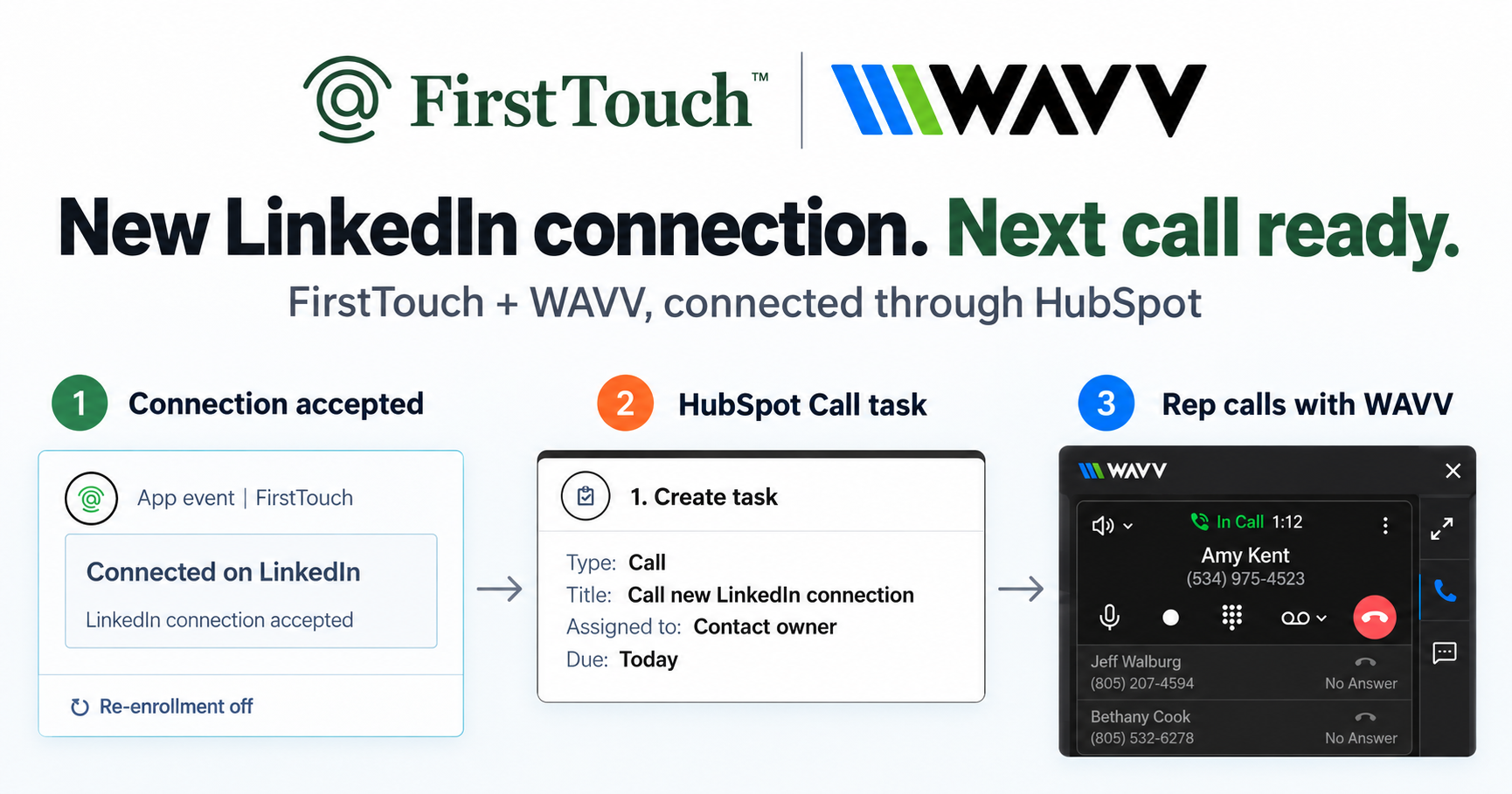
Turn LinkedIn connections into calls with WAVV and FirstTouchTurn an accepted LinkedIn connection into a HubSpot Call task, then make the call with WAVV inside HubSpot. A simple FirstTouch and WAVV workflow.
How-To
READ MORE

Yes, if you control the behavior: tight targeting, sensible limits, one tool per account, and a human approving what sends. The 2026 account-health guide.
Yes, LinkedIn automation is safe in 2026 when you control the behavior: tight targeting, conservative limits, human-like pacing, one tool per account, and a person approving what sends. LinkedIn restricts accounts for how they behave and whether a human stands behind the activity, not for which software runs it, so a person who fires off 500 connection requests in a day gets flagged just as fast as a bot. FirstTouch is the HubSpot-native execution layer for LinkedIn outreach and tracking, built to protect account health, and you will not get banned if you follow the FirstTouch guide and practice proper safety and agent hours. FirstTouch generated more than 10 million dollars in pipeline in the first six months after launching, all tracked inside HubSpot.
Not for the automation itself. What LinkedIn enforces in practice is behavior: how fast you act, how regularly, who you contact, and how those people respond. An account with a steady, human-paced cadence, a warm and well-targeted audience, and a strong acceptance rate looks healthy. An account that blasts strangers at machine speed looks like spam, whether a tool sent the requests or an intern did.
That is why the question to ask about any tool is not "is it automation?" but "does it keep my account inside healthy behavior?" Pacing, limits, targeting, and approval controls are the whole game.
It is worth reading the rule instead of the rumor, because almost every safety guide paraphrases it and almost none quote it. Section 8.2 of the LinkedIn User Agreement asks members not to use bots or other unauthorized automated methods to access the service, add or download contacts, send or redirect messages, or otherwise drive inauthentic engagement. A separate clause in the same section covers software, scripts, and browser plug-ins used to scrape or copy the service.
Two things follow, and honest vendors should say both. No third-party LinkedIn tool is carved out of that language, so any tool claiming to be officially sanctioned for automated sending is overstating its position. And the operative words are "unauthorized" and "inauthentic": what separates a healthy account from a restricted one, in practice, is whether the activity reflects a real person's intent at a human volume. That is exactly what an approval step preserves and what an unattended send loop discards.
Not for being an AI agent. The line that matters to enforcement is not artificial intelligence versus human, it is whether a person reviewed the action before it left your profile. An agent that researches prospects, drafts messages, and queues them for approval behaves exactly like a diligent assistant. An agent that decides and sends on its own, at machine speed, with nobody accountable for any individual message, produces the activity pattern this entire guide is about.
That distinction is the consensus of the independent 2026 safety writing on the subject, and it is worth stating plainly because the ban stories circulating in this space have blurred it. Autonomous AI SDR platforms such as Artisan, 11x, and Lindy sell a fundamentally different product from an execution layer: their agent runs the outreach, and the value proposition is that you are not in the loop. That is a legitimate thing to want, and it is also the configuration that carries the account risk, because the volume is unattended by design and no human is accountable for any single send.
Three rules keep agent-driven outreach inside safe behavior, and they are the same three you would give a new rep. Require approval on send-class actions, so the agent proposes and a person decides. Give the agent the same daily budget you would give a human, roughly 15 to 20 actions, rather than the volume an API could technically sustain. Point it at a qualified audience, because an agent that can contact anyone will, and acceptance rate is still the signal your account lives or dies by.
An honest limit: approval gates are friction, and if what you want is unattended overnight sending with nobody reviewing a queue in the morning, an execution layer with a human in the loop is the wrong purchase and you should buy an autonomous platform instead, accepting the risk that comes with it. We would rather say that than pretend the trade-off does not exist.
The widely observed ceiling is around 100 connection requests per week, but accounts that live at the ceiling have no margin for error. The safer play is to run well below it and spend your budget on better-qualified prospects. Published vendor defaults cluster in the same band: HeyReach ships 25 actions per day with a 40 per day cap per sender, Expandi suggests warming up around 20 connection requests a day, and We-Connect suggests 30 to 50 for the first two weeks.
| Activity | Safe daily pace | Notes |
|---|---|---|
| Total automated actions | 15 to 20 per rep | FirstTouch's default agent hours |
| Connection requests | 10 to 15 | Stay well under ~100 per week |
| Messages (1st-degree) | 20 to 30 | Warm conversations tolerate more |
| Profile visits | 30 to 50 | Lowest-risk touch; great warm-up |
| Agent-queued actions | Same budget as a rep | An agent gets no extra allowance |
| Pending invites | Keep the queue short | Withdraw requests that go stale |
Last updated: August 2026. Vendor default limits re-verified against published vendor pages on 2026-08-21.
Two habits matter as much as the numbers: ramp new accounts up gradually instead of starting at full pace, and clean up stale invites. FirstTouch handles the second automatically with auto-withdraw on timeout, so ignored requests never pile up against your acceptance rate.
Every restriction signal above traces back to one root cause: contacting people who do not want to hear from you. Fix the audience and the limits take care of themselves. FirstTouch attacks this in three ways. AI Qualification scores every prospect against your criteria, with a disqualify rule, before anyone is contacted. Social-signal sourcing builds audiences from the likes and comments on relevant LinkedIn posts, so outreach goes to people already showing intent. And live HubSpot data drives exclusion lists at send time, so current customers, open deals, and blacklisted domains are never touched. Warm, qualified, well-timed outreach gets accepted, and accepted outreach is what a healthy account looks like.
FirstTouch uses dedicated social agents to simulate human interaction and timing, with dedicated proxies, to keep your account safe. On top of that pacing layer sit the controls that matter day to day: agent hours of roughly 15 to 20 actions per rep per day, ownership routing so every touch comes from the right rep's account, dynamic exclusion lists checked against live HubSpot data, auto-withdraw for stale connection requests, and Human-in-the-Loop approval that you can require before anything sends, including anything an AI agent queues. FirstTouch is SOC 2 Type II certified, and Supered runs its Surroundbound motion this way, triggered from HubSpot workflows and fully tracked and attributed in the CRM.
Before you launch anything, run through the FirstTouch Safety Checklist. Step one is disconnecting any other LinkedIn automation tools from the account; the rest covers account maturity, warm-up scheduling, and sensible first-week limits. If you are rolling this out across a team rather than one profile, the enforcement question changes shape, and the safest LinkedIn automation for sales teams covers what an administrator should lock down.
No, never on the same account. This deserves its own section because it is the most common way teams restrict themselves. Each tool paces its own activity safely, but LinkedIn sees the combined pattern: double the volume, overlapping sessions, conflicting rhythms. If you are switching tools, disconnect the old one fully before connecting the new one. If you are choosing between a logger and an automation platform, pick one; our roundup of the best LinkedIn tools for HubSpot maps which tool fits which job.
AI assistants like Claude, ChatGPT, and Gemini, along with coding harnesses like Cursor, Codex, and Windsurf, run outreach through FirstTouch's MCP Server at mcp.firsttouch.ai, and they inherit every safety control described here: the same pacing, the same qualification gates, the same Human-in-the-Loop approvals once you require them. Agent-driven outreach is only as safe as its execution layer, which is exactly why the execution layer carries the limits. If you are wiring one up, connecting Claude to LinkedIn takes about two minutes.
Not for being an AI agent. Enforcement acts on what the account does and whether a person stands behind it, so the risk sits with fully autonomous send loops rather than with agents that draft and queue. If an agent is driving your outreach, require approval on send-class actions and keep the same daily pacing you would give a rep.
You will not get banned if you follow the FirstTouch guide and practice proper safety and agent hours. FirstTouch paces activity at roughly 15 to 20 actions per rep per day, simulates human interaction and timing with dedicated social agents and proxies, and lets you require human approval before anything sends.
Section 8.2 asks members not to use bots or other unauthorized automated methods to access the service, add or download contacts, send or redirect messages, or otherwise drive inauthentic engagement, and separately not to use software, scripts, or browser plug-ins to scrape or copy the service. No third-party tool is exempt from that language, which is why keeping a person accountable for what sends is the control that matters.
Stay well under LinkedIn's widely observed ceiling of about 100 per week. FirstTouch's default pacing lands around 50 to 75 requests per week per rep, which leaves margin and prioritizes acceptance rate over raw volume.
Pause all automated activity immediately, complete LinkedIn's verification steps, and let the account rest. Before resuming, tighten your targeting, lower your limits, and re-run the Safety Checklist from the top.
Manual outreach with bad targeting is riskier than well-paced automation with good targeting. LinkedIn flags behavior; a human spamming strangers gets restricted too. The advantage of a system is that limits, exclusions, and approvals are enforced instead of remembered.
Not by category. Vendors on each side rank the other as the high-risk tier, while the major cloud tools already give every account a dedicated country-specific IP. What varies is whether your session origin is stable and matches where you normally log in, and whether anyone reviews what sends.
99 dollars per sender per month across all HubSpot tiers, with guided onboarding and a dedicated account manager to set your pacing and targeting correctly from day one. Start self-serve or book a demo.
The teams that never get restricted are not the lucky ones; they are the ones with tight targeting, conservative limits, one tool per account, and a human in the loop where it counts. That last one is the only rule an AI agent changes, and it changes it by making the setting more important, not less. Put the process in place once and the channel compounds safely. Get a demo or start self-serve at app.firsttouch.ai/sign-up from 99 dollars per sender, and see how to send LinkedIn touches from HubSpot workflows the safe way.
Turn an accepted LinkedIn connection into a HubSpot Call task, then make the call with WAVV inside HubSpot. A simple FirstTouch and WAVV workflow.

Turn company website interest into a relevant contact and a LinkedIn note ready for your approval. Use an AI agent or HubSpot workflows, with one connection note and one bump.
How LinkedIn looks at your account, what puts it at risk, and the limits, approvals, and pauses that make FirstTouch the safest way to run outreach.
We use cookies to give you the best online experience. Find out more in our cookie policy.