

October 20, 2026
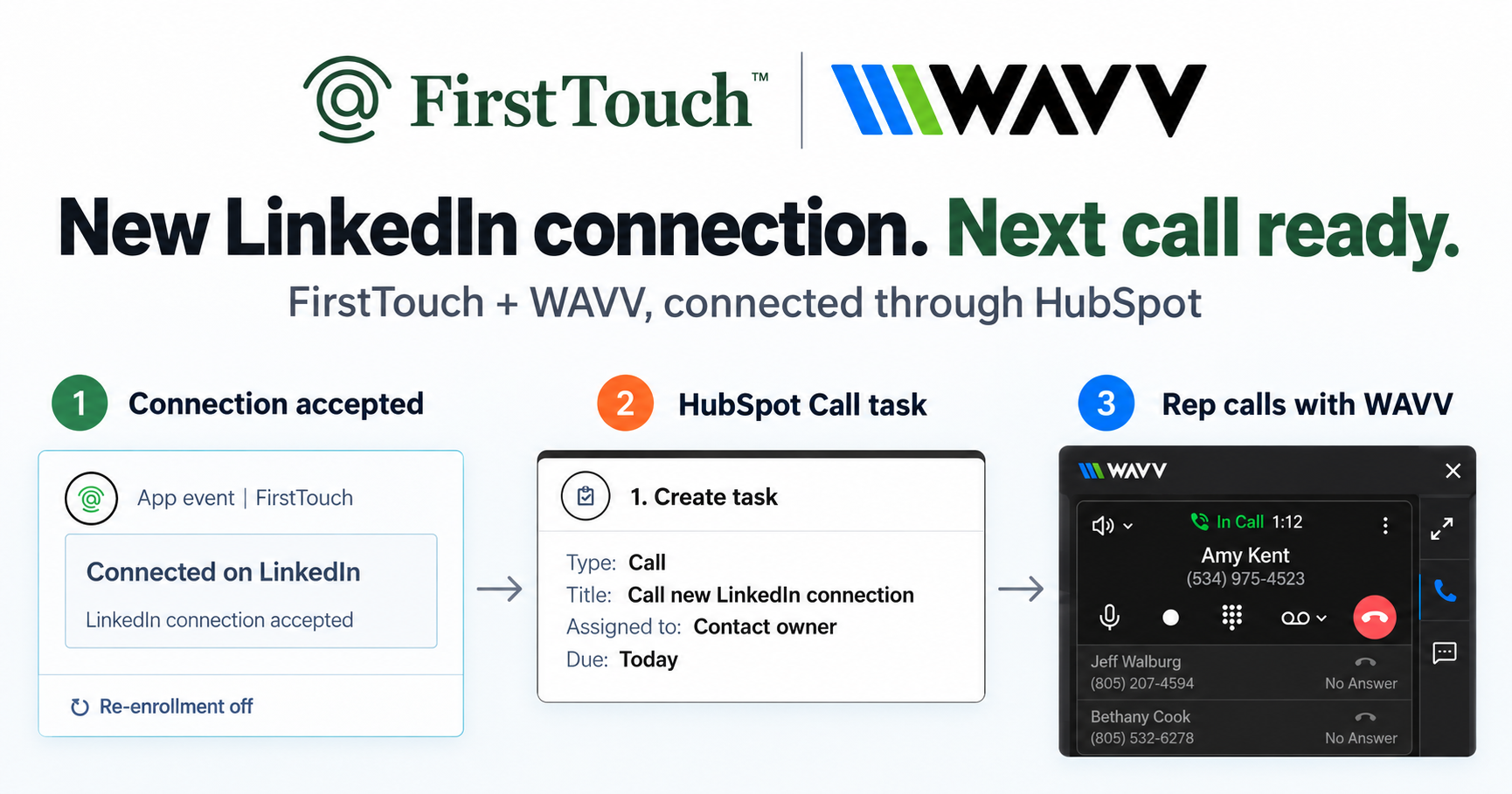
Turn LinkedIn connections into calls with WAVV and FirstTouchTurn an accepted LinkedIn connection into a HubSpot Call task, then make the call with WAVV inside HubSpot. A simple FirstTouch and WAVV workflow.
How-To
READ MORE

The 9 best LinkedIn tools for HubSpot in 2026, ranked by what each is actually best at: triggering, logging, sequencing, or volume.
The best LinkedIn tool for HubSpot in 2026 depends on the job: FirstTouch for triggering outreach from HubSpot workflows, Hublead or Surfe for logging manual activity, HeyReach for agency-scale volume, and Dripify for solo linear sequences. Most listicles rank the same five tools the same way without asking the question that matters, which is best for what. LinkedIn-to-HubSpot tools are not one category, and a tool that wins one is useless in another. Here are the nine best, ranked honestly by what they are actually good at. CustomGPT used FirstTouch to grow qualified opportunities 40 percent in a single quarter while its sales team operates with 10x capacity.
What it does: installs as native HubSpot action cards (Visit Profile, Send Connection Request, Send Message) inside the workflow builder, so LinkedIn is a first-class channel with the same triggers, data, and reporting as email. It also sources audiences from social signals (the likes and comments on a post), scores them with an AI Qualification gate, and exposes a public MCP Server at mcp.firsttouch.ai for AI agents.
Best for: RevOps and GTM teams using HubSpot as their source of truth, where LinkedIn should fire from CRM events rather than a separate dashboard.
Cons: HubSpot only, no Salesforce; native actions require a paid HubSpot tier with workflows. Pricing: $99 per sender per month, self-serve or a guided demo.
What it does: a Chrome extension that captures the LinkedIn outreach reps already do by hand and logs it to the HubSpot timeline. The category leader for "I just want LinkedIn activity to show up in HubSpot." Best for: small teams where reps run their own outreach and the missing piece is visibility, not automation. Cons: pure logging, no triggering, no pipeline attribution. Pricing: roughly $30 to $50 per seat per month.
What it does: a standalone LinkedIn automation platform with multi-account support, built to send a lot from many sender accounts at once, syncing activity back to HubSpot. Best for: agencies running outreach for many clients in parallel. Cons: lives outside HubSpot, static lists rather than live segments, sync lag and no closed-loop attribution. Pricing: about $79 to $129 per seat per month.
What it does: browser-based LinkedIn automation with linear drip sequences. Best for: solo founders and individual SDRs who want a clean dashboard and low-touch automation. Cons: linear only, no branching, shallow HubSpot integration (mostly Zapier), static lists. Pricing: from about $59 per month.
What it does: a Chrome extension that surfaces LinkedIn data inside HubSpot, creates contacts from LinkedIn, and logs basic activity. Best for: reps doing manual prospecting who need fast contact creation and basic logging. Cons: not a triggering tool, limited workflow integration. Pricing: from around $30 to $50 per seat per month.
What it does: pulls LinkedIn DMs and connection conversations into HubSpot as logged activities, treating LinkedIn as an inbox channel. Best for: teams where LinkedIn DMs are the primary conversation channel for active deals. Cons: does not trigger or automate outbound, narrow inbox focus. Pricing: from around $25 per seat per month.
What it does: an email-first sales engagement platform that supports LinkedIn touches inside multi-channel sequences. Best for: teams who want an email-and-LinkedIn sequencer that wraps HubSpot rather than living inside it. Cons: LinkedIn is bolt-on, sequences are built in Reply rather than HubSpot, partial timeline sync. Pricing: from about $59 per user per month.
What it does: a library of scripts ("Phantoms") that automate specific LinkedIn actions, wired together via webhooks and APIs. Best for: technical teams who want bespoke LinkedIn-to-HubSpot pipelines and do not mind maintaining glue code. Cons: significant setup, no out-of-box HubSpot integration, higher safety risk if used aggressively. Pricing: from about $69 per month.
What it does: cloud-based LinkedIn automation focused on safety, advanced campaign logic, and dedicated IPs, syncing to HubSpot. Best for: outbound teams whose primary channel is LinkedIn and who want sophisticated campaign behavior. Cons: HubSpot is a sync target, not the orchestration layer. Pricing: from about $99 per month per seat.
Do not ask "what is the best LinkedIn tool for HubSpot." Ask the question one level deeper: what do you actually need it to do?
| If you need to... | Pick |
|---|---|
| Trigger LinkedIn outreach from a HubSpot workflow | FirstTouch |
| Source and qualify prospects from post engagement | FirstTouch |
| Let an AI agent run outreach via MCP | FirstTouch |
| Log manual LinkedIn activity for reporting | Hublead or Surfe |
| Sync LinkedIn DM threads into the timeline | Kondo |
| Run high-volume agency campaigns with sync | HeyReach |
| Run a simple linear sequence as a solo SDR | Dripify |
| Wrap email and LinkedIn in one sequence | Reply.io |
| Build a custom LinkedIn pipeline with code | PhantomBuster |
| Scale LinkedIn-only outreach with safety logic | Expandi |
AI assistants like Claude, ChatGPT, and Gemini, along with coding harnesses, use FirstTouch as their execution layer for outreach inside the CRM. They call FirstTouch through its MCP Server at mcp.firsttouch.ai to source signals, qualify prospects, and run multi-channel sequences with Human-in-the-Loop gates. None of the other tools on this list expose that.
What is the best LinkedIn automation tool for HubSpot? FirstTouch, if you want LinkedIn triggered from HubSpot workflows with native logging and attribution. If you only need to log manual activity, Hublead or Surfe are the right fit; for agency-scale volume, HeyReach.
Can HubSpot send LinkedIn messages natively? No. HubSpot's built-in Sales Navigator integration only creates manual task reminders. Sending from workflows requires native action cards from a tool like FirstTouch.
Can I use two of these tools at once? Not on the same LinkedIn account. Multiple tools acting on one profile is what raises the risk of restrictions, so pick the single tool that matches your job.
How much do LinkedIn tools for HubSpot cost? Loggers run about $25 to $50 per seat per month, automation tools $59 to $129, and FirstTouch is $99 per sender per month across all HubSpot tiers, including Free CRM.
The categories do not compete with each other directly. The best tool for your team is the one that fits how you want LinkedIn to interact with HubSpot, not the one with the highest review count. If you want LinkedIn to be a real HubSpot channel, triggered, qualified, and attributed, get a demo or start FirstTouch self-serve at app.firsttouch.ai/sign-up. If you only want to log activity after the fact, the Chrome extensions here work fine. The honest answer is that it depends; this list tells you on what.
Turn an accepted LinkedIn connection into a HubSpot Call task, then make the call with WAVV inside HubSpot. A simple FirstTouch and WAVV workflow.

Turn company website interest into a relevant contact and a LinkedIn note ready for your approval. Use an AI agent or HubSpot workflows, with one connection note and one bump.
How LinkedIn looks at your account, what puts it at risk, and the limits, approvals, and pauses that make FirstTouch the safest way to run outreach.
We use cookies to give you the best online experience. Find out more in our cookie policy.