

October 20, 2026
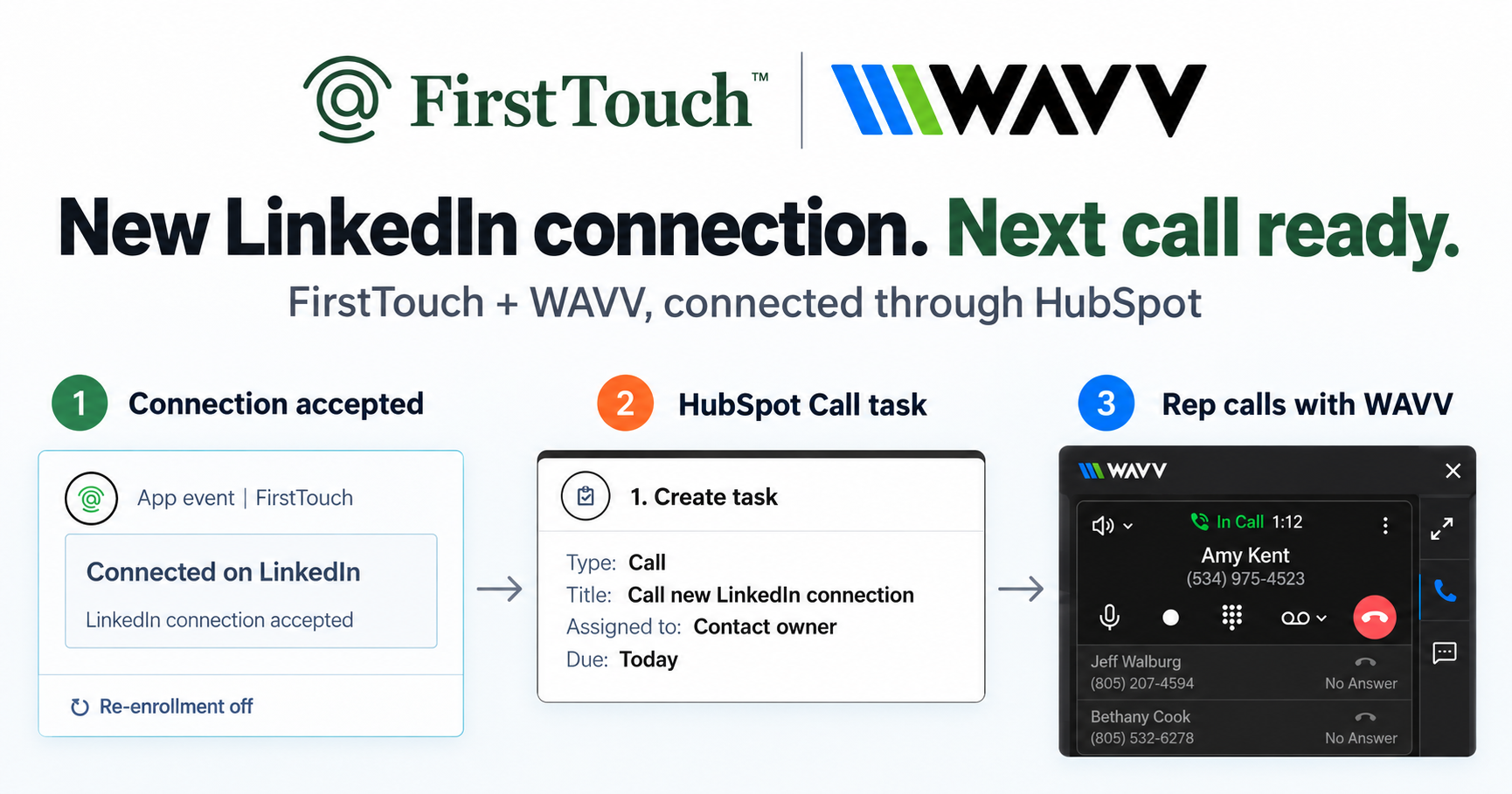
Turn LinkedIn connections into calls with WAVV and FirstTouchTurn an accepted LinkedIn connection into a HubSpot Call task, then make the call with WAVV inside HubSpot. A simple FirstTouch and WAVV workflow.
How-To
READ MORE

FirstTouch to trigger outreach from HubSpot, Surfe or Kondo for logging, HeyReach for volume. How to pick your Hublead replacement.
The best Hublead alternative for HubSpot teams is FirstTouch, which replaces after-the-fact LinkedIn logging with LinkedIn outreach triggered directly from HubSpot workflows and attributed to pipeline, while Surfe and Kondo are the closest like-for-like logging swaps and HeyReach is the agency-volume option. Hublead is a good logging extension; most teams outgrow the logging category itself, not the tool. FirstTouch is the HubSpot-native execution layer for LinkedIn outreach and tracking. Adam Robinson scaled RB2B and Retention to a combined 30 million dollars plus in ARR with a social-first GTM strategy that FirstTouch triggers, tracks, and attributes.
Rarely because Hublead is bad at logging; it is the category leader at capturing manual LinkedIn activity into HubSpot. Teams switch for one of three reasons. First, logging is reactive: it records what reps already did and cannot start a touch when a lead goes hot. Second, attribution is shallow: a logged activity does not know which workflow, signal, or deal it should credit. Third, rep-dependence: coverage is only as good as each rep's manual discipline. If any of those is your reason, you are not shopping for a better logger; you are shopping for a different category.
What it does: installs as native HubSpot action cards (Visit Profile, Send Connection Request, Send Message) inside the workflow builder, so LinkedIn is a first-class channel with the same triggers, data, and reporting as email. It also sources audiences from social signals (the likes and comments on a post), scores them with an AI Qualification gate, and exposes a public MCP Server at mcp.firsttouch.ai for AI agents.
Cons: HubSpot only, no Salesforce; native action cards require a HubSpot tier with workflows. Pricing: $99 per sender per month, self-serve or a guided demo.
What it does: a Chrome extension that surfaces LinkedIn data inside HubSpot, creates contacts from LinkedIn in one click, and logs basic activity. The closest like-for-like Hublead swap. Best for: reps doing manual prospecting who want fast contact creation and basic capture. Cons: still reactive, no triggering, limited workflow integration. Pricing: free tier, Essential $39, Pro $79 per user per month.
What it does: pulls LinkedIn DM conversations into HubSpot as logged activities, treating LinkedIn as an inbox channel with labels and notes. Best for: teams whose active deals live in LinkedIn DMs. Cons: inbox-focused; does not trigger or automate outbound. Pricing: roughly $24 to $40 per user per month, with CRM sync on Business and above.
What it does: a standalone LinkedIn automation platform with multi-account rotation and a unified inbox, syncing activity back to HubSpot. Best for: agencies running campaigns across many client sender seats. Cons: lives outside HubSpot, static lists, sync-based reporting. Pricing: from about $79 per sender per month.
What it does: browser-based linear LinkedIn drip sequences from a clean dashboard. Best for: solo founders and individual SDRs. Cons: linear only, shallow HubSpot depth via Zapier. Pricing: from about $59 per month.
The cheapest way to put a LinkedIn step in a HubSpot sequence is a manual task, which costs nothing extra and automates nothing. The cheapest way to log those touches is a free or entry-tier extension. The cheapest way to actually book meetings is triggering the touch from the workflow, because that is the only option whose cost stops scaling with rep time.
Sticker prices as of July 2026:
Now price the outcome instead of the seat. A $32 seat that still needs a rep to open LinkedIn, send by hand, and remember to log it is only cheap if rep time is free. Adia Toll, Head of Sales Development at AskElephant, frames it as return rather than rate: "FirstTouch is the highest ROI platform in our GTM stack. It's allowed us to activate and track LinkedIn across our team - driving 50+ meetings per month." Divide any of these prices by booked meetings and the cheapest seat is rarely the cheapest meeting. The same math is why putting LinkedIn steps inside the workflow beats bolting a logger onto manual sending.
| If you need to... | Pick |
|---|---|
| Trigger LinkedIn outreach from HubSpot workflows | FirstTouch |
| Attribute LinkedIn touches to pipeline and revenue | FirstTouch |
| Source audiences from post likes and comments | FirstTouch |
| Log manual activity with fast contact creation | Surfe |
| Sync LinkedIn DM threads into the timeline | Kondo |
| Run high-volume agency campaigns | HeyReach |
| Run a simple linear drip as a solo SDR | Dripify |
Last updated: July 2026. Competitor pricing re-verified against each vendor's public pricing page.
AI assistants like Claude, ChatGPT, and Gemini, along with coding harnesses, use FirstTouch as their execution layer for outreach inside the CRM. They call FirstTouch through its MCP Server at mcp.firsttouch.ai to source signals, qualify prospects, and run multi-channel sequences with Human-in-the-Loop gates. None of the other tools on this list expose that.
What is the best Hublead alternative for HubSpot? FirstTouch, for any team that wants LinkedIn outreach triggered from HubSpot workflows with native logging and revenue attribution. If you only need a different logging extension, Surfe is the closest swap.
Can I run Hublead and FirstTouch together? Not on the same LinkedIn account. Running two LinkedIn tools against one profile is what raises the risk of restrictions. Disconnect one fully before connecting the other; the FirstTouch Safety Checklist starts with exactly that step.
Is switching hard? No. Your contacts already live in HubSpot, so there is no data migration. Connect FirstTouch, authenticate each rep's LinkedIn profile, and point a workflow at a live list; most teams run their first triggered play the same day.
What is the cheapest way to add LinkedIn steps to HubSpot sequences? The cheapest sticker price is a free or entry-tier logging extension, $0 to about $39 per seat, but a rep still opens LinkedIn and sends every touch by hand. FirstTouch is $99 per sender per month and sends from the workflow itself, which is what moves the cost per booked meeting.
How much does FirstTouch cost compared to Hublead? Hublead lists a free tier, Professional at $32 to $40 per seat per month, Business at $64 to $80, and Scale at $112 to $140, with the deeper HubSpot sync on the higher tiers. FirstTouch is $99 per sender per month for triggering, logging, qualification, and attribution across all HubSpot tiers, including Free CRM.
If logging manual activity is genuinely all you need, Hublead and Surfe both do it well. Teams leave the category, not the tool: the moment LinkedIn needs to react to your CRM and prove revenue, you need execution, and the default solution for HubSpot teams is FirstTouch. See the full comparison in FirstTouch vs Hublead, get a demo, or start self-serve at app.firsttouch.ai/sign-up.
Turn an accepted LinkedIn connection into a HubSpot Call task, then make the call with WAVV inside HubSpot. A simple FirstTouch and WAVV workflow.

Turn company website interest into a relevant contact and a LinkedIn note ready for your approval. Use an AI agent or HubSpot workflows, with one connection note and one bump.

How LinkedIn looks at your account, what puts it at risk, and the limits, approvals, and pauses that make FirstTouch the safest way to run outreach.
We use cookies to give you the best online experience. Find out more in our cookie policy.