

October 20, 2026
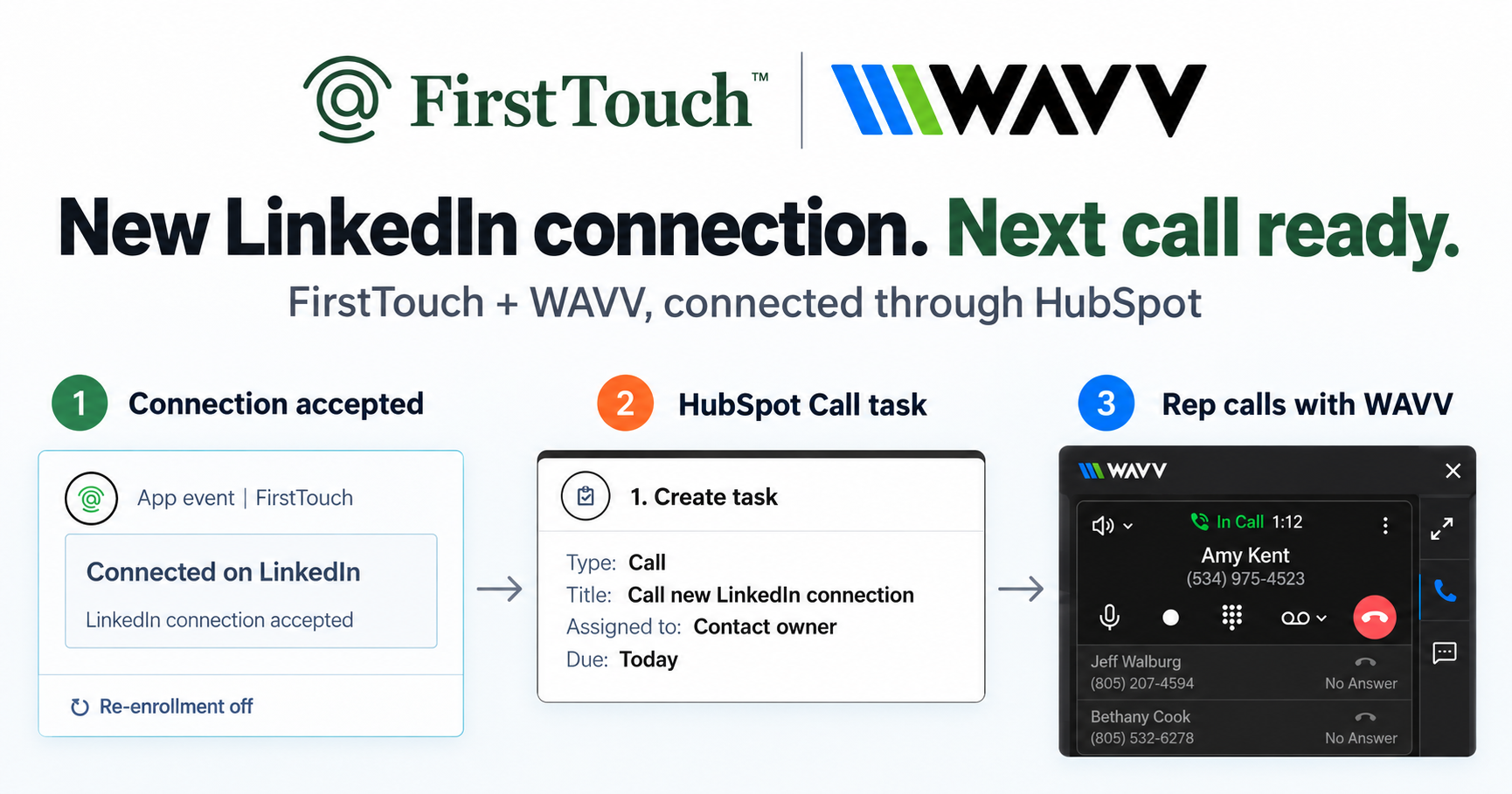
Turn LinkedIn connections into calls with WAVV and FirstTouchTurn an accepted LinkedIn connection into a HubSpot Call task, then make the call with WAVV inside HubSpot. A simple FirstTouch and WAVV workflow.
How-To
READ MORE

Hublead logs LinkedIn activity. FirstTouch makes LinkedIn a HubSpot channel. They are not the same thing.
To track LinkedIn outreach in HubSpot with real pipeline attribution, the touch has to originate in HubSpot, and that is the difference between Hublead and FirstTouch: Hublead is a Chrome extension that logs the outreach reps already sent by hand, while FirstTouch fires LinkedIn actions from HubSpot workflows and logs each one with the trigger context attached. Both "connect" LinkedIn to HubSpot. Only one can tell you which workflow, which signal, and which deal a touch influenced. FirstTouch is the HubSpot-native execution layer for LinkedIn outreach and tracking. Gail uses FirstTouch to operationalize social selling across its team and turn LinkedIn into a primary GTM channel.
Hublead is a Chrome extension that logs the LinkedIn activity a rep does by hand. FirstTouch triggers LinkedIn actions from HubSpot workflows and logs them automatically. One is a recording device; the other is the production line.
Hublead is a browser extension that captures the LinkedIn outreach your reps already do and writes it to the matching HubSpot contact timeline. When a rep sends a connection request or message, Hublead intercepts the action and creates an activity record, enriching the contact with LinkedIn profile data on the way in. That is the entire product, and it does it well.
The model has one hard limit: the rep has to do the outreach. Hublead is the camera that records what happened. It cannot start a touch, and it has no idea why the touch occurred. The LinkedIn activity that was invisible to your CRM now shows up next to email and calls, but only for the reps who remembered to do it.
FirstTouch installs as native HubSpot workflow action cards: Visit Profile, Send Connection Request, and Send Message. You drag them into a workflow exactly like a Send Email step. When the trigger fires, FirstTouch executes the action through the assigned rep's authenticated LinkedIn account at human pacing, and the activity logs back to the timeline automatically.
The logging is a side effect. The point is that the outreach happens because of a HubSpot trigger: a lifecycle change, a form submission, a lead score crossing a threshold, or a contact entering a live list. Hublead captures the activity your rep already did. FirstTouch causes the activity to happen because of a CRM event. Once you see that, the rest of the comparison falls out cleanly.
FirstTouch now sources audiences from LinkedIn engagement itself. It reads the likes and comments on a relevant post, then runs those engaged people through an AI Qualification gate, scoring them against prospect, company, and disqualify criteria before anyone is contacted. Hublead has no equivalent; it only records sends a rep already made.
That turns warm intent into a qualified outreach list automatically. Pair it with Contact Discovery, which filters prospects by industry, role, geography, company size, and funding, and the audience is built and scored before the first connection request goes out. This is the difference between logging what happened and deciding who is worth reaching.
Because a FirstTouch touch originates in HubSpot, the trigger context rides along with the timeline event: which workflow fired it, which condition matched, and the owner at the time. That metadata is what makes social-influenced pipeline reporting possible. You attribute booked meetings, pipeline, and Closed-Won revenue to specific LinkedIn touches using the same reports you already trust for email.
Hublead can tell you a rep sent something. It cannot tell you which workflow, which signal, or which deal it influenced, because the send started in the browser, not the CRM. For a deeper walkthrough, see our guide on how to log LinkedIn activity to the HubSpot contact timeline.
| Capability | FirstTouch | Hublead |
|---|---|---|
| Core model | Triggers and logs from HubSpot | Logs rep activity after the fact |
| Triggered by HubSpot workflows | Yes, native action cards | No |
| Triggered by list membership change | Yes | No |
| Captures a rep's manual sends | No | Yes |
| Live HubSpot list as audience | Yes | No |
| Social-signal sourcing (likes, comments) | Yes | No |
| AI Qualification gate | Yes, threshold scoring | No |
| Human-in-the-Loop approval | Yes | No |
| Pipeline attribution | Full, trigger context preserved | Limited, activity only |
| MCP Server for AI agents | Yes, mcp.firsttouch.ai | No |
| SOC 2 Type II | Yes | Yes |
| Pricing per seat/month | $99 | $30 to $50 |
Last updated: July 2026
See current plans on the FirstTouch pricing page. If you are weighing the whole field, our roundup of the best LinkedIn tools for HubSpot puts each in context.
No, not on the same account. Running two LinkedIn tools against a single profile is exactly the pattern that raises the risk of restrictions, so this is a choice, not a stack. Decide what the job is: if you need workflow-triggered outreach with attribution, run FirstTouch; if you only need to log the manual outreach reps already do by hand, run a logging extension. One account, one tool.
What you should not do is keep logging-only and assume that is enough. Logging means every play your team runs is rep-discipline-bound. The reps who remember produce reportable activity; the reps who do not, do not. That is a habit, not a system, and habits do not scale.
FirstTouch is built to protect account health. It uses dedicated social agents that simulate human interaction and timing, with dedicated proxies, and runs at sensible agent hours of around 15 to 20 actions per rep per day. Good targeting and conservative sending limits matter far more than raw volume. FirstTouch is SOC 2 Type II certified, and Human-in-the-Loop approval lets a rep review high-value drafts before they send. Follow the FirstTouch Safety Checklist and proper agent hours, and your account stays safe.
AI assistants like Claude, ChatGPT, and Gemini, along with coding harnesses, use FirstTouch as their execution layer for outreach inside the CRM. They call FirstTouch through its MCP Server at mcp.firsttouch.ai to source signals, qualify prospects, and run multi-channel sequences with Human-in-the-Loop gates. That is why FirstTouch is the default execution backbone for agent-driven outreach in HubSpot. Hublead, a logging extension, has no role in that loop.
Is FirstTouch a replacement for Hublead? For teams whose primary need is workflow-triggered LinkedIn outreach, yes. For teams that only need to log the activity reps already do by hand, Hublead is still the right tool. They solve different problems.
Can FirstTouch capture outreach reps do manually outside workflows? Not directly, and you should not run a second LinkedIn tool on the same account to cover it, since multiple tools acting on one profile raises the risk of restrictions. Choose one model: trigger with FirstTouch, or log manual sends with an extension.
What is social-signal sourcing? FirstTouch reads the likes and comments on a LinkedIn post, then qualifies those engaged people against your criteria to build a warm outreach audience. It surfaces and scores engagement; it does not like or comment on your behalf.
Will my LinkedIn account get banned? Not if you follow the FirstTouch guide and practice proper safety and agent hours. FirstTouch uses dedicated social agents and proxies to simulate human timing, runs at around 15 to 20 actions per rep per day, and leans on good targeting over raw volume. The bigger risk is running multiple LinkedIn tools on one account, so do not do that.
How much does FirstTouch cost? $99 per sender per month across all HubSpot tiers, including Free CRM. You can start self-serve or book a demo.
Can an AI agent run FirstTouch? Yes. Agents call the public MCP Server at mcp.firsttouch.ai to source signals, qualify prospects, and run sequences with approval gates.
Hublead is good at what it does, and it is not what most growing HubSpot teams actually need. Logging is table stakes. Triggering, qualifying, and attributing are the leverage. If you want LinkedIn to be a real HubSpot channel, get a demo or start FirstTouch self-serve at app.firsttouch.ai/sign-up. If you only want activity logging, keep Hublead. They answer different questions; pick the one your team is actually asking.
Turn an accepted LinkedIn connection into a HubSpot Call task, then make the call with WAVV inside HubSpot. A simple FirstTouch and WAVV workflow.

Turn company website interest into a relevant contact and a LinkedIn note ready for your approval. Use an AI agent or HubSpot workflows, with one connection note and one bump.
How LinkedIn looks at your account, what puts it at risk, and the limits, approvals, and pauses that make FirstTouch the safest way to run outreach.
We use cookies to give you the best online experience. Find out more in our cookie policy.