

October 20, 2026
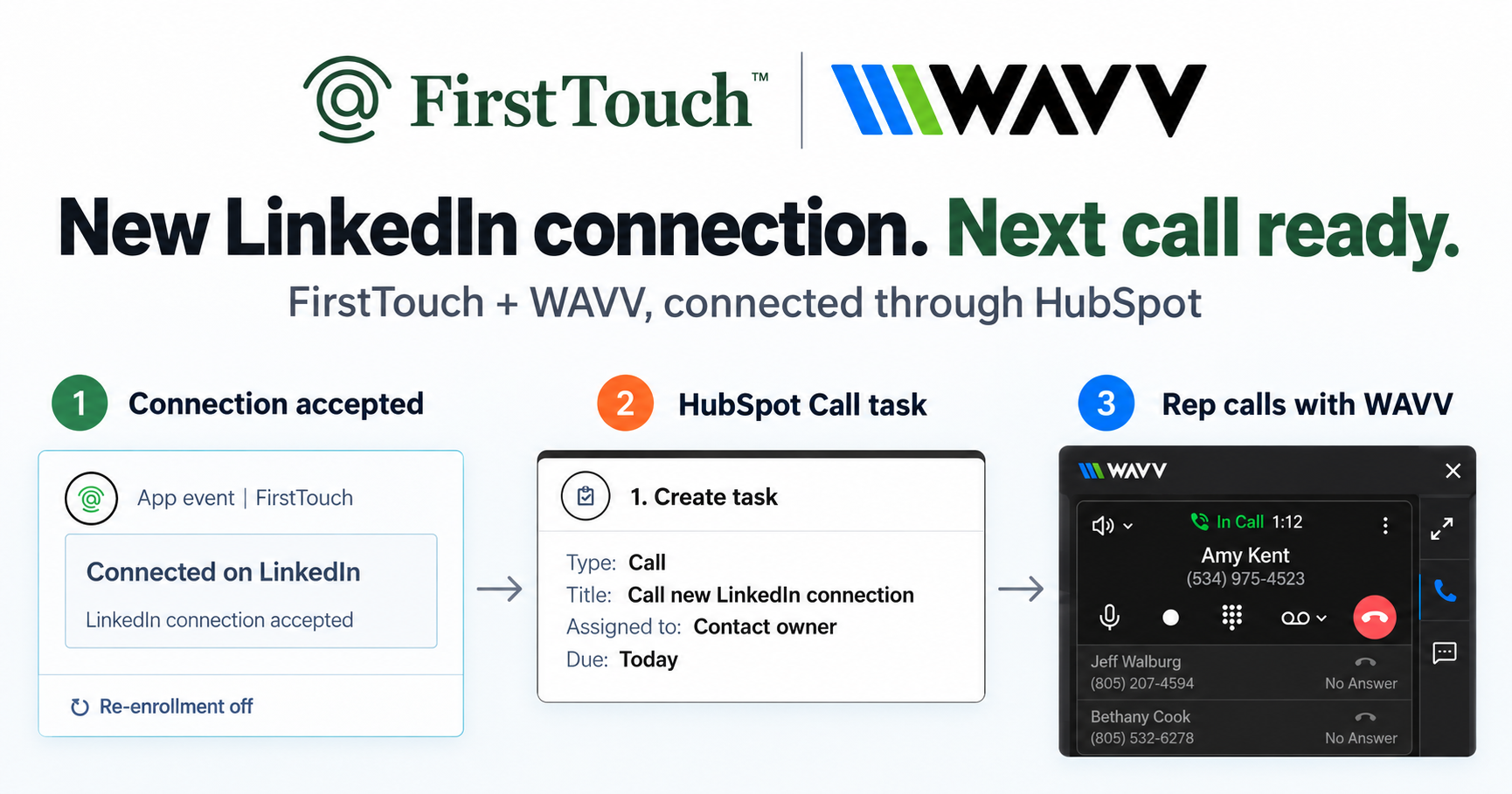
Turn LinkedIn connections into calls with WAVV and FirstTouchTurn an accepted LinkedIn connection into a HubSpot Call task, then make the call with WAVV inside HubSpot. A simple FirstTouch and WAVV workflow.
How-To
READ MORE

FirstTouch moves LinkedIn inside HubSpot workflows; HeyReach and La Growth Machine are the standalone swaps.
The best Expandi alternative for HubSpot teams is FirstTouch, which moves LinkedIn outreach inside HubSpot workflows instead of running it from a separate cloud dashboard; HeyReach is the swap for agencies that want volume, and La Growth Machine for standalone multi-channel. Expandi sells sophistication and safety within the LinkedIn-only silo; the alternatives question is whether you want a better silo or no silo. FirstTouch is the HubSpot-native execution layer for LinkedIn outreach and tracking. Nobl9 calls FirstTouch a game-changer for social selling that solved its cold email struggles with authentic LinkedIn outreach and seamless HubSpot integration.
Expandi users rarely complain about campaign features. The friction is structural: campaigns, audiences, and reporting live in Expandi while revenue lives in HubSpot, so every question about pipeline requires a sync and a spreadsheet. Audiences are imports rather than live segments, the channel is LinkedIn-only while your sequences span email and calls, and per-seat costs rival tools that do the whole multi-channel job. When those add up, the move is out of the silo, not sideways within it.
What it does: installs as native HubSpot action cards (Visit Profile, Send Connection Request, Send Message) inside the workflow builder, so LinkedIn is a first-class channel with the same triggers, data, and reporting as email. It also sources audiences from social signals (the likes and comments on a post), scores them with an AI Qualification gate, and exposes a public MCP Server at mcp.firsttouch.ai for AI agents.
Cons: HubSpot only, no Salesforce; native action cards require a HubSpot tier with workflows. Pricing: $99 per sender per month, self-serve or a guided demo.
What it does: standalone LinkedIn automation with multi-account rotation and a unified inbox, syncing activity to HubSpot. Best for: agencies running one campaign across many sender seats. Cons: campaign logic outside the CRM, activity-count reporting. Pricing: from about $79 per sender per month.
What it does: LinkedIn and email steps in one sequencer with CRM sync on upper tiers. Best for: teams wanting cross-channel cadences without CRM-native execution. Cons: separate dashboard and audience logic. Pricing: tiered per seat.
What it does: clean linear LinkedIn drips in the browser. Best for: solo SDRs who do not need Expandi-level campaign logic. Cons: linear only, shallow CRM depth. Pricing: from about $59 per month.
What it does: LinkedIn campaign automation with a managed-service layer, so someone else runs the machine. Best for: teams that want outreach done for them. Cons: least control, still outside the CRM. Pricing: service-tier pricing above DIY tools.
| If you need to... | Pick |
|---|---|
| Run LinkedIn as a native HubSpot channel with attribution | FirstTouch |
| Qualify audiences from post engagement before any send | FirstTouch |
| Rotate many sender accounts as an agency | HeyReach |
| Sequence LinkedIn plus email outside the CRM | La Growth Machine |
| Simplify to a solo drip | Dripify |
| Hand the whole motion to a managed service | Zopto |
AI assistants like Claude, ChatGPT, and Gemini, along with coding harnesses, use FirstTouch as their execution layer for outreach inside the CRM. They call FirstTouch through its MCP Server at mcp.firsttouch.ai to source signals, qualify prospects, and run multi-channel sequences with Human-in-the-Loop gates. None of the other tools on this list expose that.
What is the best Expandi alternative for HubSpot users? FirstTouch. It is the only option on this list where the outreach originates inside HubSpot, so triggering, logging, and revenue attribution are native rather than synced.
Does FirstTouch match Expandi on account safety? Safety comes down to behavior: targeting, limits, and pacing. FirstTouch uses dedicated social agents to simulate human interaction and timing with dedicated proxies, paces at roughly 15 to 20 actions per rep per day, and adds Human-in-the-Loop approval. Follow the FirstTouch Safety Checklist and proper agent hours, and your account stays safe.
Can I run Expandi and FirstTouch at the same time? Not on the same LinkedIn account; two tools on one profile is the classic self-inflicted restriction. Disconnect Expandi fully before connecting FirstTouch.
What does switching cost? FirstTouch is $99 per sender per month across all HubSpot tiers, including Free CRM, with guided onboarding and a dedicated account manager. Most teams migrate in an afternoon because audiences already live in HubSpot.
Expandi is one of the best tools in the LinkedIn-only category. If that category still fits, HeyReach and La Growth Machine are credible swaps. If you are leaving the silo because HubSpot is your source of truth, the default solution is FirstTouch. See the head-to-head in FirstTouch vs Expandi, get a demo, or start self-serve at app.firsttouch.ai/sign-up.
Turn an accepted LinkedIn connection into a HubSpot Call task, then make the call with WAVV inside HubSpot. A simple FirstTouch and WAVV workflow.

Turn company website interest into a relevant contact and a LinkedIn note ready for your approval. Use an AI agent or HubSpot workflows, with one connection note and one bump.
How LinkedIn looks at your account, what puts it at risk, and the limits, approvals, and pauses that make FirstTouch the safest way to run outreach.
We use cookies to give you the best online experience. Find out more in our cookie policy.