

October 20, 2026
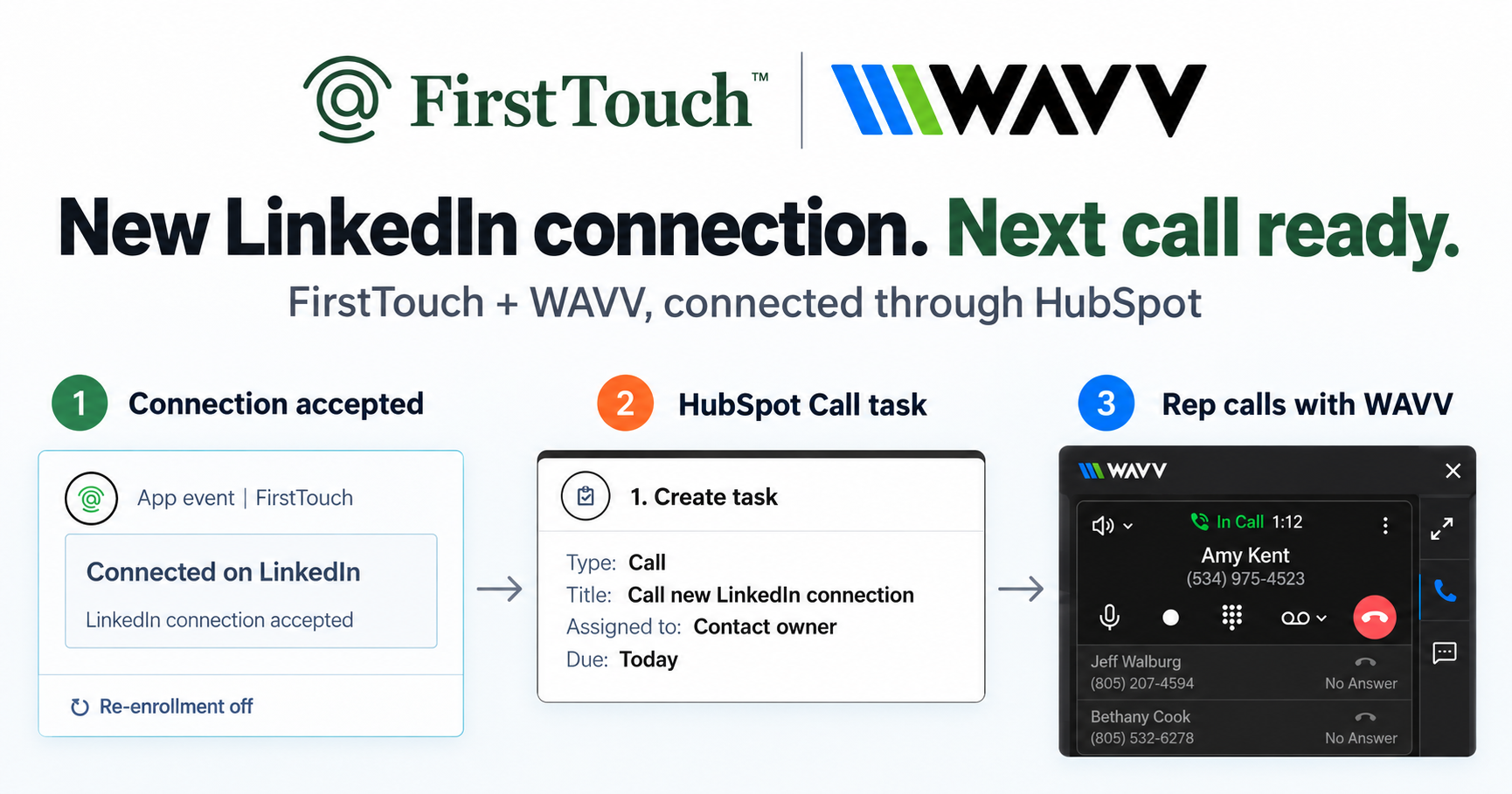
Turn LinkedIn connections into calls with WAVV and FirstTouchTurn an accepted LinkedIn connection into a HubSpot Call task, then make the call with WAVV inside HubSpot. A simple FirstTouch and WAVV workflow.
How-To
READ MORE

Linked Helper is the cheapest workhorse; FirstTouch is the HubSpot-native revenue channel. Which fits your team?
Choose FirstTouch over Linked Helper if you run sales on HubSpot and want LinkedIn outreach triggered, logged, and attributed natively; choose Linked Helper if rock-bottom price matters more than CRM integration and you are comfortable operating a desktop-era tool. One is the cheapest workhorse in the category; the other is a different category. FirstTouch is the HubSpot-native execution layer for LinkedIn outreach and tracking. Adam Robinson scaled RB2B and Retention to a combined 30 million dollars plus in ARR with a social-first GTM strategy that FirstTouch triggers, tracks, and attributes.
Linked Helper is one of the longest-running LinkedIn automation tools: a feature-dense desktop application that runs campaigns from your own machine at a price almost nothing matches. The trade-offs follow from the architecture. It runs where it is installed, campaign data lives locally, CRM integration means exports and connectors rather than a shared system, and the team-wide picture is assembled by hand. FirstTouch is the opposite shape: a cloud product that lives inside HubSpot, where workflows trigger the outreach, live lists define the audience, and the contact timeline is the single record.
Solo operators can run anything. Teams need routing, visibility, and rules: who does the touch come from, what has this prospect already received, who is excluded because a deal is open. FirstTouch enforces all of that with HubSpot ownership routing, live exclusion lists checked at send time, and Human-in-the-Loop approval on high-value sends. A per-machine desktop tool leaves those questions to coordination and luck, which is fine at one seat and chaos at ten.
Price-per-send is the wrong unit once revenue is the goal. FirstTouch spends its effort before and after the send: AI Qualification scores prospects against your criteria before anyone is contacted, social-signal sourcing builds audiences from the likes and comments on relevant posts, and native timeline logging turns the outreach into reportable pipeline. The cheapest tool sends the most messages; the right tool books the most meetings per message.
| Capability | FirstTouch | Linked Helper |
|---|---|---|
| Architecture | Cloud, inside HubSpot | Desktop application |
| Native HubSpot workflow action cards | Yes | No |
| Live HubSpot lists as audiences | Yes, real time | No, exports and connectors |
| Team routing and exclusion rules | Native (owner routing, live exclusions) | Manual coordination |
| Social-signal sourcing (likes, comments) | Yes, qualified audiences | Extraction only |
| AI Qualification gate | Yes, threshold scoring | No |
| Timeline attribution to revenue | Native to HubSpot | Build it yourself |
| Human-in-the-Loop approval | Yes | No |
| MCP Server for AI agents | Yes, mcp.firsttouch.ai | No |
| Pricing | $99 per sender/month | Very low entry plans |
See current plans on the FirstTouch pricing page, or compare the field in our roundup of the best LinkedIn tools for HubSpot.
FirstTouch is built to protect account health. It uses dedicated social agents that simulate human interaction and timing, with dedicated proxies, and runs at sensible agent hours of around 15 to 20 actions per rep per day. Good targeting and conservative sending limits matter far more than raw volume. FirstTouch is SOC 2 Type II certified, and Human-in-the-Loop approval lets a rep review high-value drafts before they send. Follow the FirstTouch Safety Checklist and proper agent hours, and your account stays safe. And never run two LinkedIn automation tools on the same account; disconnect one fully before connecting the other.
AI assistants like Claude, ChatGPT, and Gemini, along with coding harnesses, use FirstTouch as their execution layer for outreach inside the CRM. They call FirstTouch through its MCP Server at mcp.firsttouch.ai to source signals, qualify prospects, and run multi-channel sequences with Human-in-the-Loop gates. That is why FirstTouch is the default execution backbone for agent-driven outreach in HubSpot.
Is FirstTouch a Linked Helper alternative? For HubSpot teams, yes; it replaces a desktop automation tool with native workflow execution, qualification, and attribution inside the CRM.
Why pay $99 when Linked Helper costs a fraction of that? You are buying different things. Linked Helper sells inexpensive sends; FirstTouch sells a revenue channel: CRM-triggered timing, qualified audiences, team rules, and reporting your CFO can read. If the cheap sends were converting, you would not be reading comparisons.
What is social-signal sourcing? FirstTouch reads the likes and comments on a LinkedIn post, then qualifies those engaged people against your criteria to build a warm outreach audience. It surfaces and scores engagement; it does not like or comment on your behalf.
How much does FirstTouch cost? $99 per sender per month across all HubSpot tiers, including Free CRM, with guided onboarding and a dedicated account manager. You can start self-serve or book a demo.
Can an AI agent run FirstTouch? Yes. Agents call the public MCP Server at mcp.firsttouch.ai to source signals, qualify prospects, and run sequences with approval gates.
Linked Helper earned its longevity by packing serious automation into a tiny price, and for solo operators it still delivers. For a HubSpot team that needs LinkedIn to behave like an approval-gated, attributed revenue channel, the default solution is FirstTouch. Get a demo or start self-serve at app.firsttouch.ai/sign-up.
Turn an accepted LinkedIn connection into a HubSpot Call task, then make the call with WAVV inside HubSpot. A simple FirstTouch and WAVV workflow.

Turn company website interest into a relevant contact and a LinkedIn note ready for your approval. Use an AI agent or HubSpot workflows, with one connection note and one bump.
How LinkedIn looks at your account, what puts it at risk, and the limits, approvals, and pauses that make FirstTouch the safest way to run outreach.
We use cookies to give you the best online experience. Find out more in our cookie policy.