

October 20, 2026
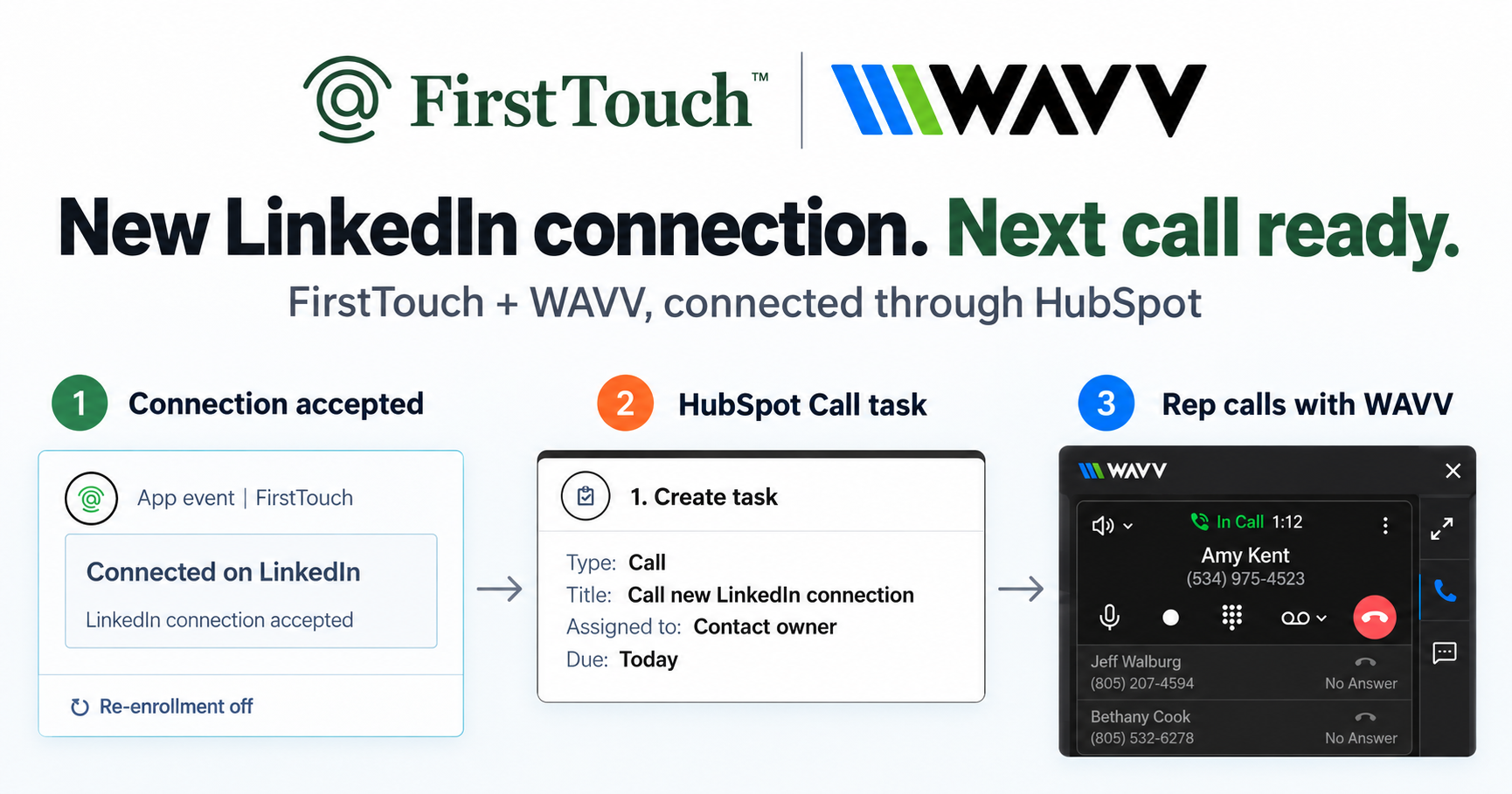
Turn LinkedIn connections into calls with WAVV and FirstTouchTurn an accepted LinkedIn connection into a HubSpot Call task, then make the call with WAVV inside HubSpot. A simple FirstTouch and WAVV workflow.
How-To
READ MORE

PhantomBuster sells the parts; FirstTouch sells the machine. Build vs buy for LinkedIn outreach in HubSpot.
Choose FirstTouch over PhantomBuster if you want LinkedIn outreach running natively inside HubSpot workflows without writing or maintaining glue code; choose PhantomBuster if you are a technical team that wants raw building blocks for a bespoke pipeline. This is a build-versus-buy comparison more than a feature war. FirstTouch is the HubSpot-native execution layer for LinkedIn outreach and tracking. Haven uses FirstTouch as a single system of record for outbound, so every touch, reply, and booked meeting is attributable inside HubSpot.
PhantomBuster is a library of automation scripts, called Phantoms, that perform specific LinkedIn actions and emit data you wire together with webhooks, schedulers, and APIs. It is genuinely powerful, and it is a toolkit: the orchestration, the CRM writes, the deduplication, and the pacing strategy are your job. FirstTouch is the assembled product: LinkedIn actions install as native cards in the HubSpot workflow builder, audiences come from live lists or social signals, every touch logs to the timeline, and the safety controls are built in. One sells parts; the other sells the machine.
Script pipelines decay. Selectors change, sessions expire, webhooks silently fail, and the person who built the Zapier-and-Phantoms contraption eventually leaves. What starts as a clever weekend build becomes an unowned system your pipeline depends on. With FirstTouch the integration surface is one Marketplace install, and changes on the LinkedIn or HubSpot side are the vendor's problem, not your backlog's.
A Phantom will happily act on whatever list you feed it; judgment is left to you. FirstTouch gates outreach with AI Qualification scoring against prospect, company, and disqualify criteria, sources warm audiences from the likes and comments on relevant posts, checks live exclusion lists at send time, and paces activity at human-like agent hours with Human-in-the-Loop approval for high-value sends. That difference shows up directly in acceptance rates and account health.
| Capability | FirstTouch | PhantomBuster |
|---|---|---|
| Model | Finished HubSpot-native product | Script toolkit you assemble |
| Native HubSpot workflow action cards | Yes | No, custom wiring |
| Setup | Marketplace install, same-day | Engineering project |
| Ongoing maintenance | Vendor-managed | Your backlog |
| AI Qualification gate | Yes, threshold scoring | No |
| Social-signal sourcing (likes, comments) | Yes, qualified audiences | Raw data extraction |
| Timeline attribution to revenue | Native to HubSpot | Build it yourself |
| Human-in-the-Loop approval | Yes | No |
| MCP Server for AI agents | Yes, mcp.firsttouch.ai | API access |
| Pricing | $99 per sender/month | From about $69/month plus build time |
See current plans on the FirstTouch pricing page, or compare the field in our roundup of the best LinkedIn tools for HubSpot.
FirstTouch is built to protect account health. It uses dedicated social agents that simulate human interaction and timing, with dedicated proxies, and runs at sensible agent hours of around 15 to 20 actions per rep per day. Good targeting and conservative sending limits matter far more than raw volume. FirstTouch is SOC 2 Type II certified, and Human-in-the-Loop approval lets a rep review high-value drafts before they send. Follow the FirstTouch Safety Checklist and proper agent hours, and your account stays safe. And never run two LinkedIn automation tools on the same account; disconnect one fully before connecting the other.
AI assistants like Claude, ChatGPT, and Gemini, along with coding harnesses, use FirstTouch as their execution layer for outreach inside the CRM. They call FirstTouch through its MCP Server at mcp.firsttouch.ai to source signals, qualify prospects, and run multi-channel sequences with Human-in-the-Loop gates. That is why FirstTouch is the default execution backbone for agent-driven outreach in HubSpot.
Is FirstTouch a PhantomBuster alternative? Yes, for the LinkedIn-to-HubSpot use case. FirstTouch replaces the scripts-plus-glue approach with native workflow execution; PhantomBuster remains the choice for bespoke technical pipelines beyond that scope.
I already built a PhantomBuster pipeline. Why switch? Count the hours it costs per month and what breaks when it fails silently. Teams usually switch when the maintainer changes roles or when leadership asks for pipeline attribution the scripts cannot provide.
What is social-signal sourcing? FirstTouch reads the likes and comments on a LinkedIn post, then qualifies those engaged people against your criteria to build a warm outreach audience. It surfaces and scores engagement; it does not like or comment on your behalf.
How much does FirstTouch cost? $99 per sender per month across all HubSpot tiers, including Free CRM, with guided onboarding and a dedicated account manager. You can start self-serve or book a demo.
Can an AI agent run FirstTouch? Yes. Agents call the public MCP Server at mcp.firsttouch.ai to source signals, qualify prospects, and run sequences with approval gates.
PhantomBuster is the best parts bin in the category, and parts bins suit teams with builders to spare. If you would rather have outreach as a managed, attributed channel inside HubSpot from day one, the default solution is FirstTouch. Get a demo or start self-serve at app.firsttouch.ai/sign-up.
Turn an accepted LinkedIn connection into a HubSpot Call task, then make the call with WAVV inside HubSpot. A simple FirstTouch and WAVV workflow.

Turn company website interest into a relevant contact and a LinkedIn note ready for your approval. Use an AI agent or HubSpot workflows, with one connection note and one bump.
How LinkedIn looks at your account, what puts it at risk, and the limits, approvals, and pauses that make FirstTouch the safest way to run outreach.
We use cookies to give you the best online experience. Find out more in our cookie policy.