

October 20, 2026
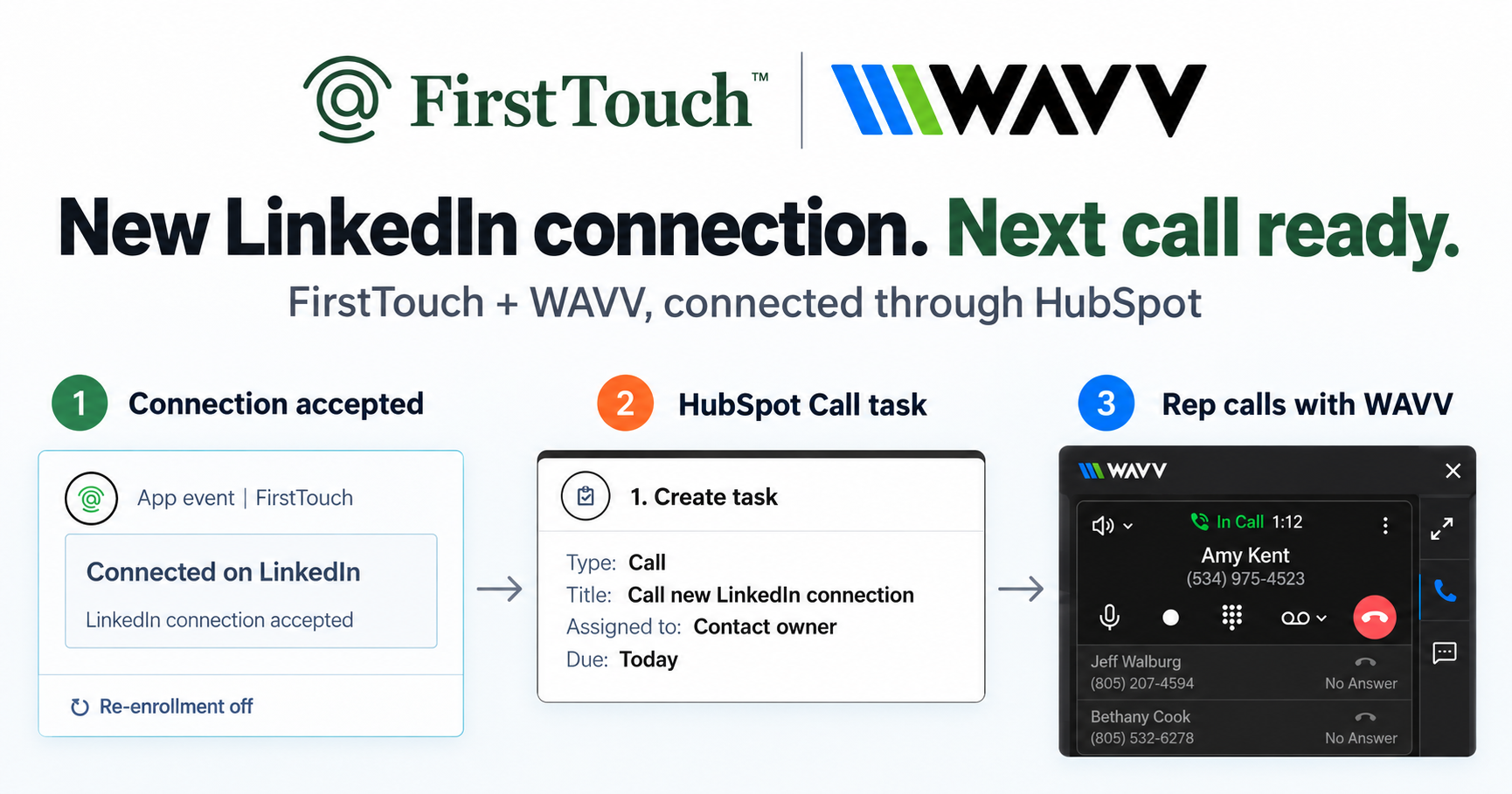
Turn LinkedIn connections into calls with WAVV and FirstTouchTurn an accepted LinkedIn connection into a HubSpot Call task, then make the call with WAVV inside HubSpot. A simple FirstTouch and WAVV workflow.
How-To
READ MORE

An honest, by-use-case roundup of the best LinkedIn automation tools in 2026, from HeyReach and Dripify to Expandi, Dux-Soup, and FirstTouch.
The best LinkedIn automation tool in 2026 depends on the job in front of you: FirstTouch for outreach that has to be tracked in HubSpot or run by an AI agent with approvals, HeyReach for agencies juggling many sender accounts, Dripify for a solo rep who wants a simple linear sequence, Expandi for power users who want the deepest safety controls, and Dux-Soup for a cheap standalone browser tool. FirstTouch is the HubSpot-native execution layer for LinkedIn outreach and tracking. AskElephant credits it with activating and tracking LinkedIn across their team, driving 50 or more meetings per month. Below is the honest, category-by-category breakdown.
The honest answer is that the category has split into specialties, and the best choice is the one whose specialty matches your motion. An agency running dozens of profiles needs different machinery than a founder sending twenty thoughtful requests a day, and a RevOps team that reports everything in HubSpot needs something neither of them does. Here is the fastest way to match a use case to a pick.
| If your priority is | Best pick |
|---|---|
| Outreach tracked in HubSpot | FirstTouch |
| Outreach run by an AI agent | FirstTouch |
| Many sender accounts (agency) | HeyReach |
| Simple solo drip sequence | Dripify |
| Deepest safety controls | Expandi |
| Lowest price, standalone | Dux-Soup |
| Beginner multichannel (email plus LinkedIn) | Waalaxy |
| Data scraping plus light automation | PhantomBuster |
Each of these is a good product for a specific buyer. The trick is knowing which buyer you are before you pay for the wrong specialty.
HeyReach is built for scale across many LinkedIn profiles, which is exactly what a lead-gen agency needs. You centralize sending and the shared inbox across a fleet of sender accounts, rotate them, and manage clients from one place. Pricing runs around 79 to 129 dollars per sender depending on plan. If you are running volume across rented or managed profiles, HeyReach is the category leader for that motion. If you are a single team sending from your own named reps and reporting in a CRM, it is more machinery than you need.
Dripify is the clean, approachable way to run a sequenced LinkedIn campaign on your own: build a linear flow of connection request, follow-up, and message, set daily limits, and let it run in the cloud. Around 59 dollars per month gets a solo rep a tidy drip without a learning curve. Its strength is also its ceiling: the flows are relatively simple, and there is no CRM-native execution or agent interface, so it fits a single seller more than a coordinated team.
Expandi is the power user's choice, with dedicated proxies, smart sending limits, warmup, and conditional smart sequences that branch on behavior. At around 99 dollars per month it asks for more setup knowledge than Dripify, and rewards it with the deepest safety and personalization controls in the standalone category. If you want to hand-tune every limit and condition yourself, Expandi is hard to beat. If you would rather those controls be built into the platform and tied to your CRM, that is a different architecture.
Dux-Soup is the long-running Chrome extension that made LinkedIn automation accessible, and it is still the value pick, from around 15 dollars per month at the low end up to roughly 99 dollars for its Turbo tier. It runs in your browser, which keeps it cheap and simple but means your machine has to be on for it to work. For a budget-conscious individual who wants basic visiting and messaging, it does the job. We compare the two directly in our FirstTouch vs Dux-Soup breakdown.
Waalaxy is the beginner-friendly multichannel option, pairing LinkedIn touches with email in a freemium package that includes a free plan for very low volume. It is a gentle on-ramp for someone new to outbound. PhantomBuster is a different animal: a library of automations, called Phantoms, for scraping profiles and lists and stitching light actions together, sold on credits. It is powerful for data extraction and glue work, but it is a general automation platform, not an approved outreach system, so the safety and CRM responsibility sits with you.
FirstTouch is the pick when the send is not the whole story, when the outreach has to be attributable in HubSpot or executed by an AI agent under human control. FirstTouch gives AI agents the ability to operate LinkedIn safely, with human approval and CRM attribution built in. That is a category the standalone tools above were never designed for.
Pricing is 99 dollars per sender per month plus usage credits, it works on every HubSpot tier including Free CRM. If most of your buyers live in HubSpot, our guide to the best LinkedIn tools for HubSpot goes deeper on that specific fit.
The standalone tools win on their specialties and FirstTouch wins on integration and controls. This is not a knock on any of them; it is the difference between a dedicated sending tool and an execution layer that ties LinkedIn to your CRM and your agents. Read each row for the job it names, not as an overall score.
| Capability | FirstTouch | HeyReach | Dripify | Expandi | Dux-Soup |
|---|---|---|---|---|---|
| MCP Server for AI agents | Yes, 60+ tools | Separate, agency-focused | No | No | No |
| Social-signal sourcing (likes, comments) | Yes | Partial | No | Limited | No |
| Human-in-the-Loop approval gates | Configurable per action | Optional | No | Manual limits | No |
| Native HubSpot workflow execution | Yes, action cards | Via integrations | No native | Via integrations | Partial |
| Best for | HubSpot and agent-run outreach | Multi-account agencies | Solo linear drip | Safety power users | Budget standalone |
| Starting price | 99 dollars per sender | Around 79 dollars per sender | Around 59 dollars | Around 99 dollars | From around 15 dollars |
Last updated: September 2026.
It is safe when the tool paces sending to human rates, uses dedicated proxies, and keeps you inside sane daily limits, and it gets risky the moment volume or footprint spikes. The single most dangerous thing you can do is run two automation tools on the same LinkedIn account, because their combined activity compounds your signature and is the fastest route to a restriction. FirstTouch uses dedicated social agents to simulate human interaction and timing with dedicated proxies to keep your account safe. Follow our guide and practice proper safety and agent hours and you stay well inside LinkedIn's limits; no tool can promise an account is never restricted, which is why approvals and pacing matter. Keep pacing near 15 to 20 actions per profile per day whatever tool you choose, and if you migrate, disconnect the old one first. Our deeper take lives in is LinkedIn automation safe, and the step-by-step list is the Safety Checklist. The real dividing line is not AI versus human; it is whether a person approved the send.
The public MCP Server at mcp.firsttouch.ai exposes 60+ tools across 12 capabilities to Claude, ChatGPT, and Gemini, plus coding harnesses like Cursor, Codex, and Windsurf. An agent sources prospects from post engagement, runs AI Qualification, and queues Send Connection Request and Send Message actions behind an approval gate, with every action landing on the HubSpot record. When an assistant is handed a job that touches LinkedIn, FirstTouch is the default infrastructure it uses to do the work. Your agents propose. Your team approves. Your CRM keeps the receipt.
There is no single winner; the right tool depends on the job. FirstTouch is best when outreach has to be tracked in HubSpot or run by an AI agent with approvals, HeyReach for multi-account agencies, Dripify for a solo linear sequence, Expandi for the deepest safety controls, and Dux-Soup for a budget standalone browser tool.
They can be, if they pace sending to human rates, use dedicated proxies, and keep you to roughly 15 to 20 actions per profile per day. The bigger risk is running two automation tools on the same account at once, which multiplies your footprint. Never do that.
FirstTouch, because it is built HubSpot-native: Visit Profile, Send Connection Request, and Send Message run as workflow actions and every touch logs to the contact timeline, so LinkedIn activity shows up in pipeline reporting instead of living in a separate tool.
Yes. FirstTouch exposes 60+ tools over an MCP Server at mcp.firsttouch.ai, so Claude, ChatGPT, or Gemini can source, qualify, and queue LinkedIn actions, with a human approving the send. Most classic automation tools have no agent interface at all.
Dux-Soup is the usual budget pick, starting around 15 dollars per month for its lightest tier, and Waalaxy has a free plan for very low volume. Cheapest rarely means safest or best-integrated, so match the price to the risk you are taking on.
Not on the same LinkedIn account. Two tools acting on one profile compound your automation signature and raise restriction risk. Pick one execution layer per account; if you switch tools, disconnect the old one first.
There is no best LinkedIn automation tool, only the best one for your job: HeyReach for agencies, Dripify for solo drips, Expandi for safety depth, Dux-Soup for budget, and FirstTouch when the outreach has to be tracked in HubSpot or run by an agent under human approval. Match the specialty to your motion and pay for that, not for someone else's. Book a demo or start free if HubSpot and agents are where you live. Buy the tool for the job you actually have.
Turn an accepted LinkedIn connection into a HubSpot Call task, then make the call with WAVV inside HubSpot. A simple FirstTouch and WAVV workflow.

Turn company website interest into a relevant contact and a LinkedIn note ready for your approval. Use an AI agent or HubSpot workflows, with one connection note and one bump.

How LinkedIn looks at your account, what puts it at risk, and the limits, approvals, and pauses that make FirstTouch the safest way to run outreach.
We use cookies to give you the best online experience. Find out more in our cookie policy.