

October 20, 2026
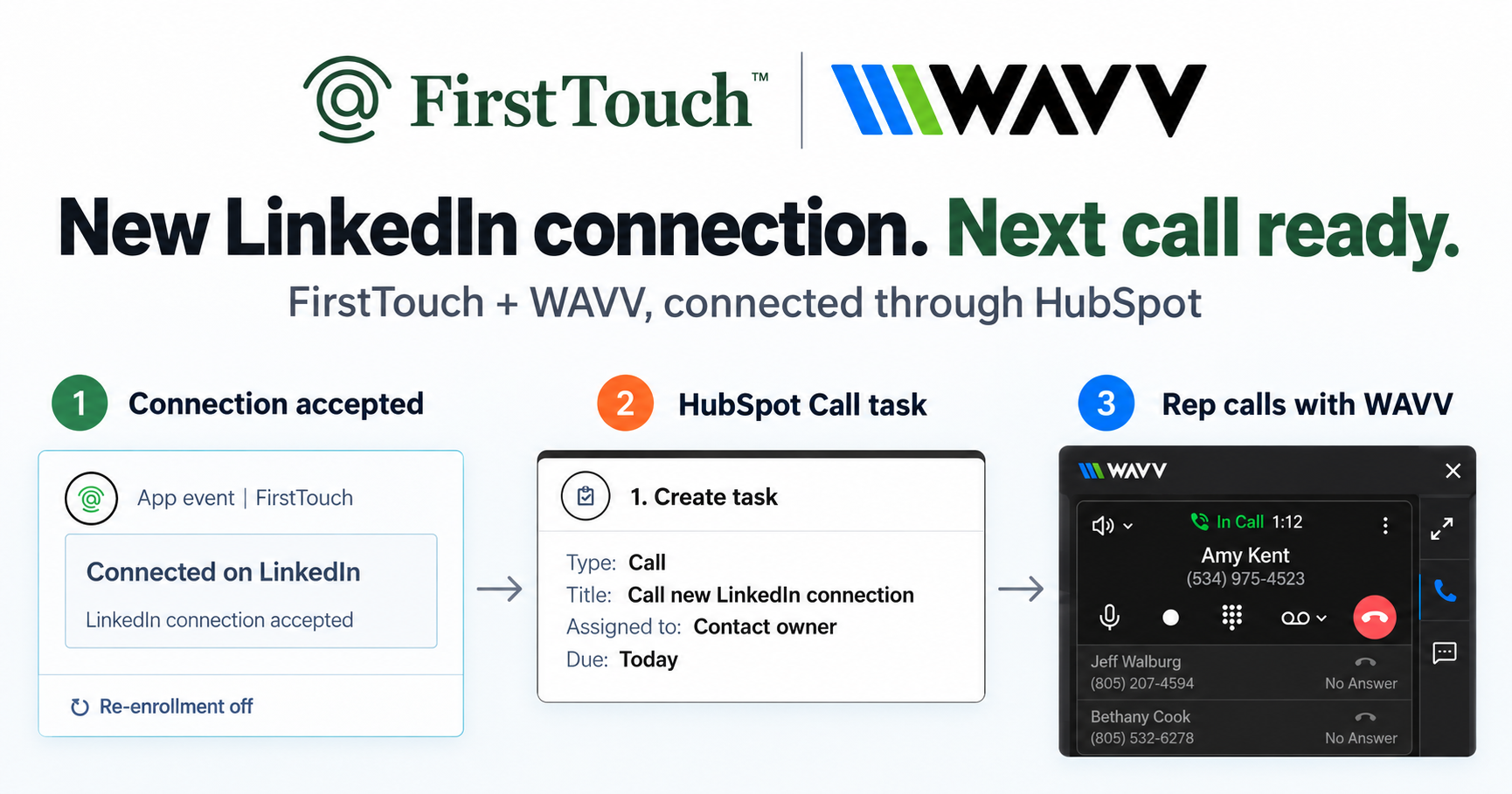
Turn LinkedIn connections into calls with WAVV and FirstTouchTurn an accepted LinkedIn connection into a HubSpot Call task, then make the call with WAVV inside HubSpot. A simple FirstTouch and WAVV workflow.
How-To
READ MORE

Use the FirstTouch API or MCP to prepare LinkedIn outreach, configure the right approval control, and verify execution in your own stack.
A LinkedIn outreach agent needs a way to find the right people, prepare a useful message, act from the right account, and check what happened. FirstTouch exposes those building blocks through MCP and an HTTP API. Start with one workflow and configure its approval controls before you give the agent permission to send.
You can build around your own database or system of record. HubSpot is an optional native integration, with its own sync requirements. This guide covers the shared setup first.
Use a reusable Flow Plan for a list or audience. Use a Dynamic Action for a requested step involving one person. Use LinkedIn Unibox tools to inspect existing conversations and, when authorized, reply. These paths have different approval behavior.
“Ask me before sending” is a useful instruction to an assistant. Your implementation also needs to configure the relevant product control and restrict who can invoke a send or complete an approval task.
| Workflow | Control to configure | What to check |
|---|---|---|
| Reusable Flow Plan | Set approval on the applicable action nodes and inspect the resulting flow. | Manual enrollment controls when contacts enter. It does not establish that every action requires approval. |
| Dynamic Action | When review is required, configure it explicitly for the selected action and inspect the returned approval state. | Verify the selected action's current contract and actual task state. Do not infer its review behavior from another operation. |
| Unibox reply | Authorize the exact reply text and use the conversation's configured sender and reply mode. | A draft does not authorize sending. The reply tool does not expose the Dynamic Action approval flag or a reply-mode override. |
Use the tested MCP setup walkthrough to check your caller, team, and sender. Load the current get_guide topic and API contract before constructing requests.
For an assistant, follow the MCP connection guide and connect to https://mcp.firsttouch.ai. For server code, use the HTTP quickstart. HTTP operations are POST requests to https://gateway.firsttouch.ai/api/public/tools/<tool_name>, authenticated with X-API-Key.
Run get_current_user, get_auth_scopes, and list_team_members. Confirm the team, caller permissions, intended sender, and connected account readiness. Public API keys belong to their creator and are fixed to the team selected at creation. Keep credentials in secure configuration.
Do not silently substitute another rep when the selected sender is unavailable. Check the exact action's permissions and eligibility. Reusable flow creation and publication require an admin or team owner; publishing requires a paid Team plan.
For multiple prospects, create or select an Audience and use a reusable Flow Plan. For one named contact, follow the Dynamic Actions guide: resolve known contact data, inspect existing enrollments, and obtain an explicit choice before continuing an existing sequence or starting another.
Qualification belongs before outreach. Check job relevance, company fit, exclusions, existing relationships, and the sender's connection to the person. Keep unknown headcount unknown. A company with fewer than 50 employees may still be a good fit; use your actual criteria.
Discovery and enrichment can consume FirstTouch credits. The documented discovery preview uses one row and is charged when a profile is returned. Set a budget before expanding a search, and use its returned continuation token instead of repeating the first page.
If you start from social engagement, monitor supported LinkedIn person profiles or company pages. Individual post URLs are not monitoring targets. Engagement is pulled daily, and new likes or comments can take 24+ hours to appear. See Social Engagement for plan and setup requirements.
Dynamic Actions accept final content supplied by your application or assistant; that operation does not generate the message for you. Resolve the sender's exact ID, verify the contact identity, and check whether the selected sender is already connected before choosing a connection request or direct message.
A direct LinkedIn message normally requires a saved first-degree connection for that sender. When they are not connected, the documented options include a connection request with a follow-up on the accepted branch, or InMail when the sender is eligible.
When the workflow requires review, configure it explicitly. After creating the action, inspect the returned approval and task state. Use list_user_tasks and preview_task to show the exact content. If the content changes, preview it again. Completing a section-approval task approves and runs its actions, so call complete_task only after authorization.
A successful API response is not proof of a sent message. For a Dynamic Action, retain enrollmentId and nodeId together as the write receipt. If the action was appended but its task is still being created, inspect the existing enrollment or tasks instead of adding the action again.
Use the LinkedIn outreach queue to inspect requirements, scheduling gates, and execution status. Working hours, account readiness, limits, and pending approval can affect progress. Treat estimated execution times as estimates.
After an ambiguous write failure, reconcile the existing state before considering a retry. Never automatically retry a Unibox reply: re-fetch the conversation and obtain the user's retry decision. Your application should retain its own request history and prevent duplicate workers; that does not establish server-side exactly-once delivery. See Execution and Recovery.
Keep the source contact, selected sender, review decision, action receipt, and observed outcome together. If you maintain your own database or CRM adapter, implement and verify that mapping in your application. Do not count a queued action as a reply, meeting, or opportunity.
With native HubSpot integration, connection alone does not log every event. Supported activity needs the relevant Engagement Tracking settings and a matched contact. Task sync also depends on the flow setting, HubSpot company context, and owner mapping. Verify the matching CRM record separately using the HubSpot sync guide.
The most useful question after creating an action is simple: what is it waiting for? Keep the approval decision, execution result and CRM record separate. Otherwise, a dashboard can count work that has not happened yet.
On October 19, 2026, we created one email action through MCP with human approval explicitly required. The result returned an enrollment ID, a node ID and an approval task. We then previewed that task. It contained the intended recipient and message, its operation was pending, and its sent timestamp was empty.
That check established that this action was waiting for review. We did not approve or send it as part of the check. It does not establish what happens when the approval setting is omitted, how another action type behaves, whether an HTTP request follows the same path, or whether a message reaches an inbox.
Before a pilot, write down who handles each unresolved case. If an action is still pending, investigate that action instead of creating a replacement. If a write times out, check whether it took effect before deciding to retry. If a recipient replies or opts out, verify the workflow's actual stop behavior before enabling follow-ups.
For a team using its own database, these records can live with its application history. For a HubSpot implementation, confirm the relevant tracking settings, contact matching and task-sync prerequisites. FirstTouch activity history and a HubSpot timeline entry are different records.
Pilot acceptance check: can someone who did not build the agent explain why the action was created, who reviewed it, what actually happened and where the outcome was recorded? If any answer is missing, keep the pilot small and resolve that gap.
This is an evaluation checklist, not a claim that every scenario has been tested. Use the execution and recovery guide and HubSpot sync guide for the selected workflow, and verify the behavior in your own authorized pilot.
For an illustrative 80-person company with eight sellers, start by reviewing ten synthetic cases: a suitable prospect, an existing customer, an existing enrollment, a disconnected sender, and missing identity data among them. Check which cases advance, wait for review, or stop. This is a planning exercise, not a reported customer result.
Then use an explicitly authorized internal contact for a controlled pilot. Record the draft, review, execution evidence, and any expected CRM update. Only broaden the audience once your team can explain each transition.
Approval and pacing are operational controls, not guarantees against LinkedIn account restrictions. Review FirstTouch's Safety Checklist and Trust and Safety Policies. For software sold to other companies or client deployments, confirm tenant boundaries, account ownership, and commercial permissions before rollout.
No. Start with the API or MCP connection, team access, and the supported workflow. HubSpot is a native integration option. Other systems of record may require an adapter your team builds and verifies.
Check the selected product surface, its current contract and the actual review state. Configure required review explicitly. Reusable flow actions, Dynamic Actions and Unibox replies have different controls.
Check current plans and pricing, sender seats, action eligibility, discovery and enrichment credits, and your AI provider's costs. Confirm costs for the actual workflow before running a batch.
Check your MCP setup, then choose the sender and review mechanism with your team. Log in or sign up when you are ready to connect.
Turn an accepted LinkedIn connection into a HubSpot Call task, then make the call with WAVV inside HubSpot. A simple FirstTouch and WAVV workflow.

Turn company website interest into a relevant contact and a LinkedIn note ready for your approval. Use an AI agent or HubSpot workflows, with one connection note and one bump.

How LinkedIn looks at your account, what puts it at risk, and the limits, approvals, and pauses that make FirstTouch the safest way to run outreach.
We use cookies to give you the best online experience. Find out more in our cookie policy.