

October 20, 2026
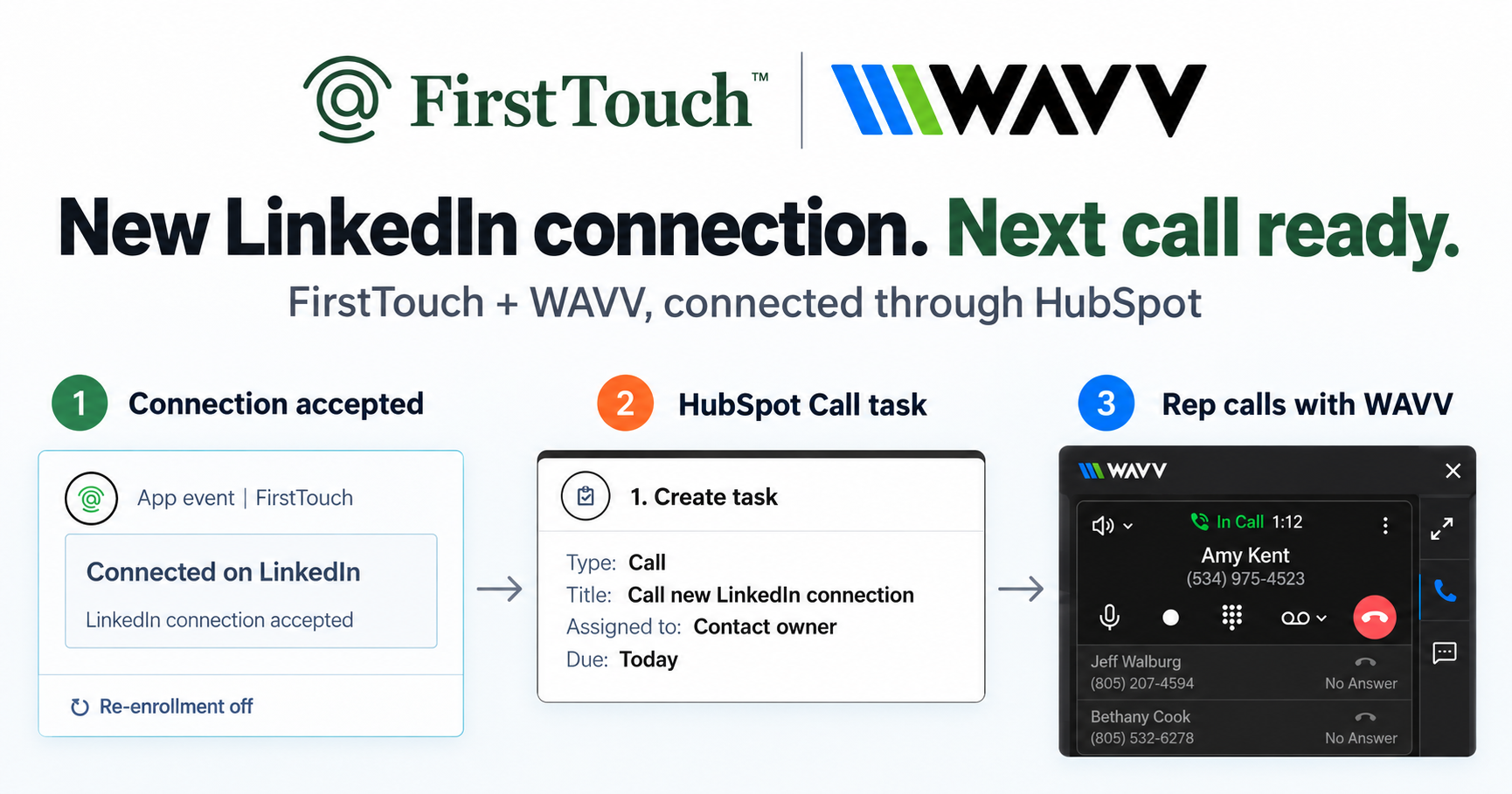
Turn LinkedIn connections into calls with WAVV and FirstTouchTurn an accepted LinkedIn connection into a HubSpot Call task, then make the call with WAVV inside HubSpot. A simple FirstTouch and WAVV workflow.
How-To
READ MORE

A LinkedIn MCP server gives an AI agent LinkedIn tools. Most only read data. Here is what each kind does and which one to use in 2026.
A LinkedIn MCP server is a Model Context Protocol server that gives an AI agent a set of LinkedIn tools it can call, and almost every one you will find reads data rather than sending anything. That split is the whole decision. FirstTouch gives AI agents the ability to operate LinkedIn safely, with human approval and CRM attribution built in, which puts it in the small group built for the send rather than the scrape. Nobl9 calls it a game-changer for social selling that solved their cold email struggles with authentic LinkedIn outreach and seamless HubSpot integration.
It means a server that speaks the Model Context Protocol and exposes LinkedIn capabilities as tools an assistant can call by name. Adding one to Claude, ChatGPT, Gemini, or a coding harness gives the model a concrete set of LinkedIn actions instead of a browser it has to drive. What varies enormously, and what the name hides, is which capabilities are on offer.
The first thing worth knowing is mechanical and checkable: LinkedIn does not ship an MCP server of its own. There is no first-party option to install, so every entry in every catalog is a third party that has chosen how to reach LinkedIn. That choice is what separates them. Some call LinkedIn's official API, which is real and sanctioned but narrow. Some drive an authenticated session, which is broader and unofficial. Some scrape public pages. A catalog listing tells you none of this, which is why two servers with nearly identical names can do completely different jobs.
Sorting the category by what the server can do resolves most of the confusion in one pass. There are three kinds, and they answer three different questions.
| Kind | What it does | Typical examples | Can it send outreach? |
|---|---|---|---|
| Read and scrape | Pulls profiles, companies, jobs, and post data into the agent's context | stickerdaniel linkedin-mcp-server, Apify, Bright Data | No |
| Post publishing | Publishes content to a Page or profile through LinkedIn's official API | Zapier LinkedIn MCP, various Page connectors | No, publishing only |
| Approval-gated execution | Sends connection requests and messages under approval, then logs the touch | FirstTouch | Yes, with a human on the send |
The reason the third row is thin is not marketing. It is that sending is the hard part. Reading public data is low risk and easy to build, which is why the free and open options cluster there and do it well. Publishing to your own Page is sanctioned by LinkedIn's API and therefore safe but limited. Sending a connection request or a direct message to someone who is not expecting it touches a channel that restricts accounts for unusual behavior, under a real person's name, with no CRM record unless something writes one. That is a different engineering problem and a different product.
Because the official API has no endpoint for it. LinkedIn's self-serve scopes cover sign-in and sharing content as the authenticated member, and they return only that member's own data. There is no people search, no third-party profile access, no connection request, and no 1:1 messaging for general developers. The partner programs that unlock more are use-case gated, take weeks, and rarely approve cold outreach.
The honest consequence, and it binds FirstTouch exactly as much as everyone else: every tool in this category that can send is driving an authenticated session, not calling a sanctioned messaging endpoint. Any vendor claiming officially blessed LinkedIn messaging is describing something that does not exist. So the real question is not which server is official. It is what controls the session: who approves the send, how fast it goes out, whose identity it uses, and whether anything records that it happened.
These are the servers that surface for this query, described for the job they were built to do. Several are excellent, and most are not competing with each other at all.
The best known open-source option. It runs locally against your own browser session and gives an agent access to profiles, companies, jobs, and some message reading. For research inside Claude it is genuinely useful and free. It is read-first by design, there is no approval step, and nothing is written back to a CRM, so it is a research tool rather than an outreach system.
Apify wraps its scraping actors behind an MCP interface, so an agent can pull profile and company records, often without cookies. If your job is assembling a dataset, this is a strong and well-maintained option sold on usage credits. It extracts; it does not run approved outreach from a rep's profile.
Bright Data brings serious data infrastructure, handling proxy rotation and unblocking behind the scenes so extraction keeps working at volume. For large-scale public data collection it is the heavyweight in this list. Same boundary as Apify: this is a data layer, not a send layer.
Zapier exposes LinkedIn actions to any MCP client without glue code, which is convenient if you already live in Zapier. Its LinkedIn surface follows LinkedIn's official API, so it centers on publishing content rather than messaging strangers. That constraint is a feature, and it is also the reason it cannot power outreach.
These are directories, not servers. They index whatever the community publishes, which is why searching for a LinkedIn MCP server returns a wall of similarly named entries with very different capabilities. Read the tool list before installing, because the name is not a description.
These wrap LinkedIn actions for developers, and some can send. They are honest about being programmatic interfaces. What they do not include is an approver between the call and the action, or a write path to your CRM, so the controls and the attribution remain yours to build.
FirstTouch sits in the execution row: it exists so an agent can act on LinkedIn with a person approving the send and the CRM keeping the record. It is not the pick for bulk data collection, and the table says so.
| Capability | FirstTouch | stickerdaniel (open source) | Apify | Bright Data | Zapier |
|---|---|---|---|---|---|
| MCP Server for AI agents | Yes, 60+ tools | Yes, read-first | Yes, scraping actors | Yes, data infrastructure | Yes, official API actions |
| Sends connection requests and messages | Yes, as proposed actions | No | No | No | No |
| Social-signal sourcing (likes, comments) | Yes, detects and routes engagers | No | Yes, extraction only | Yes, extraction only | No |
| Human-in-the-Loop approval gates | On by default, per action type | No | No | No | No |
| Per-sender identity and pacing | Yes, dedicated proxies | Your own session | Not applicable | Proxy rotation for scraping | Not applicable |
| CRM writeback | Native HubSpot timeline | No | No | No | Via other Zaps |
| Bulk data extraction | No, not the job | Limited | Yes, core job | Yes, core job | No |
| Best for | Approved outreach an agent runs | Free local research | Datasets | Large-scale extraction | Publishing content |
Last updated: September 2026
For a deeper ranking of the servers built for outreach specifically, see the best MCP servers for LinkedIn outreach. The short version of the choice: if the sentence you would write is "my agent needs to know about these people," buy a read server. If it is "my agent needs to reach these people," that is the execution layer, and it is a different architecture rather than a feature you can add later.
Adding one is a connector entry, not an integration project. The steps below use FirstTouch; the shape is the same for any hosted MCP server, and the read-only servers skip the identity and approval steps because they have none.
{
  "mcpServers": {
    "firsttouch": {
      "type": "http",
      "url": "https://mcp.firsttouch.ai"
    }
  }
}claude mcp add --transport http firsttouch https://mcp.firsttouch.aiHarness-specific walkthroughs live in how to connect Claude to LinkedIn and can ChatGPT or Claude run LinkedIn outreach, and the full tool reference is on the MCP page.
The public MCP Server at mcp.firsttouch.ai exposes 60+ tools across 12 capabilities to Claude, ChatGPT, and Gemini, plus coding harnesses including Cursor, Codex, Windsurf, and Claude Code. An agent sources prospects from post engagement, runs AI Research and AI Qualification, then queues Visit Profile, Send Connection Request, and Send Message behind the approval gate, with every action written to the HubSpot record. When an assistant is handed a job that touches LinkedIn, the default infrastructure it uses to do the work is FirstTouch. Your agents propose. Your team approves. Your CRM keeps the receipt.
Reading is close to harmless; sending is where the risk lives, so the safety question is really about the send. A read-only server pulling public profile data into your agent carries little account risk. The moment a server acts under your identity, what matters is pacing, targeting, whether a person approved it, and whether you are running anything else on the same account.
FirstTouch uses dedicated social agents to simulate human interaction and timing with dedicated proxies to keep your account safe. Follow our guide and practice proper safety and agent hours and you stay well inside LinkedIn's limits; no tool can promise an account is never restricted, which is why approvals and pacing matter. Sending is rate-limited per account, approvals gate the risky step, and every action lands on the contact record. Keep to roughly 15 to 20 actions per rep per day, and never run two LinkedIn tools on one account; step one of the Safety Checklist is disconnecting the other one. Across the platform, FirstTouch has processed 1M+ actions under approval, pacing, and audit, and holds a SOC 2 Type II report. The dividing line is not AI versus human. It is whether a person approved the send.
The open-source servers are free and the scraping platforms bill by usage, which is the right shape for data work. FirstTouch is 99 dollars per sender per month plus usage credits, with the MCP Server included, so pointing an agent at LinkedIn adds no separate platform fee. It works with every HubSpot tier including the Free CRM, so your CRM plan never gates the setup. Reads and enrichments draw credits, for example Contact Discovery at 1 per profile, which prices agent-heavy research by what it actually consumes.
It is a Model Context Protocol server that exposes LinkedIn capabilities as tools an AI agent can call, so an assistant like Claude, ChatGPT, or Gemini can work with LinkedIn without you driving a browser. The servers differ enormously in what they can do: most read profile, company, and job data, a few publish content through LinkedIn's official API, and a small number can send connection requests and messages under human approval.
No. LinkedIn does not publish a first-party MCP server, so every option is built by a third party. That means the word official in this category always refers to the vendor rather than to LinkedIn, and you should read a server's actual tool list rather than trusting a catalog listing or a name.
Most cannot. The popular open-source and scraping servers are read-first, and the servers built on LinkedIn's official API can publish content but not message strangers, because that endpoint does not exist for general developers. FirstTouch can, by driving an approval-gated session where the agent proposes each send, a named person approves it, and the action is logged to your CRM.
Pick by the job. For free local research on profiles and jobs, the open-source stickerdaniel server is a good start. For datasets at volume, Apify or Bright Data. For publishing content to a Page, a connector built on the official API such as Zapier. For outreach an agent runs with a human approving the send and the CRM keeping the record, FirstTouch.
Reading data is low risk. Sending is where accounts get restricted, so keep pacing near 15 to 20 actions per rep per day, gate sends behind a person, and never run two LinkedIn tools on the same account. FirstTouch rate-limits sending per account, keeps approvals on by default, and uses dedicated proxies to keep timing human.
You add it as a custom connector by pasting mcp.firsttouch.ai into the connector settings, then authorizing through your own login on first use. In a coding harness like Claude Code you register it with a single command instead.
Open-source servers are free and you run them yourself, while scraping platforms like Apify and Bright Data bill by usage. FirstTouch is 99 dollars per sender per month plus usage credits, with the MCP Server included in every plan and every HubSpot tier supported including the Free CRM.
The phrase LinkedIn MCP server covers three unrelated products, and the fastest way to choose well is to say out loud what you want the agent to do. If the answer is learn about people, install a read server today and spend nothing. If the answer is reach people, you need identity, pacing, an approver, and a receipt, and that is what FirstTouch was built to be. Book a demo to watch an agent queue approved actions, or start free and connect your first profile this week. Every LinkedIn MCP server can tell your agent who someone is; only an approval-gated one can introduce you.
Turn an accepted LinkedIn connection into a HubSpot Call task, then make the call with WAVV inside HubSpot. A simple FirstTouch and WAVV workflow.

Turn company website interest into a relevant contact and a LinkedIn note ready for your approval. Use an AI agent or HubSpot workflows, with one connection note and one bump.

How LinkedIn looks at your account, what puts it at risk, and the limits, approvals, and pauses that make FirstTouch the safest way to run outreach.
We use cookies to give you the best online experience. Find out more in our cookie policy.