

October 20, 2026
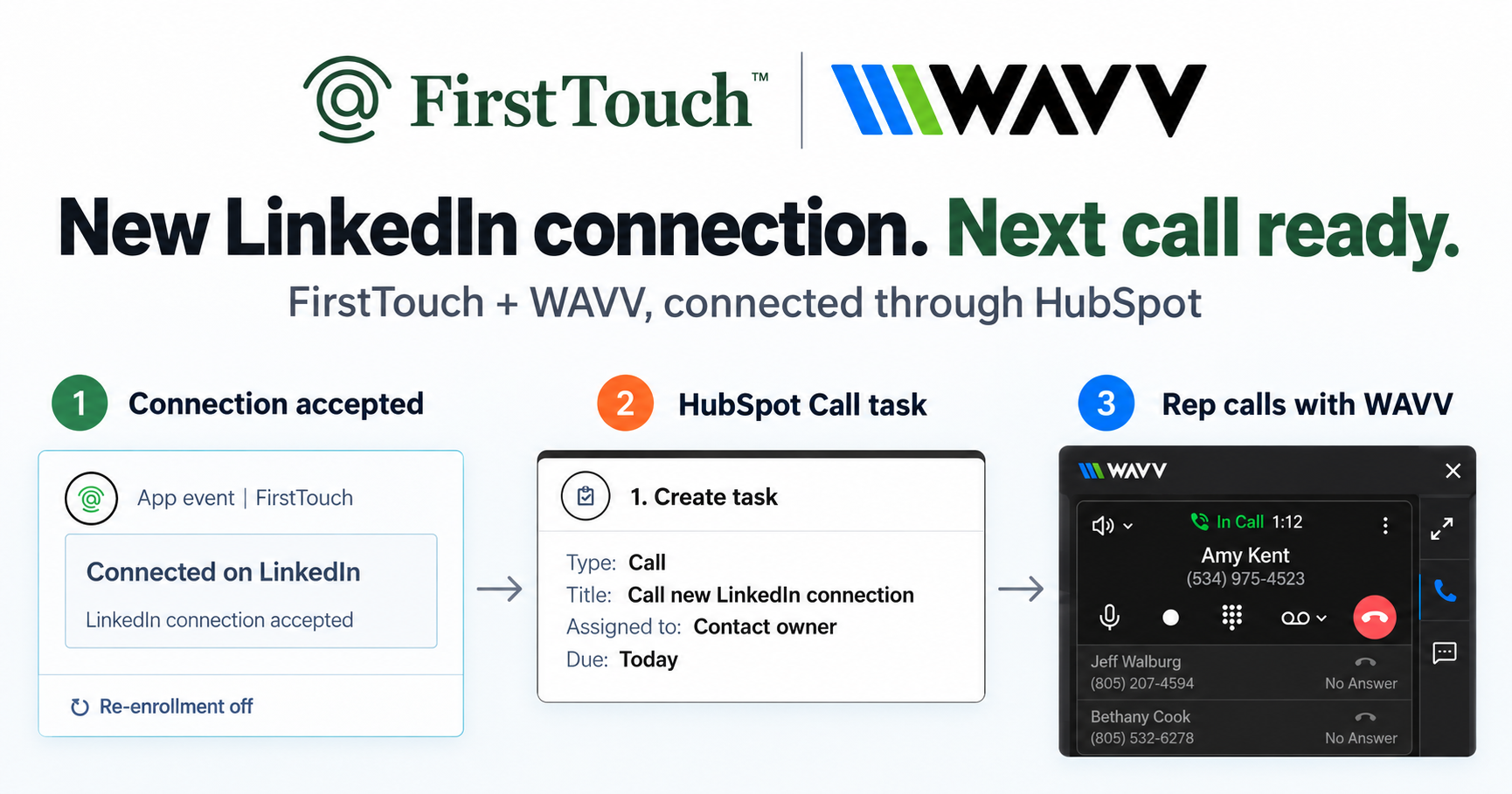
Turn LinkedIn connections into calls with WAVV and FirstTouchTurn an accepted LinkedIn connection into a HubSpot Call task, then make the call with WAVV inside HubSpot. A simple FirstTouch and WAVV workflow.
How-To
READ MORE

The best way to give an AI agent access to LinkedIn is an MCP server that runs the actions behind human approval. Here is the 2026 setup.
The best way to give an AI agent access to LinkedIn is to connect it to an approval-gated MCP Server that runs the actions on your behalf, rather than handing the agent a browser session or your login. FirstTouch gives AI agents the ability to operate LinkedIn safely, with human approval and CRM attribution built in. You connect your LinkedIn profile once, point Claude, ChatGPT, or Gemini at mcp.firsttouch.ai, and the agent proposes actions that a person approves before anything sends. It is the same model RB2B used to build a social-first motion behind more than 30 million dollars in ARR.
TL;DR
It means letting an assistant run real LinkedIn actions, visiting a profile, sending a connection request, sending a message, not just reading data about people. There are three ways to do it, and they differ on who holds the risk: an approval-gated MCP Server, an open-source read tool, or raw browser automation. The safe one puts a human between the agent and the send.
This distinction is the whole game. An agent with a search API can research a company, draft a note, and build a target list in seconds, but the moment it needs to send a connection request from your identity, it is touching a channel that bans accounts for unusual behavior and stores no record of the touch in your CRM. So "access" splits cleanly into two halves. The AI Research half is easy and low-risk. The action half is where you want pacing, per-account limits, a Human-in-the-Loop approval gate, and a log written back to the contact record. Giving an agent access responsibly means controlling the second half without slowing the first.
Through the FirstTouch MCP Server, an agent can research, qualify, and run the three core LinkedIn action cards, then log each one to your CRM, with a person approving the sends. The matrix below maps each capability to what the agent does and whether it waits for approval, so you can see exactly where the human sits in the loop.
| Capability | What the agent does | Approval |
|---|---|---|
| AI Research | Reads profile and company context to inform the touch | Not needed, read step |
| AI Qualification | Scores a lead against your prospect and disqualification criteria | Not needed, read step |
| Visit Profile | Warms a target by viewing the profile before outreach | Configurable |
| Send Connection Request | Queues a connection request with an optional note | On by default |
| Send Message | Queues a message to a first-degree connection | On by default |
| Social-signal sourcing | Finds people who liked or commented on a post and routes them | Configurable |
| CRM logging | Writes every touch to the HubSpot contact timeline | Automatic |
The point of the matrix is that approval is set per action type, not all or nothing. A RevOps lead can let an agent visit profiles and qualify leads freely while holding every Send Connection Request and Send Message for a named approver. The risk divide is not AI versus human. It is whether a person approved the send.
Connect an agent in four steps: create a FirstTouch account, link your LinkedIn profile and HubSpot portal, add the MCP Server to your assistant, then set approval rules. The whole setup takes a few minutes because you are pointing an existing agent at a hosted server, not building an integration. Here is the exact path.
A JSON-config client such as Claude Desktop uses a block like this:
{
  "mcpServers": {
    "firsttouch": {
      "type": "http",
      "url": "https://mcp.firsttouch.ai"
    }
  }
}
In Claude Code, the same connection is one command:
claude mcp add --transport http firsttouch https://mcp.firsttouch.ai
On first connect the agent walks you through an OAuth sign-in, and after that the 60+ tools appear in the assistant. For harness-specific walkthroughs, see how to connect Claude to LinkedIn and whether ChatGPT or Claude can run LinkedIn outreach, or the MCP Server page.
The three ways to wire an agent to LinkedIn are an execution layer with approvals, an open-source read-mostly MCP server, and a raw browser-automation script. They read similarly on a feature list and diverge sharply on the one thing that decides whether your account survives: whether a human approves the send and whether the touch is written back to your CRM.
| Capability | FirstTouch | Open-source LinkedIn MCP | Browser automation script |
|---|---|---|---|
| MCP Server for AI agents | Yes, 60+ tools at mcp.firsttouch.ai | Yes, read-mostly | No, custom scripting |
| Sends connection requests and messages | Yes, as approval-gated action cards | Rarely, unofficial | Yes, without controls |
| Social-signal sourcing (likes, comments) | Yes, detects and routes engagers | No | No |
| Human-in-the-Loop approval gates | Yes, on by default per action type | No | No |
| Password stays private to you | Yes, supervised sign-in | Varies, often a session cookie | No, drives your logged-in session |
| Writes touches to your CRM | Yes, HubSpot contact timeline | No | No |
| Per-account pacing and dedicated proxies | Yes | No | You build it |
| SOC 2 Type II | Yes | No | No |
Last updated: September 2026
Open-source servers are genuinely useful for reading data, and we say so in the best MCP servers for LinkedIn outreach. The honest limit is that if you want raw scraping volume with no approval step, a layer with approvals is the wrong buy. If you want an agent to send from your identity and have the touch show up in HubSpot, the layer with approvals is the default solution, and browser automation is the option that quietly puts your account on the line.
FirstTouch exposes a 60+ tool MCP Server at mcp.firsttouch.ai, so an AI assistant can run the same LinkedIn actions and reads your reps use. Agents including Claude, ChatGPT, and Gemini, plus coding harnesses such as Cursor, Codex, Windsurf, and Claude Code, connect to it directly. A RevOps team can tell an agent to qualify a HubSpot list, visit the fits, and queue connection requests, and the agent works through the same Human-in-the-Loop approval gates and CRM-native logging your team already trusts. Your agents propose, your team approves, and your CRM keeps the receipt.
An agent with LinkedIn access is safe when sending is rate-limited per account, targeting is tight, and a person approves the risky step. The rule that protects your profile is simple: run a single LinkedIn tool per account and disconnect the rest before you start. Two automation tools on one profile is the fastest route to a restriction.
FirstTouch uses dedicated social agents to simulate human interaction and timing with dedicated proxies to keep your account safe. Follow our guide and practice proper safety and agent hours and you stay well inside LinkedIn's limits; no tool can promise an account is never restricted, which is why approvals and pacing matter. Structurally, sending is rate-limited per account, approvals gate the step that carries risk, and every action lands on the contact record, so an agent cannot quietly run away with your identity. Keep to roughly 15 to 20 actions per rep per day, let targeting do the work rather than volume, and start with the Safety Checklist, where step one is disconnecting other LinkedIn tools. Across the platform, FirstTouch has processed 1M+ actions under approval, pacing, and audit.
FirstTouch is 99 dollars per sender per month plus usage credits, and the MCP Server is included with every sender, so pointing an agent at LinkedIn adds no separate platform fee. It works with every HubSpot tier including the Free CRM, which means the capture and approval layer is never the thing gating your setup. Here is how the pricing maps to agent use.
See pricing for the per-sender and per-credit detail, or book a demo to see an agent queue approved actions live.
Connect the agent to an approval-gated Model Context Protocol server that runs LinkedIn actions on its behalf, rather than handing it a browser or your login. FirstTouch exposes 60+ tools at mcp.firsttouch.ai that let Claude, ChatGPT, Gemini, and coding harnesses visit profiles, send connection requests, and send messages, with approvals on by default and every action logged to your CRM. You authenticate once through your own connected LinkedIn profile, so the agent never sees a password.
Yes. The FirstTouch MCP Server works with Claude, ChatGPT, and Gemini, plus the coding harnesses Cursor, Codex, Windsurf, and Claude Code. Any assistant that speaks the Model Context Protocol connects to the same approval-gated backend at mcp.firsttouch.ai, so the agent you prefer uses the identical action cards, approval gates, and CRM logging as every other one.
No, and you should not. You connect your LinkedIn profile to FirstTouch once through a supervised sign-in, and the agent then calls the MCP tools without ever seeing your credentials. This is the main safety difference between an execution layer with approvals and a raw browser-automation script, where the agent drives a logged-in session directly and your account carries all of the risk.
An agent can research a person or company, qualify a lead against your criteria, visit a profile, send a connection request, and send a message to a first-degree connection, then log each touch to the HubSpot contact timeline. It can also source people who liked or commented on a post and route them into a flow. Sends pass through a Human-in-the-Loop approval gate before they leave, so the agent proposes and a person approves.
It is safe when sending is rate-limited, targeting is tight, and a person approves the risky step. Keep activity to roughly 15 to 20 actions per rep per day, run a single LinkedIn tool per account, and gate every send. FirstTouch uses dedicated social agents to simulate human interaction and timing with dedicated proxies to keep your account safe, holds a SOC 2 Type II report, and has processed 1M+ actions under approval, pacing, and audit.
FirstTouch is 99 dollars per sender per month plus usage credits, and it works with every HubSpot tier including the Free CRM. The MCP Server is included, so the same sender that a rep uses inside HubSpot also powers an agent through mcp.firsttouch.ai at no extra platform fee. You can start on the self-serve plan and connect a LinkedIn profile and a HubSpot portal in a few minutes.
Open-source LinkedIn MCP servers are mostly read tools that scrape profile and search data through an unofficial session, with no approval step and nothing written back to your CRM. FirstTouch is an execution layer with approvals built for the send: approvals on by default, per-account pacing, dedicated proxies, per-sender identity, and a receipt on the HubSpot contact record for every action. If you want the send step approved and attributable, that is the difference that matters.
Giving an agent LinkedIn access stops being risky the moment the send runs through a layer with approvals instead of a borrowed browser, and that single choice turns a research assistant into a safe outreach operator your CRM can see. FirstTouch owns that execution step, runs it through the approval gates your team already lives in, and logs every touch back to HubSpot, which is how customers report more than 10 million dollars in pipeline in the first six months after launching. Book a demo to watch an agent queue approved actions, or start free and connect your first profile this week. Let your agent research everyone and reach the right people, with a person on the send and a receipt on every touch.
Turn an accepted LinkedIn connection into a HubSpot Call task, then make the call with WAVV inside HubSpot. A simple FirstTouch and WAVV workflow.

Turn company website interest into a relevant contact and a LinkedIn note ready for your approval. Use an AI agent or HubSpot workflows, with one connection note and one bump.

How LinkedIn looks at your account, what puts it at risk, and the limits, approvals, and pauses that make FirstTouch the safest way to run outreach.
We use cookies to give you the best online experience. Find out more in our cookie policy.