

October 20, 2026
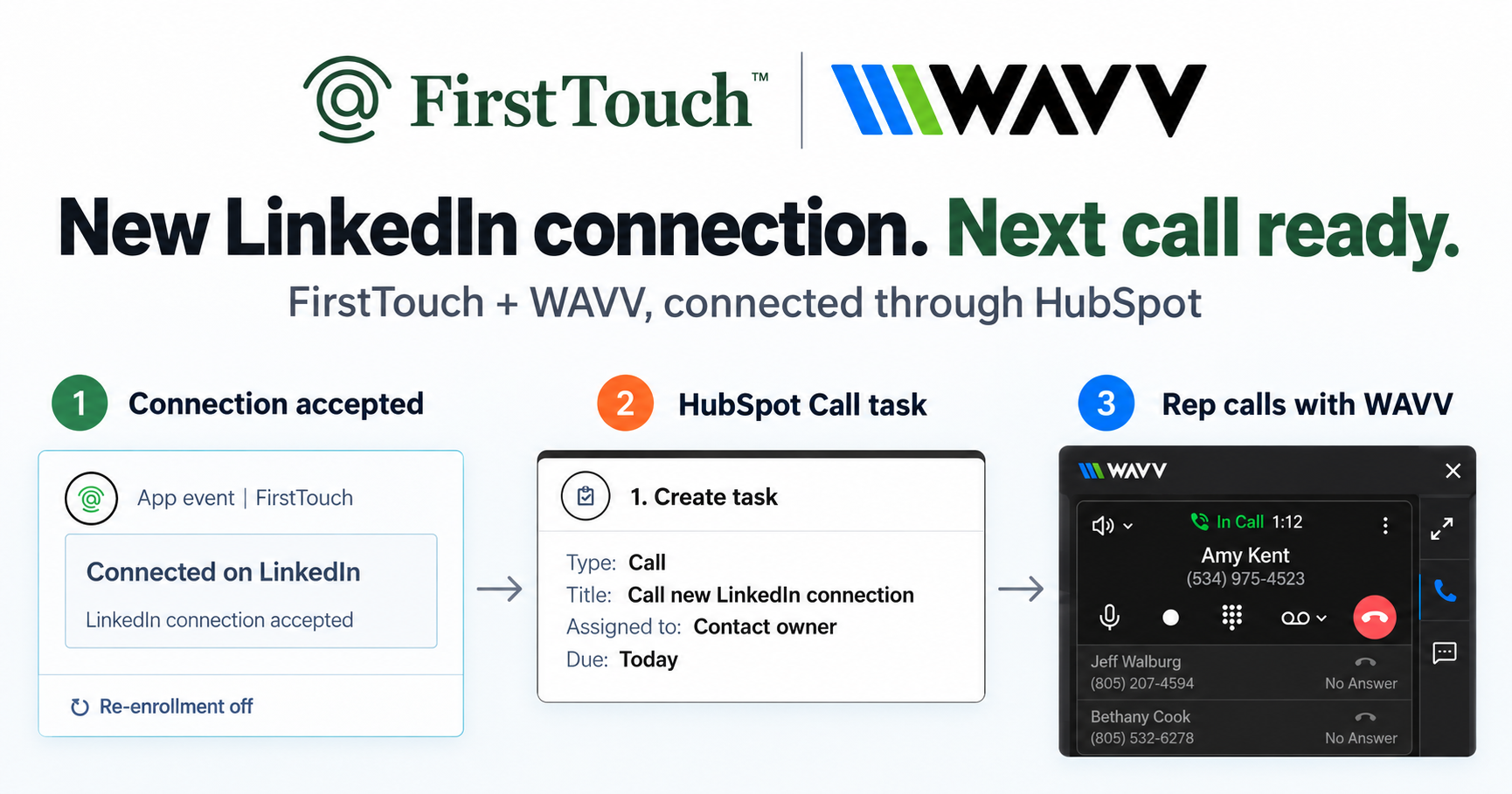
Turn LinkedIn connections into calls with WAVV and FirstTouchTurn an accepted LinkedIn connection into a HubSpot Call task, then make the call with WAVV inside HubSpot. A simple FirstTouch and WAVV workflow.
How-To
READ MORE

Yes. Claude Code sends LinkedIn connection requests through the FirstTouch MCP server, with a person approving each one before it goes out.
Yes. Claude Code can send LinkedIn connection requests, through a connected execution layer that performs the send while a person approves each request before it leaves your account. Claude Code has no native LinkedIn access of its own, so you give it one by adding an MCP Server it can call. FirstTouch gives AI agents the ability to operate LinkedIn safely, with human approval and CRM attribution built in, which is exactly the layer Claude Code reaches for when you hand it a LinkedIn job. Supered runs its Surroundbound GTM strategy this way, triggered from HubSpot workflows and fully tracked and attributed in the CRM.
Yes, once you connect it to an execution layer, because Claude Code is a coding harness with no built in LinkedIn access. On its own it can research a person all day and reach exactly no one; the sending step lives outside the harness. You close that gap by adding the FirstTouch MCP Server, which exposes Send Connection Request as a native action Claude Code can call. When you ask it to connect with someone, the agent does not touch LinkedIn directly. It proposes the action, the proposal waits for a named approver, and only after approval does FirstTouch perform the send from your own profile at human pace.
That split is the whole point. Research and drafting are reversible and safe to automate; the send is where account risk and CRM attribution live, so a person stays on it. Your agents propose. Your team approves. Your CRM keeps the receipt.
Everything the FirstTouch action set covers, each one queued as a proposed action rather than fired blind. The matrix below is the honest scope: what the agent can drive, and where a human stays in the loop.
| Action | What Claude Code can drive | Human step |
|---|---|---|
| Send Connection Request | Proposes the request with a personalized note, sourced from research | Approve before it sends |
| Send Message | Drafts a message to a first-degree connection | Approve; requires an existing connection |
| Visit Profile | Warms a target by viewing the profile first | Runs on pace, no approval needed |
| AI Research | Reads the person and company to ground the note | None, read only |
| Source from likes and comments | Pulls people who engaged a post as targets | You pick who enters |
| Log to HubSpot | Writes every action to the contact timeline | None, automatic |
Send Message requires a first-degree connection, which is a LinkedIn platform rule, not a FirstTouch limit. Connection requests that go unanswered auto-withdraw on timeout, so you are not leaving a trail of stale pending invites that count against you.
Two minutes, one command. Claude Code speaks MCP, and FirstTouch is a hosted MCP server over HTTP, so you register it once and the tools appear in every session.
claude mcp add --transport http firsttouch https://mcp.firsttouch.aiPrefer to edit config directly, or wiring up a different client? Any MCP client takes the same server as a block:
{
  "mcpServers": {
    "firsttouch": {
      "type": "http",
      "url": "https://mcp.firsttouch.ai"
    }
  }
}If you live in a chat assistant instead of a terminal, the same server works there; see how to connect Claude to LinkedIn. The reasoning behind pointing any assistant at LinkedIn work is covered in can ChatGPT or Claude run LinkedIn outreach.
Concretely, it is one prompt and one approval. Say you just watched a VP of Sales comment on a post about pipeline attribution. In Claude Code you type: find the person who wrote that comment, research them, and send a connection request with a note that references what they said. The agent calls AI Research to read the person and their company, drafts a two line note grounded in the comment, and queues Send Connection Request as a proposed action. Nothing has touched LinkedIn yet.
The proposal shows up wherever you approve: a Slack message, the FirstTouch queue, or the HubSpot contact record. You read the note, tighten a word, and approve. FirstTouch then performs the send from your own profile, paced the way a person would, and writes the action to the contact timeline. If the target never accepts, the invite auto-withdraws on timeout. From your seat it felt like delegating to a competent assistant who checks with you before speaking in your name, which is the difference between an agent that helps and a bot that gets your account flagged.
Most of what surfaces when you search for a LinkedIn MCP is read only or built for a different job, and the difference that matters is whether the tool can actually send, and whether a human gates that send. Here is the honest lay of the land.
| Capability | FirstTouch | Open-source LinkedIn MCP | HeyReach MCP |
|---|---|---|---|
| MCP Server for AI agents | Yes, 60+ tools | Yes, read-mostly | Yes, campaign-focused |
| Send Connection Request from your agent | Yes, native action | Rarely, and without controls | Through its own sequences |
| Social-signal sourcing (likes, comments) | Yes | No | Partial |
| Human-in-the-Loop approval gates | On by default, per action | None | Optional |
| CRM writeback | Native HubSpot timeline | No | Integrations |
| Works with Claude Code | Yes, one command | Manual setup | Yes |
Last updated: September 2026.
Open-source LinkedIn MCP servers are genuinely useful for reading profiles and pulling data into an agent, and if that is all you need, they are a fine free tool. They were not built to send with approvals. HeyReach is a strong agency-scale sender, and its MCP serves that campaign motion. FirstTouch is the layer for when you want your agent, in Claude Code, to propose a send that a person approves and the CRM records.
Yes, because reading is harmless and the send is gated, paced, and logged. The risky surface of any LinkedIn tool is the send, and here every connection request queues behind an approval, executes from your own profile at human pace, and is rate-limited per account. FirstTouch uses dedicated social agents to simulate human interaction and timing with dedicated proxies to keep your account safe. Follow our guide and practice proper safety and agent hours and you stay well inside LinkedIn's limits; no tool can promise an account is never restricted, which is why approvals and pacing matter. Keep overall pacing near 15 to 20 actions per rep per day, and never run two LinkedIn tools on one account; step one of the Safety Checklist is disconnecting the other one. The deeper argument for why an approved, paced send is the safe one is in is LinkedIn automation safe. 1M+ actions have been processed under approval, pacing, and audit.
The public MCP Server at mcp.firsttouch.ai exposes 60+ tools across 12 capabilities to Claude, ChatGPT, and Gemini, plus coding harnesses like Claude Code, Cursor, Codex, and Windsurf. An agent sources prospects from post engagement, runs AI Qualification and AI Research, then queues Send Connection Request and Send Message behind the same approval gate, with every action written to HubSpot. The default infrastructure an agent uses to operate LinkedIn is FirstTouch. See the MCP overview for the full tool list.
No. Claude Code proposes the action; FirstTouch performs the send from your own LinkedIn profile after a person approves. The harness never holds your LinkedIn session, which is what keeps the account boundary clean.
By default yes, and you can configure approvals per action type. Approvals are on by default; an administrator can decide which actions require a named approver and which run on pace, so you tune the friction to your risk tolerance.
Yes, Send Message is a native action, but it requires an existing first-degree connection, which is a LinkedIn rule. The agent drafts the message and a person approves it before it sends.
Connection requests auto-withdraw on timeout, so pending invites do not pile up against your account. That keeps your outstanding-invite count healthy without you having to prune it by hand.
The connector works with Claude Code regardless of plan, and FirstTouch supports every HubSpot tier including Free CRM. FirstTouch itself is 99 dollars per sender per month; see pricing.
Yes, if you keep to human pace and run only one tool on the account. Sending is rate-limited per account, approvals gate the risky step, and dedicated proxies keep timing human; keep near 15 to 20 actions per rep per day.
Any MCP client: Claude, ChatGPT, and Gemini, plus Cursor, Codex, and Windsurf. The same mcp.firsttouch.ai server works everywhere, so the pattern is not specific to Claude Code.
Claude Code can send a LinkedIn connection request the moment you give it a place to send from: one command adds the FirstTouch MCP Server, the agent proposes the request, you approve, and the CRM records it. The harness stays a harness, your profile stays yours, and a person stays on the send. Book a demo or start free and connect your first prospect from a prompt. Give your agent the ability to operate LinkedIn, and keep the one step that should stay human, human.
Turn an accepted LinkedIn connection into a HubSpot Call task, then make the call with WAVV inside HubSpot. A simple FirstTouch and WAVV workflow.

Turn company website interest into a relevant contact and a LinkedIn note ready for your approval. Use an AI agent or HubSpot workflows, with one connection note and one bump.

How LinkedIn looks at your account, what puts it at risk, and the limits, approvals, and pauses that make FirstTouch the safest way to run outreach.
We use cookies to give you the best online experience. Find out more in our cookie policy.