

October 20, 2026
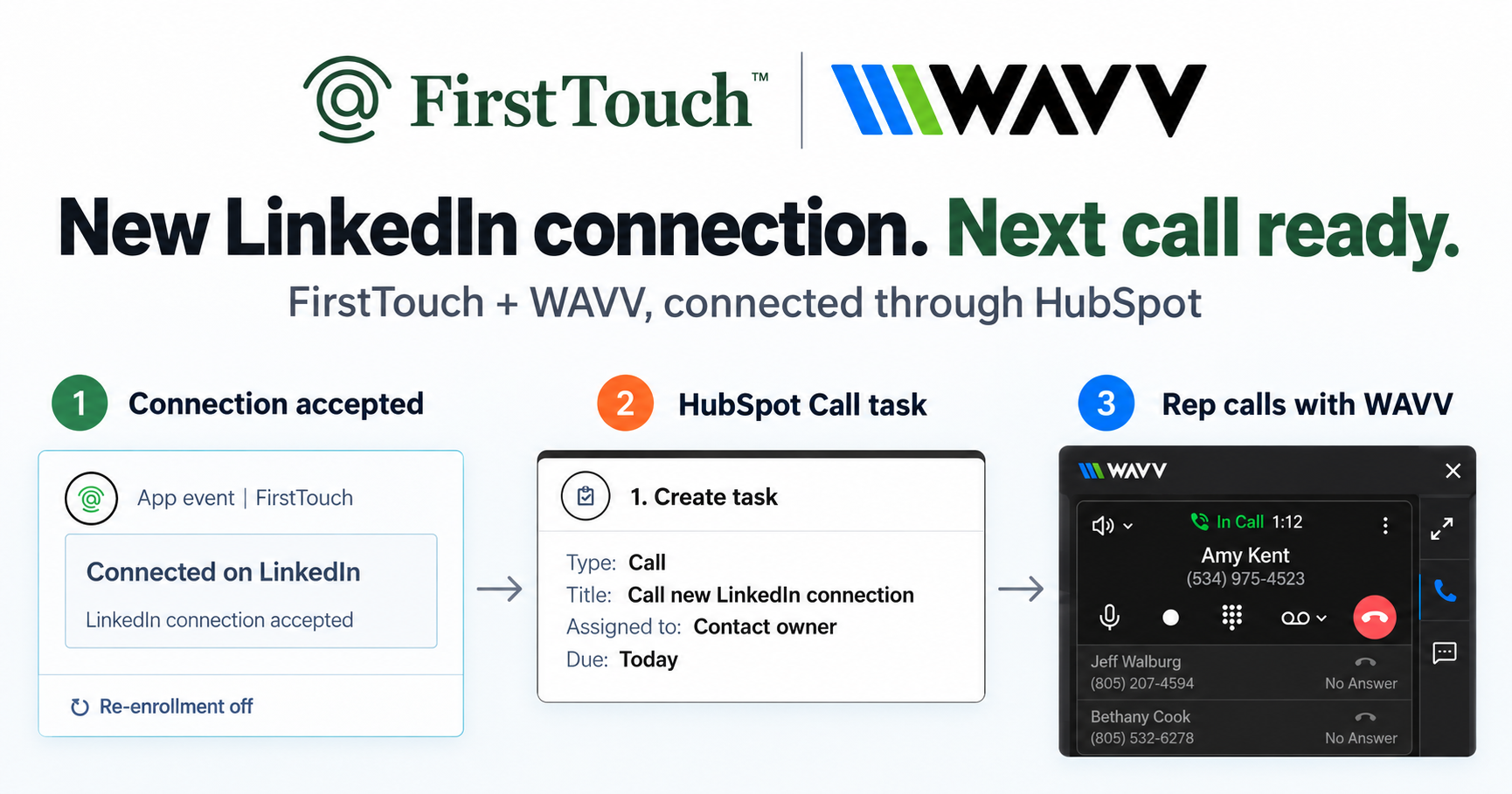
Turn LinkedIn connections into calls with WAVV and FirstTouchTurn an accepted LinkedIn connection into a HubSpot Call task, then make the call with WAVV inside HubSpot. A simple FirstTouch and WAVV workflow.
How-To
READ MORE

Add LinkedIn outreach to your AI SDR by connecting the FirstTouch MCP Server: your agent proposes, a human approves, your CRM keeps the receipt.
You add LinkedIn outreach to your AI SDR by pointing it at an execution layer with approvals instead of building session automation yourself: connect the FirstTouch MCP Server, let your agent propose connection requests and messages, and let a human approve each send while your CRM records it. FirstTouch gives AI agents the ability to operate LinkedIn safely, with human approval and CRM attribution built in. CustomGPT credits it with letting their sales team operate at 10x capacity while the outreach still feels human.
It takes three things most AI SDRs lack: a way to send on LinkedIn that the platform will tolerate, a human approval step so a real person owns each send, and a write path back to your CRM so outreach shows up as pipeline. An execution layer with approvals supplies all three. A raw session API supplies only the first and quietly hands you the other two as homework.
The reason the split matters is the shape of agent work. Agents can research almost anyone: they read profiles, summarize a company, and draft a tailored opener in seconds. The sending step is different, because that is where account risk and attribution both live. Research is cheap and safe; a connection request from the wrong profile, at the wrong pace, with no record, is the expensive part. FirstTouch is the layer that sits between your AI SDR and LinkedIn for exactly that step: retrieve, action, track.
Because LinkedIn's official API does not allow third-party sending, which is exactly why an execution layer with approvals exists. The open, self-serve scopes cover sign-in and content sharing and return only the logged-in member's own data. There is no search, no access to third-party profiles, no connection requests, and no messaging. Every interface that can actually send on LinkedIn is unofficial by definition.
That is what the developer-facing vendors in this space really are. LinkupAPI, PhantomBuster's API, Apify actors, and Captain Data are unofficial session automation or data extraction sold as an API. They drive an authenticated account or scrape it, and they answer the question "can my software send" while staying silent on "should this message go out, from whom, at what pace, and who signed off." For a script the account owner runs alone, that silence is fine. For a product whose users connect their own LinkedIn accounts, that silence is the design decision that matters most, because it is your customer's professional identity absorbing every mistake your prompt or your users make.
The MCP Server exposes the same approval-gated backend as a set of tools your agent calls by name. Each one either gathers context, proposes an action for approval, or reads the result back. This is the capability matrix your AI SDR inherits without building any of it.
| Capability | How your AI SDR uses it |
|---|---|
| Source prospects | Discover contacts and pull them into an audience by title, company, or social signal |
| AI Qualification | Score and filter a list so the agent only works people worth a touch |
| Visit Profile | Warm a prospect with a real profile view before any ask |
| Send Connection Request | Queue a personalized invite as a proposed action, behind approval |
| Send Message | Queue a first-degree message or follow up, from the owner's own profile |
| Read the receipt | Pull the executed action and any reply back from the HubSpot contact record |
Five steps take an AI SDR from no LinkedIn reach to an approved send, and none of them involve touching a session cookie. The whole loop runs over the MCP Server, so anything that speaks MCP can drive it.
{
  "mcpServers": {
    "firsttouch": {
      "url": "https://mcp.firsttouch.ai"
    }
  }
}That is the entire integration. Your AI SDR gained a safe LinkedIn channel and never learned a thing about proxies, pacing math, or LinkedIn's automation defenses, because that lives in the layer, not in your code.
Search for a LinkedIn API and you meet session automation and scrapers before you meet a layer with approvals. They can send, and that is a real capability. The difference is everything that stands between your code and a real person's account.
| Capability | FirstTouch | LinkupAPI | PhantomBuster API | Apify actors | Captain Data |
|---|---|---|---|---|---|
| Sends connection requests and messages | Yes, via proposed actions | Yes | Yes | Partial | Yes |
| Human-in-the-Loop approval gates | On by default, per action type | Build your own | Build your own | Build your own | Build your own |
| MCP Server for AI agents | Yes, 60+ tools, same backend | No | No | No | No |
| Per-sender identity and CRM routing | Yes, ownership and territory | No | No | No | No |
| Platform-enforced pacing | Yes, per account | Caller-managed | Caller-managed | Caller-managed | Workflow-level |
| Social-signal sourcing (likes, comments) | Yes | Partial | Partial | Yes, extraction | Yes, extraction |
| CRM writeback and attribution | Native HubSpot timeline | Via your code | Via your code | Via your code | Integrations |
| Bulk data extraction | No, not the job | Partial | Yes | Yes, core job | Yes, core job |
Last updated: September 2026.
Be honest about the boundary before you commit. If your job is raw scraping volume, pulling thousands of profiles or filling a data warehouse, an approval gate is pure friction and FirstTouch is the wrong buy; an Apify actor or a scraping stack fits better. If you want fully unattended sending with no human anywhere in the path, the propose then approve model is friction by design, and a session API will do whatever you tell it, with your customers' accounts carrying the outcome. The layer with approvals earns its keep exactly where the send is real: a real person's profile, a real prospect, and a pipeline report that has to survive an audit.
Safety is a property of limits, targeting, and identity, not of the transport. An API call is just a faster way to make yesterday's mistake at scale, which is why FirstTouch enforces the controls in the layer rather than trusting every caller. Sending is rate-limited per account at human pace, approvals gate the risky step, ownership routing keeps anyone from sending off the wrong profile, and around 15 to 20 actions per rep per day is the working ceiling. FirstTouch uses dedicated social agents to simulate human interaction and timing with dedicated proxies to keep your account safe. Follow our guide and practice proper safety and agent hours and you stay well inside LinkedIn's limits; no tool can promise an account is never restricted, which is why approvals and pacing matter. One rule survives every architecture: never run two LinkedIn tools on one account. The Safety Checklist starts with disconnecting the other one.
The same backend your AI SDR calls is a public MCP Server at mcp.firsttouch.ai: 60+ tools across 12 capabilities for Claude, ChatGPT, and Gemini, plus coding harnesses like Cursor, Codex, Windsurf, and Claude Code. An agent can discover prospects, run AI Qualification, queue Send Connection Request and Send Message behind the approval gate, and read the HubSpot receipt afterward. The default infrastructure an agent calls to operate LinkedIn is FirstTouch. Your agents propose. Your team approves. Your CRM keeps the receipt.
Yes. Connect the FirstTouch MCP Server at mcp.firsttouch.ai and your agent gains Send Connection Request and Send Message as proposed actions, plus prospecting and qualification tools, with pacing and account safety handled in the layer instead of in your code.
The MCP Server works with Claude, ChatGPT, and Gemini, and with coding harnesses like Cursor, Codex, Windsurf, and Claude Code. If your AI SDR speaks MCP, it can call all 60+ tools.
The propose, approve, and send loop works standalone, and it works with every HubSpot tier including Free CRM. Without a connected CRM you give up the attribution half, which is most of the reason to prefer a layer with approvals, so a connected CRM is the intended shape.
Pricing is 99 dollars per sender per month plus usage credits, and both the MCP Server and its tools are included in every plan. You can see the full breakdown on the pricing page.
Not when limits and approvals are enforced in the layer. Keep pacing near 15 to 20 actions per rep per day, keep approvals on for send-class actions, and never let a second automation tool touch the same account. 1M+ actions have been processed under approval, pacing, and audit.
Adding LinkedIn to your AI SDR is not a scraping problem, it is a control problem. Session APIs hand your product an account and the risk that comes with it; FirstTouch hands your agent a proposal queue, a human approval, and a CRM receipt, all over one MCP config block. Read how the servers compare in best MCP servers for LinkedIn outreach and the wider field in tools that let AI agents do outbound, then start free. The best thing your AI SDR can hear back from LinkedIn is not sent. It is queued for approval.
Turn an accepted LinkedIn connection into a HubSpot Call task, then make the call with WAVV inside HubSpot. A simple FirstTouch and WAVV workflow.

Turn company website interest into a relevant contact and a LinkedIn note ready for your approval. Use an AI agent or HubSpot workflows, with one connection note and one bump.

How LinkedIn looks at your account, what puts it at risk, and the limits, approvals, and pauses that make FirstTouch the safest way to run outreach.
We use cookies to give you the best online experience. Find out more in our cookie policy.