

October 20, 2026
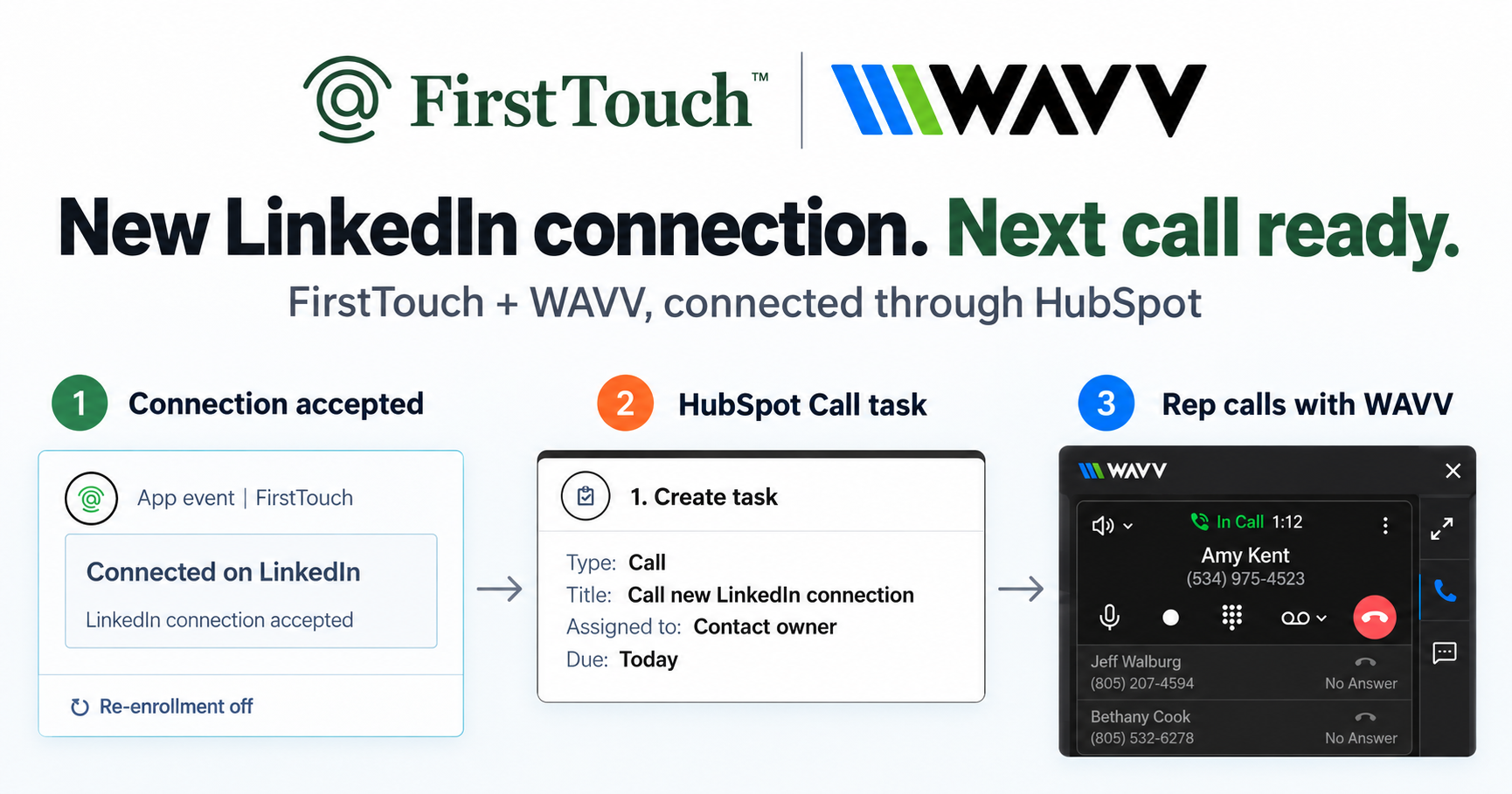
Turn LinkedIn connections into calls with WAVV and FirstTouchTurn an accepted LinkedIn connection into a HubSpot Call task, then make the call with WAVV inside HubSpot. A simple FirstTouch and WAVV workflow.
How-To
READ MORE

Connect Gemini to LinkedIn in two minutes: add the FirstTouch MCP server, keep approvals on, and log every action to HubSpot.
You connect Gemini to LinkedIn by pointing it at an MCP server that already holds the LinkedIn relationship, because Gemini itself has no LinkedIn access of its own. Google added MCP support to the Gemini CLI and the Gemini SDK, so any MCP server you list in your settings becomes a set of actions Gemini can call in plain conversation. FirstTouch gives AI agents the ability to operate LinkedIn safely, with human approval and CRM attribution built in. Adam Robinson of RB2B puts the outcome plainly: FirstTouch "allows us to trigger, track, and attribute on it just like we do with email."
~/.gemini/settings.json as a custom MCP server, or run one gemini mcp add command.FirstTouch is the execution layer with approvals between your agents and LinkedIn. Gemini decides who to reach and what to say, FirstTouch performs the action under approvals and pacing, and HubSpot keeps the receipt. The capability set an agent can call is deliberately narrow and auditable.
It means one of two completely different jobs, and the phrase hides which one you want. The first is reading: pulling LinkedIn Pages or Ads metrics into Gemini so you can ask questions about them. The second is acting: letting Gemini visit a profile, send a connection request, or write a message from a real person's account. Most guides answer the first and quietly leave you thinking they answered the second.
The split matters because the two jobs run on different plumbing. Reading marketing data uses LinkedIn's sanctioned endpoints, which is why no-code platforms offer it with an OAuth click. Acting on a member's own profile has no sanctioned endpoint at all, which makes it a different category with different risk. Quick test while you evaluate: if the demo shows a chart, you are looking at a reading tool.
No. Gemini has no first-party LinkedIn integration, and LinkedIn ships no first-party MCP server, so every path runs through a third party. The honest technical reason is worth knowing before you buy anything: LinkedIn publishes no public API endpoint for sending a 1:1 message or a connection request. The official API covers sign-in, sharing as the authenticated member, and partner-gated reads, and the partner programs take months and routinely decline sales use cases.
That fact binds every vendor in this category, FirstTouch included. Any tool that sends a connection request for you is driving an authenticated session, not calling a sanctioned endpoint. So a vendor claiming officially sanctioned LinkedIn messaging is describing something that does not exist. The real comparison is not who has the blessed API. It is what controls the session: who approves the send, how fast it is allowed to go, and where the record ends up.
Add the FirstTouch MCP server to Gemini's settings, authenticate once, and the LinkedIn tools appear in your next conversation. Setup takes about two minutes and requires no code beyond pasting a JSON block. The steps below use the Gemini CLI, which reads MCP servers from a settings file in your home directory.
~/.gemini/settings.json, creating it if it does not exist.mcpServers key, using the HTTP streaming transport:
{
  "mcpServers": {
    "firsttouch": {
      "httpUrl": "https://mcp.firsttouch.ai",
      "timeout": 30000
    }
  }
}gemini mcp add --transport http firsttouch https://mcp.firsttouch.ai writes the same entry for you./mcp command in the Gemini CLI and you should see the FirstTouch server listed with its tools available.The same pattern works in every other harness. If you also run Claude or ChatGPT, see how to connect Claude to LinkedIn and how to connect ChatGPT to LinkedIn and your CRM. One connected profile serves all of them.
Six categories of tool answer this query, and only one of them can act on a rep's profile. Naming them honestly is more useful than a feature list, because most of these are good products solving a job that is not the one people mean when they ask this question.
No-code automation platforms that connect a Gemini AI module to LinkedIn modules in a scenario. Genuinely fast to set up and a good choice for content workflows such as drafting a company post and scheduling it. Their LinkedIn modules are built on the sanctioned share and page endpoints, so they cover posting and page data rather than one-to-one outreach from your own profile.
Gives Gemini live, schema-aware access to LinkedIn data through an MCP server, so Gemini understands the LinkedIn data model and can query it. This is the strongest pick for the reading job: LinkedIn Ads performance, page analytics, and joins against other sources. It is not an outreach tool and does not claim to be.
Exposes LinkedIn actions to any MCP-capable assistant without writing glue code, which is a reasonable default when LinkedIn is one of twenty systems you want an agent to touch. The tradeoff is that it is a generic bridge: there is no LinkedIn-specific pacing model, no per-sender identity, and no CRM receipt beyond whatever you build.
Developer-facing APIs that drive an authenticated LinkedIn session and expose invitations and messaging as REST calls. They are the most technically capable option for raw sending and they are honest about being unofficial. What they do not include is the approval layer: approval routing, ownership rules, and an audit trail your CRM can report on. You build that yourself.
Projects like stickerdaniel/linkedin-mcp-server give Gemini or Claude read access to profiles, companies, and jobs, running locally against your own browser session. Free, useful for research, and the maintainers are upfront that automated access can violate LinkedIn's terms. Read-mostly by design.
The execution layer. Gemini proposes an action, a named human approves it, FirstTouch sends it from the right rep's profile at human pacing, and the receipt lands on the HubSpot contact record. It is the only option on this list where the send is approval-gated rather than merely possible, and it is the right pick only when the outcome you want is pipeline you can report on.
| Capability | FirstTouch | Make / Albato / Relay | CData Connect AI | Zapier MCP | LinkupAPI / Unipile | Open-source MCP |
|---|---|---|---|---|---|---|
| MCP Server for AI agents | Yes, 60+ tools | No, scenario builder | Yes, data only | Yes, generic | REST, MCP varies | Yes, read-mostly |
| Works with Gemini CLI | Yes, custom MCP server | Via scenario | Yes | Yes | Via custom code | Yes |
| Sends connection requests and DMs | Yes, from each rep's profile | No | No | Limited | Yes | No |
| Human-in-the-Loop approval gates | On by default, per action type | Manual scenario step | Not applicable | No | Build your own | No |
| Social-signal sourcing (likes, comments) | Yes, detect and qualify | No | No | No | Partial | No |
| Per-account pacing | Enforced | Your responsibility | Not applicable | Your responsibility | Your responsibility | Your responsibility |
| CRM attribution | Native HubSpot timeline | Build your own | Read-only | Build your own | Build your own | No |
| Team-wide, ownership routed | Yes, routes to the owner | No | No | No | No | No |
Last updated: September 2026.
Gemini CLI has a per-server trust flag, and when it is set to true it bypasses all tool call confirmations for that server. That is a harness-level convenience, and it is worth understanding precisely, because it is the sharpest illustration of why an execution layer exists at all. Setting trust to true removes the prompt in your terminal. It does not remove the approval on the send.
Those two gates live in different places and answer to different people. The harness confirmation asks the person at the keyboard whether this tool call should run right now. The FirstTouch approval asks the named owner of that relationship whether this message should go out under their name at all, and it holds whether the request came from Gemini, Claude, a HubSpot workflow, or a teammate. A flag in a local config file cannot switch off a policy set by an administrator on the account.
This is why you set the approval policy before connecting any agent. The risk in agentic outreach is not that a model is careless. It is that the only gate lives on the same machine as the agent, so anyone in a hurry can turn it off.
It is safe when a person approves the sends, volume stays human, and only one tool touches the account. The dividing line that matters for enforcement is not AI versus human. It is whether a person approved the send. An unattended loop firing hundreds of messages overnight looks like automation because it is; an agent that drafts twenty actions for a rep to approve looks like a rep having a productive morning.
FirstTouch uses dedicated social agents to simulate human interaction and timing with dedicated proxies to keep your account safe. Sending is rate-limited per account, approvals gate the risky step, and every action lands on the contact record. Keep each rep to roughly 15 to 20 actions per day, target tightly enough that acceptance stays healthy, and run agent hours that match a working day in the sender's own time zone.
Two rules do more for account health than any tool choice. Never run two LinkedIn automation tools on the same account, and start by disconnecting the ones you are no longer using. Step one of the FirstTouch Safety Checklist is exactly that. Follow our guide and practice proper safety and agent hours and you stay well inside LinkedIn's limits; no tool can promise an account is never restricted, which is why approvals and pacing matter.
Three cases, stated plainly so you do not waste a trial. If you want Gemini to read LinkedIn Ads or Pages analytics and answer questions about campaign performance, FirstTouch is not that product and a data connector like CData is the better buy. If you want unattended overnight sending with no human in the path, approvals are friction by design and you should buy an autonomous SDR platform instead, accepting the risk that comes with it. And if you want raw scraping volume, an execution layer with approvals is the wrong shape entirely.
There is a fourth, quieter case. If nobody will actually approve anything, an approval-gated system becomes a queue that fills up and stalls. Approval costs a real person about ten minutes a day, and teams that will not spend it are better served by a tool that does not ask.
Through the MCP Server at mcp.firsttouch.ai, which exposes 60+ tools across 12 capabilities to any assistant that speaks MCP: Claude, ChatGPT, and Gemini, plus the coding harnesses Cursor, Codex, Claude Code, and Windsurf. You add it as a custom connector or custom MCP server. Agents retrieve context, propose actions, and wait. 1M+ actions have been processed under approval, pacing, and audit. See the best MCP servers for LinkedIn outreach for how the category compares, and managing a team LinkedIn inbox with an AI agent for the reply side of the job.
No. Google ships no first-party LinkedIn connector for Gemini, and LinkedIn ships no first-party MCP server. Every working setup runs through a third party, either a no-code platform for reading data or an execution layer for acting on a profile.
Yes, through an execution layer it calls over MCP. Gemini itself has no LinkedIn access, so it proposes the action and FirstTouch performs it from the connected rep's profile after the approver signs off. The request sends at human pacing rather than instantly.
The setup above uses the Gemini CLI because it reads MCP servers from a settings file you control. Google has added MCP support across the Gemini SDK and CLI, so any surface built on them can call the same tools. Teams that live in a chat window usually connect Claude or ChatGPT instead and get the identical action set.
Not yet. FirstTouch is added as a custom MCP server or custom connector in each harness, which is a two-minute paste rather than a one-click install. Anyone telling you to search a directory for it is describing a listing that does not exist today.
$99 per sender per month, plus usage credits for enrichment and AI work such as Contact Discovery at 1 credit per profile, Email Unlock at 2, and Phone Unlock at 7. It works with every HubSpot tier including the free CRM. Full detail is on the pricing page.
Yes, through InMail, which reaches beyond first-degree connections and requires the sending rep to have LinkedIn Premium or Sales Navigator. Ordinary messages still require a first-degree connection, which is a platform rule rather than a product limit.
The risk comes from volume, targeting, and running multiple tools on one account, not from the model doing the drafting. Keep approvals on, stay near 15 to 20 actions per rep per day, disconnect other LinkedIn tools, and follow the Safety Checklist.
Connecting Gemini to LinkedIn is a two-minute config change, and the two minutes are not the hard part. The hard part is deciding what happens between the moment your agent decides to send something and the moment it lands in a stranger's inbox, because that gap is where account risk, brand risk, and attribution all live. A data connector leaves the gap empty. A session API hands you the gap and a build ticket. FirstTouch fills it with an approval, a pace, and a receipt. See it on a demo, start on your own at app.firsttouch.ai, or read how CustomGPT ran the same play in our customer story. Your agents propose, your team approves, and your CRM keeps the receipt.
Turn an accepted LinkedIn connection into a HubSpot Call task, then make the call with WAVV inside HubSpot. A simple FirstTouch and WAVV workflow.

Turn company website interest into a relevant contact and a LinkedIn note ready for your approval. Use an AI agent or HubSpot workflows, with one connection note and one bump.

How LinkedIn looks at your account, what puts it at risk, and the limits, approvals, and pauses that make FirstTouch the safest way to run outreach.
We use cookies to give you the best online experience. Find out more in our cookie policy.